If you want a joystick and separate arcade buttons, choose an arcade stick that’s confirmed to work with your gaming device. If you’d like to put your controller away easily after playing, a compact stick or handheld controller may be a better fit. Check the exact version, input mode and desk space required before you buy.
Which controller is right for you?
Arcade player at their desk
Wants a proper joystick and separate arcade buttons. Compares the space required and connection options for different sticks before giving one a permanent place on the desk. Model details are based on information from 8BitDo and MAYFLASH.
Player with a small home office desk
Wants to reclaim desk space after playing, so compares a compact stick with a handheld controller. HORI and 8BitDo give the dimensions of the relevant models.
Retro player looking for a specific button layout
For example, they may want a six-button gamepad and check whether the layout and input mapping suit the games they play. Retro-Bit describes the layout of the pad mentioned here, while Libretro Docs explains how to map buttons in RetroArch.
What should you consider when choosing?
First decide whether you want a physical joystick. Then check platform support and how much space the version you choose will take up.
| What to consider |
What to look for |
Who is this most important for? |
| Arcade controls |
Check the joystick, button layout and external dimensions of the exact version. |
I want the physical joystick and separate buttons of an arcade stick. Around 33% of consumers prioritise arcade controls. |
| Compatibility |
Check the platform, input mode and any connection requirements for your console. |
If I want to play on my own device, the specific version needs to work with my system and software. Around 27% of consumers prioritise compatibility. |
| Desk space and storage |
Measure the available space and allow for the cable route and the model’s dimensions. |
I want my workspace back after gaming, so the space required is a major consideration. Around 20% of consumers mainly choose based on desk space and storage. |
| Gamepad layout |
Compare the buttons with the actions in your game and check the connection. |
If I’d rather use a handheld controller, I look for a layout that suits my games. Around 20% of consumers prioritise their preferred gamepad layout. |
Common buying mistakes
-
Assuming it’s compatible based on the platform list alone
The MAYFLASH F300 has additional connection requirements when used with certain consoles. The manufacturer also notes differences depending on the firmware.
Check the manual and firmware information for your exact console and F300 version.
-
Confusing the USB pad with a version for an original console port
Retro-Bit lists different connection options within the Mega Drive Arcade Pad product family.
Choose based on the connection on your PC or console, not just the design.
-
Assuming a compact arcade stick is the same as a handheld controller
Even a small stick takes up desk space, while a handheld controller has a different control layout and no physical arcade joystick.
Measure the available space and decide whether having a joystick matters more than being able to put the controller away easily.
Brands to compare
8BitDo
Compare the larger Arcade Stick with the SN30 Pro USB if you’re deciding between joystick controls and a wired gamepad.
- According to 8BitDo, the Arcade Stick offers Bluetooth, 2.4 GHz and wired USB-C; the SN30 Pro USB is wired.
- The SN30 Pro USB doesn’t support all Switch features. Check support for the exact version.
MAYFLASH
The wired F300 is an arcade stick for those who want to compare input modes and components.
- MAYFLASH lists XInput and DInput for use on PC, as well as compatibility with Sanwa components.
- Additional connection requirements apply to certain consoles. Also check the compatibility information for firmware V1.28.
HORI
Compare the Fighting Stick Mini versions for Nintendo Switch and for PlayStation 5/4 and Windows 11/10 separately.
- HORI lists the Switch version as measuring approximately 8 × 6 inches and being compatible with PC.
- The versions mentioned are wired and have different product identities, so check which one you’re choosing.
Retro-Bit
The wired USB versions of the SEGA Mega Drive Arcade Pad are handheld controllers with a classic six-button layout.
- Retro-Bit lists PC compatibility and extra shoulder buttons for the 8-Button Wired USB version.
- Be aware of the difference between the USB version and models with an original console port.
Gamepad option on Joybuy
This Joybuy pick is suited to anyone who’d rather use a handheld controller than a physical arcade stick for retro arcade games.
 No image available
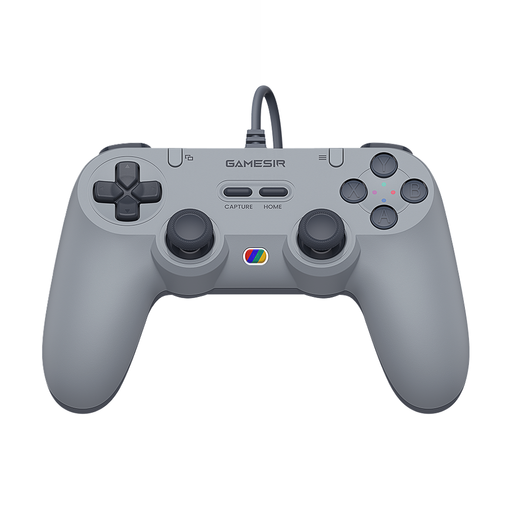
GameSir Tegenaria Lite Wired Symmetric Game Controller, Retro Gray
This wired handheld controller is a good fit if you’d rather use a gamepad than a physical arcade stick.
The product name specifies symmetrical controls and support for Switch, Android, iOS, PC and Steam.
Purchase link unavailable
Frequently asked questions
How do I know whether the controller will work with my retro games?
Check the platform and input mode for the exact version. If you use RetroArch, you can update controller profiles or map buttons manually; this doesn’t guarantee that every controller will work with every game.
Can I use a wired controller without a permanent desk setup?
Yes, as long as the cable reaches the spot where you want to use the controller. HORI describes the Fighting Stick Mini for Nintendo Switch as wired; Retro-Bit lists a 3 m cable for the Mega Drive USB pad mentioned here.
What if the buttons are mapped incorrectly after connecting?
In RetroArch, you can set buttons manually if automatic recognition or mapping doesn’t work properly. Libretro Docs also explains how to save a custom profile.
What rights do I have when buying online in the Netherlands?
For eligible distance purchases, you generally have a 14-day cooling-off period, with some exceptions. The Dutch government also distinguishes between purchases from businesses and purchases from private individuals. If a product is faulty, you can contact the seller; according to the Dutch government, the Netherlands has no fixed statutory guarantee period.


