What should you look for when choosing?
First check compatibility with your system and game. Then decide where to connect your headset, and choose the type of controls you want to use.
| What to consider |
What should you check? |
Who is this important for? |
| System and game |
Check the platform list for the exact model and whether the game supports the controller. Pay attention to the console version and any input modes. |
If I play on my own console or PC, I want to know for certain that both the system and the game support the controller. Around 29% of consumers prioritise compatibility. |
| Headset audio |
Check whether the port works on your platform and whether this depends on using a wired or wireless connection. Also make sure it’s compatible with your headset. |
If I want to hear sound through the controller, the port needs to work with my setup. Around 29% of consumers prioritise a working audio connection. |
| Control layout |
Choose between a joystick with arcade buttons and a gamepad with analogue sticks. Check that the button layout suits the games you play. |
If I’m mainly after classic arcade controls, I look for a joystick and buttons; a gamepad may be more suitable for different types of games. Around 24% of consumers choose mainly according to the controls they want. |
| Setup and use |
Check the connections and setup steps required for the model, and see what’s included. If you’re using it wirelessly, check the stated battery life with a headset connected. |
If I want a straightforward setup, I check in advance which cables and any additional connections are needed, as well as the audio output. Around 18% of consumers prioritise ease of setup. |
Joybuy products
This Joybuy selection is a wired gamepad for playing retro games with gamepad controls on Xbox and Windows.
 No image available
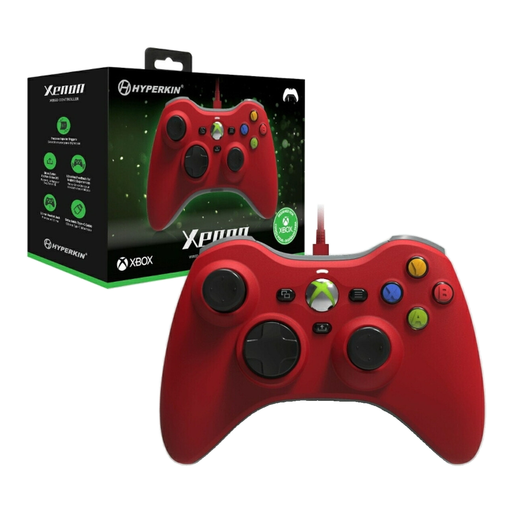
Hyperkin Xenon Wired Controller for Xbox Series X|S, Xbox One and Windows 11/10, red
This wired gamepad is a good fit if you want to play retro games on Xbox or Windows with a gamepad and need a headset socket.
The product description lists support for Xbox Series X|S, Xbox One and Windows 10/11, a 3.5mm headset socket, a detachable Type-C cable, impulse triggers and vibration feedback.
View at Joybuy
Frequently asked questions
Will a headset connected to the DualSense work if I play retro games on PC?
According to Sony, the DualSense headset socket requires a wired controller connection on PC and Mac. Sony says the headset socket doesn’t work on mobile devices.
Can I use a Switch 2 Pro Controller with my original Switch?
No. Nintendo specifies the Switch 2 Pro Controller for Switch 2 only. Also check whether the game in question supports the controller.
How can I use wireless headphones with the original Switch?
Nintendo supports Bluetooth audio on the original Switch from system version 13.0.0 for devices with A2DP and SBC. Bluetooth microphone input isn’t supported; use the console’s Bluetooth audio settings to pair a device.
What should I do if the controller or audio socket doesn’t work properly after purchase?
If a product is faulty, contact the seller about your statutory rights. According to the Government of the Netherlands, there is no fixed statutory warranty period in the Netherlands. In many cases, online purchases from a business also come with a 14-day cooling-off period; this is a separate right from the warranty.
What should I look for when it comes to controller safety?
The Government of the Netherlands states that electronic devices covered by the relevant EU product rules must carry a CE marking. Check the product and safety information for the exact model; a general category description doesn’t tell you anything about an individual item on its own.
How can I listen safely with a headset while gaming?
The World Health Organization advises keeping the volume low and taking regular breaks. Both the sound level and listening time affect the risk of hearing damage.


