Start with what your game and console require: Nintendo Switch Sports supports Joy-Con and Joy-Con 2, but not the Pro Controller. For sports games with standard button controls, a compatible gamepad may be all you need. Playing occasionally during the day doesn’t automatically mean you need a different controller, so check your screen and playing area first.
Who is this relevant to?
Motion sports game players
You want to play sports games using swinging or aiming movements, and find out which separate controllers your game supports. Nintendo explains which controller families are supported for Nintendo Switch Sports and Nintendo Switch Sports Resort.
Players who like gaming together on the sofa
You want to play with others from time to time and check how many players and individual controllers each game supports.
Players who use a standard gamepad
You play button-based sports games on PC, Xbox or PlayStation and are looking for the right connection and controls, rather than motion controls by default.
What should you look for when choosing?
First check the exact game and console, then choose the number of controllers and type of controls to suit how you play.
| What to consider |
What should you check? |
Who is this important for? |
| Game compatibility |
Check the full game title, console, supported controller family and any requirements for individual sports. |
I want to avoid buying a controller that works with the console but not with the sports game. For around 36% of consumers, game compatibility and motion controls come first. |
| Playing together |
Check the number of players, controller set-up for each sport and which controllers you already own. |
When I play with others, I want to know how many separate controllers our chosen sport requires. Around 29% of consumers give the number of controllers needed for local multiplayer top priority. |
| Gamepad controls |
Compare the supported platform, wired or wireless connection, and the controls required by the game. |
I mainly play using buttons and want a connection that suits my device and game. For around 21% of consumers, gamepad connection and controls are the main factors when choosing. |
| Playing during the day |
Check how easy your screen is to read in your usual playing spot, and whether the game supports that style of play. |
When I play during the day, I first want to know whether my screen set-up is comfortable to use; a different controller won’t automatically solve any visibility issues. Around 14% of consumers prioritise their daytime playing set-up. |
Common buying pitfalls
-
Assuming console compatibility means a controller works with every game
A Pro Controller can work with Switch 2, but it isn’t supported by Nintendo Switch Sports.
First check support for the exact game, then check general compatibility with your console.
-
Treating Joy-Con and Joy-Con 2 as identical
Existing Joy-Con can be paired wirelessly with Switch 2, but can’t be attached to the system. Joy-Con 2 work only with Switch 2 and aren’t suitable for the Nintendo Switch Sports Leg Strap.
Check separately which console, sport, leg strap and charging method you need.
-
Buying a controller to solve a daytime screen problem
The controller doesn’t affect how much light falls on your screen. Nintendo Switch Sports also doesn’t support handheld mode.
Test your existing screen and playing area at the time you usually play, and check that the game supports your preferred way of playing.
-
Choosing based on the name Ultimate 2C alone
According to 8BitDo, the Ultimate 2C Wireless and Ultimate 2C Bluetooth differ in their connections and platform support.
Compare the full model name and connection mode with your device and game.
Brands to consider
Nintendo
A relevant choice for Joy-Con and Joy-Con 2 when playing Nintendo sports games with motion controls.
- Nintendo confirms Joy-Con support in Nintendo Switch Sports and Joy-Con 2 support in Nintendo Switch Sports Resort.
- Nintendo Switch Sports doesn’t support Switch or Switch 2 Pro Controllers. Joy-Con 2 work only with Switch 2 and aren’t compatible with the Nintendo Switch Sports Leg Strap.
Microsoft Xbox
Xbox Wireless Controllers are relevant for compatible sports games on Xbox or Windows.
- Microsoft lists Bluetooth, a hybrid D-pad and support for Xbox, Windows and mobile devices.
- Check the power source and support for your specific game. An Xbox controller can’t replace the required Joy-Con controls in Nintendo Switch Sports.
Sony PlayStation
The DualSense is an option for compatible PS5 sports games and supported PC games.
- Sony lists haptic feedback and adaptive triggers as DualSense features.
- On PC, these features depend on the game, so check support for each title.
GameSir
The G7 SE is designed as a wired gamepad for supported Xbox and Windows set-ups.
- GameSir lists USB-C controls, Hall Effect sticks and two extra buttons for the G7 SE.
- The cable limits how far you can move. These manufacturer specifications alone don’t prove that the product will last longer.
8BitDo
The Ultimate 2C versions are designed for different platforms and connections.
- 8BitDo lists the Wireless version for Windows and Android, and the Bluetooth version for Switch.
- Sharing the same product family name doesn’t guarantee the same Switch support or compatibility with a specific motion sports game.
Joybuy product picks
These products are designed for gamepad controls on Xbox or PC, and motion sports games on Nintendo Switch or Switch 2. Always check that your specific game, console and preferred style of play are supported.
 Image unavailable
Xbox Wireless Controller Robot White
For button-based sports games on Xbox or Windows; check support for the specific game. The product name indicates that this is a wireless controller.
View at Joybuy
 Image unavailable
GameSir G7 SE, Dynamic Blue
Suitable for a supported Xbox or Windows game that works with a wired gamepad. The cable limits how far you can sit from your device.
View at Joybuy
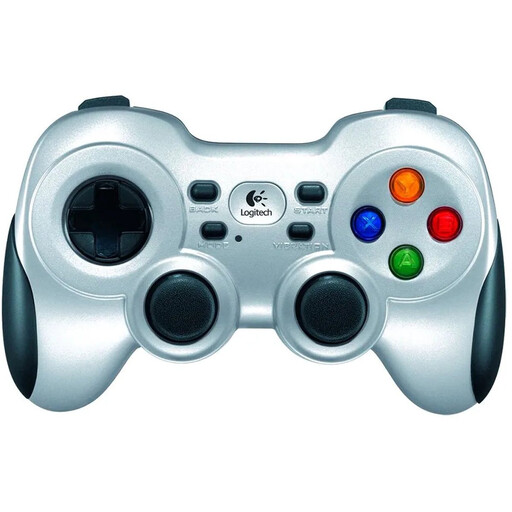 Image unavailable
Logitech F710 Wireless Gaming Controller for PC, Silver
For anyone looking for a wireless gamepad for PC. Check that your specific game and PC support this controller.
View at Joybuy
 Image unavailable
Nintendo Switch Joy-Con Controller Pair, Neon Red/Neon Blue
For Nintendo Switch sports games that support Joy-Con. Check how many controllers each sport requires and whether you’ll be playing with others.
View at Joybuy
 Image unavailable
Nintendo Switch 2 Joy-Con 2 Pair, Light Blue/Light Red
For motion games on Switch 2. Joy-Con 2 work only with Switch 2 and aren’t suitable for the Nintendo Switch Sports Leg Strap.
View at Joybuy
Frequently asked questions
Can you play Nintendo Switch Sports with a Pro Controller or in handheld mode?
No. Nintendo states that Switch and Switch 2 Pro Controllers aren’t supported and that the game doesn’t support handheld mode. Check which Joy-Con combination is needed for each sport.
Will your existing Joy-Con work with Switch 2?
Yes, you can pair them wirelessly, but they can’t be attached to Switch 2. To charge them, you’ll need a Switch system or a suitable charging accessory; Joy-Con 2 work only with Switch 2.
What can you check if motion controls aren’t responding properly?
First check that your chosen sport and controller combination is supported. Then follow Nintendo’s motion control instructions and check that the Leg Strap is fitted correctly if you’re using one; Joy-Con 2 don’t work with that Leg Strap.
What rules apply to online play and online purchases?
Nintendo states that playing Nintendo Switch Sports online requires an active Nintendo Switch Online membership. According to ACM ConsuWijzer, online purchases generally come with a 14-day cooling-off period from delivery, subject to legal exceptions. ACM ConsuWijzer also states that the seller must repair or replace a product free of charge if it breaks sooner than expected under normal use.


