First, choose a controller that works with both your gaming device and your arcade sports game; Bluetooth alone doesn’t guarantee compatibility. Wireless convenience matters when you’re playing from the sofa, while a wired USB controller may also suit a small Windows PC. Consider the D-pad too, and check separately whether the game supports multiple controllers.
Who is this guide for?
TV player who wants to check compatibility first
If you play on Apple TV or Android TV, first check that the controller and connection method suit your device, and that the game supports controller input. Apple Support lists Bluetooth controllers including DualSense and Xbox models for Apple TV 4K; Google Help explains how to pair a gamepad with Android TV.
Sofa player with a small PC
If you play from the sofa, wireless convenience may be important. If your PC is close to where you play, you could consider USB instead and avoid managing batteries. Microsoft describes Bluetooth connectivity for its wireless controller, while Logitech lists the F310 as a wired USB option.
Player who values the D-pad
When you need to change direction quickly, the D-pad and button layout may matter more than extra features. 8BitDo lists a classic D-pad for the Pro 2, while Logitech describes the F310 as having a D-pad with four switches.
What should you look for?
Apple TV 4K
A good fit if: Apple lists your controller as compatible with Apple TV, and the tvOS and game support suit your setup.
Keep in mind: Pairing with your TV doesn’t confirm that your sports game supports controller input or local multiplayer.
Android TV or Google TV
A good fit if: The manufacturer lists support for your TV or streamer, as well as the connection method you want to use.
Keep in mind: Android support for a phone doesn’t automatically mean it will work with every TV or streamer.
Compact Windows PC
A good fit if: You choose a controller whose manufacturer lists support for Windows and your preferred connection method.
Keep in mind: A wired controller needs enough cable reach; wireless models may require you to manage batteries.
| What to consider |
What should you check? |
Who is this important for? |
| Device and game compatibility |
Check the exact device model, system version, connection mode and whether the game supports the controller. |
If I play on a TV or streamer, I want to know in advance whether both my device and game support the controller. Around 31% of consumers put compatibility first. |
| Wireless play |
Check that the controller and device support the connection you want, and how the controller pairs. |
When I play from the sofa, I don’t want a cable restricting where I can sit. Around 25% of consumers prioritise wireless play. |
| D-pad and buttons |
Look at the position and design of the D-pad, and check whether the game uses the buttons you want to control. |
When I need to change direction quickly, I mainly want a layout that suits the way I play. Around 19% of consumers compare directional controls first. |
| Batteries and power |
Check which batteries or charging solution you need and what’s included in the box. |
I want to know in advance what battery management a wireless controller involves and whether I need anything else. Around 13% of consumers prioritise power and additional essentials. |
| Local multiplayer |
Check how many local players the game supports and how the device pairs multiple controllers. |
If I want to play with someone else on one screen, the game needs to support it before a second controller is useful. Around 12% of consumers say local multiplayer is their main priority. |
Common buying mistakes
-
Assuming ‘works with Android’ means ‘works with my Android TV and game’
Manufacturers may list different connection methods for different platforms. Support for a phone doesn’t automatically confirm that your TV or streamer and game will support the controller.
Check the exact TV or streamer model, connection method and the game’s controller support.
-
Choosing extra haptics or triggers without checking game support
Whether extra features are available depends on the game and platform. Sony also states that haptic feedback on PC requires USB; this feature isn’t available on Mac or mobile devices.
Prioritise support for the basic controls in your game over features that may not be available.
-
Overlooking the cable, batteries or charging method
The wired F310 needs enough cable reach. Xbox Support states that rechargeable AA batteries aren’t charged inside the controller.
Check your playing distance, available connections and what’s included in the box. If you use AA batteries, also check what charging solution you’ll need.
Brands to consider
Microsoft Xbox
The standard wireless controller is an option if you use a Windows PC or a platform listed by Microsoft; Apple also lists Bluetooth models for Apple TV 4K.
- Microsoft lists Bluetooth and a hybrid D-pad for the standard controller.
- According to Xbox Support, the standard controller uses AA batteries or a separate rechargeable battery. Don’t confuse this model with the differently equipped Elite Series 2.
8BitDo
The Pro 2 may suit you if you want a classic D-pad and support for several listed platforms. According to 8BitDo, the Ultimate 2C is designed for Windows and Android.
- For the Pro 2, 8BitDo lists Apple TV and several input modes, among other features.
- For the Ultimate 2C, 8BitDo lists Bluetooth for Android, but 2.4 GHz or wired connections for Windows. Check the mode for each device.
Sony PlayStation
The DualSense may be worth considering if you also use a PS5 or want a controller listed by Apple for Apple TV 4K.
- Sony lists USB and Bluetooth for supported devices.
- Adaptive triggers require game support. Sony states that haptic feedback on PC requires USB and isn’t available on Mac or mobile devices.
Logitech G
The F310 is a wired USB option for a compact PC that’s close enough to where you play. Logitech also lists use with Sony Android TV.
- Logitech lists XInput/DirectInput and a D-pad with four switches.
- The cable limits where you can play. The listing for Sony Android TV doesn’t automatically confirm support for other streamers.
Joybuy products for PC and Android TV
These product picks focus on use with a compact Windows PC or Android TV. Check whether each controller and game supports your device and preferred connection method.
 No image available
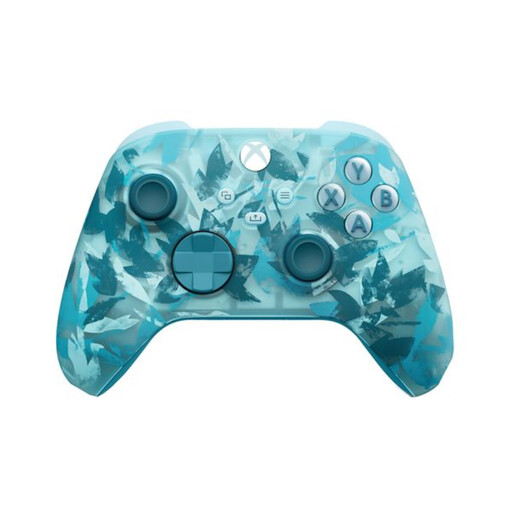
Xbox Wireless Controller for Xbox Series/PC - Ice Breaker Special Edition
A wireless option for a compatible Windows PC if you want freedom to move and a hybrid D-pad.
The product description lists Windows 10/11 and Bluetooth. Wireless use requires two AA batteries; according to the product description, these are included. Rechargeable AA batteries aren’t charged inside the controller.
View at Joybuy
 No image available
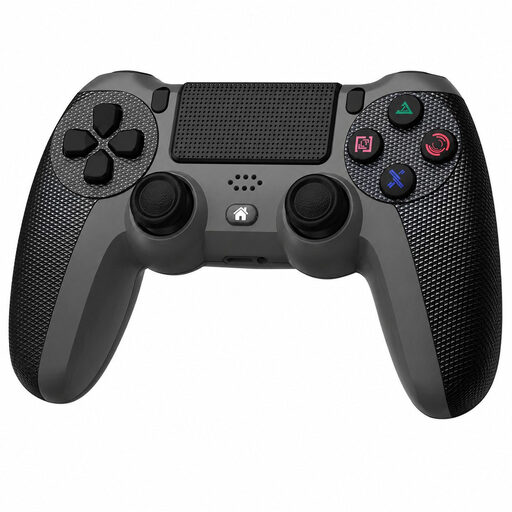
Black wireless DualShock controller for PS4 and PC
A wireless option to consider if you’re looking for a controller listed as compatible with PC and PS4.
The product description lists a touchpad, a six-axis gyroscope and dual vibration motors. According to the description, you’ll need the included USB cable for the initial synchronisation.
View at Joybuy
 No image available
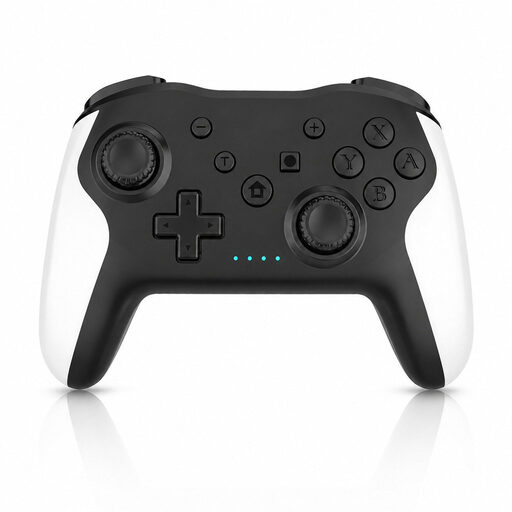
Gaming Controller with Dual Vibration and Gyro for Switch and PC
Worth considering if you want a wireless controller for PC and also need the listed Switch compatibility.
The product description lists wireless connectivity for PC and Steam, dual vibration motors and a gyroscope sensor. Check that your device and game support the connection method you want to use.
View at Joybuy
 No image available
GameSir Cyclone 2 Multiplatform Controller - Black-Bundle Edition
An option to consider if you want to compare different connection methods and a D-pad with tactile switches for a compatible PC.
The product description lists PC, Bluetooth, wired connectivity and a wireless dongle. The specifications list Hall-effect analogue triggers; check which connection suits your setup.
View at Joybuy
 No image available
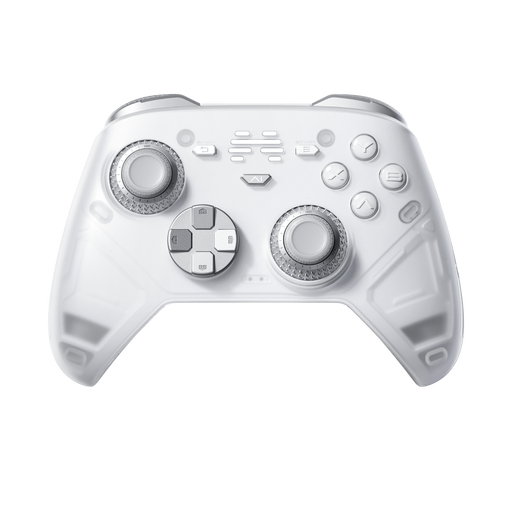
BEITONG KP70 Elite Wireless Gaming Controller
Worth checking if you need controller support for Android TV or PC.
The product description lists Android TV and wired, wireless and Bluetooth connections. The product name mentions haptic triggers, adjustable joysticks and six programmable buttons. Check which mode your device needs.
View at Joybuy
Frequently asked questions
Can I use any Bluetooth controller with my Apple TV 4K?
No. Don’t rely on the Bluetooth label alone. Apple lists supported controller families and explains how to pair them through the Bluetooth settings. Also check the system requirements for the exact model and whether your game supports it.
How do I pair a gamepad with Android TV?
Put the gamepad into pairing mode. From the Android TV home screen, go to Settings, then Remotes & accessories, and choose to add an accessory. Google Help describes these steps; menus may vary by device, so check your TV or streamer’s manual too.
Will a USB connection charge rechargeable AA batteries in an Xbox controller?
No. Xbox Support states that rechargeable AA batteries aren’t charged inside the controller; charge them according to the battery manufacturer’s instructions. A rechargeable Xbox battery designed for the controller is a different solution.
What if I’m not happy with a controller I bought online, or it’s faulty?
For eligible online purchases from a business, the Dutch government generally allows a 14-day cooling-off period; check the relevant exceptions and returns policy. If a product is faulty, contact the seller. In the Netherlands, statutory guarantee rights apply without a fixed statutory guarantee period.


