
Combo player practising in the dark
Wants to find the controls more easily during practice sessions, so compares lighting with a familiar button layout. Razer and 8BitDo describe lighting on specific models.


Start with the platform and controls you want to practise with: a leverless controller has separate direction buttons, while a traditional arcade stick has a joystick. Lighting can make it easier to find the buttons in a dark room, but check which part of the exact model lights up. Make sure the controller’s support and settings also suit your game and the current tournament rules.
Wants to find the controls more easily during practice sessions, so compares lighting with a familiar button layout. Razer and 8BitDo describe lighting on specific models.
Primarily needs a controller that suits the specific game and the console or PC they practise on. Stated platform support varies by model, so check the product information for the exact version.
Wants to practise at home using the same controls and permitted settings that may be used at their event. Manufacturer features such as SOCD modes or a tournament lock do not replace the organiser’s rules.
Choose this if: you want to use separate direction buttons and lighting matters to you. Razer lists RGB lighting and PS5 and PC support for the Kitsune; 8BitDo lists an RGB light ring and Xbox and Windows support for the Arcade Controller for Xbox.
Consider: the models are listed for different platforms, and lighting does not prove that every play button lights up or that a particular setting is permitted at your tournament.
Choose this if: platform compatibility or button feel matters more than lighting. For example, compare the 8BitDo Arcade Controller for Switch and Windows with the MAYFLASH F700 FLAT Elite, for the fighting games and platforms listed by MAYFLASH.
Consider: don’t rely on lighting to help you find the play buttons. MAYFLASH also lists macro and turbo functions, so check whether their use is allowed under your tournament rules.
Choose this if: you want to practise joystick movements during training. Qanba lists a Sanwa joystick and PS5, PS4 and PC support for the Obsidian 2.
Consider: you’ll be practising with a joystick rather than separate direction buttons. Check separately what lighting the exact version offers.
| What to consider | What to look for | Who is this important for? |
|---|---|---|
| Visibility of the controls | Check which parts light up on the exact model and whether the lighting can be adjusted. Razer describes RGB effects for the Kitsune; 8BitDo lists a light ring for the Xbox version. | If I want to find the right controls quickly in a dark room, I check that the lighting is in the right place. Around 29% of consumers say visibility in low light is their top priority. |
| Platform and game | Compare the full model name, game version and console or PC with the manufacturer’s information. Also check whether you need a particular connection method. | Players who use a particular platform want to know in advance whether the controller suits their game. Around 29% of consumers prioritise platform compatibility. |
| Control type | Choose between separate direction buttons and a joystick, then compare the layout with the movements you want to practise. | If I want to practise tournament moves as closely as possible, I choose the controls I need for that. Around 24% of consumers say practice controls are their top priority. |
| Tournament settings | Check the available SOCD modes, any lock feature, and functions such as macros or turbo. Compare them with the event’s current rules. | Players preparing for a particular tournament want to be able to match their home settings to the organiser’s requirements. Around 18% of consumers prioritise tournament settings. |
A light ring or lighting on the casing may not make the buttons you’re looking for visible in the dark.
Check the information for the exact model to see which parts light up and what settings are available.
A general description such as ‘arcade controller’ doesn’t confirm that a model works with your game version. MAYFLASH limits the stated PS5 use of the F700 FLAT Elite to fighting games.
Before buying, check the full model name, your game version and the required connection method. Haute42 notes that using PS Passthrough on PS5 may depend on having a compatible controller or dongle.
A compatible controller or dongle may be needed for some PS Passthrough connections; check the requirements for the exact model.
An adjustable controller or tournament lock doesn’t determine which configuration a particular event accepts.
Check your event’s current rules and look specifically at the SOCD, macro and turbo settings in use.
The Kitsune is a leverless model to consider if you want to compare lighting and PS5 or PC use.
Offers separate arcade controllers for Xbox and Windows, and for Switch and Windows.
The F700 FLAT Elite is a leverless model for the fighting games and platforms listed by MAYFLASH.
The Obsidian 2 is a traditional arcade stick to compare with leverless models for PS5, PS4 or PC.
A brand worth comparing if you want to look into connection modes and potential passthrough options.
This Joybuy selection focuses on combo practice with a fighting game controller.
 No image available
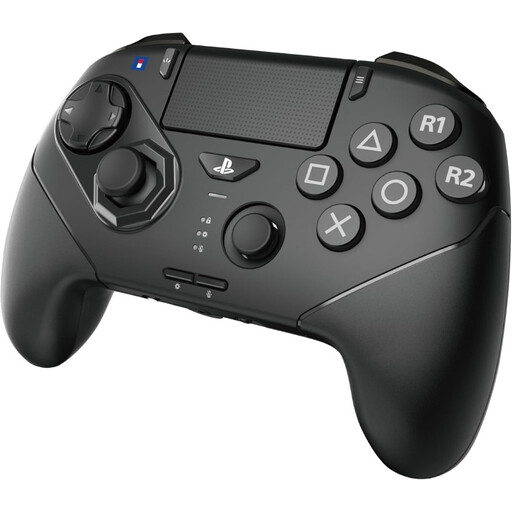
The six-button layout and analogue stick with an 8-gate layout are useful features to compare if you want to practise combos using both buttons and joystick movements.
The product description lists PS5, PS4 and Windows PC, with wired and wireless use. Check that this version and connection method suit your game and platform.
Check the full model name and whether it supports the PS5 version of your game. PS4 support, or the ability to play certain PS4 games on a PS5, doesn’t automatically confirm that it works with every PS5 game. MAYFLASH limits the stated PS5 use of the F700 FLAT Elite to fighting games.
Not necessarily. First, check which part of the exact model lights up and what settings are available. Razer describes adjustable RGB effects for the Kitsune, while 8BitDo lists an RGB light ring for its Xbox model. That doesn’t automatically mean the play buttons are illuminated.
Test the directional inputs, button layout and connection in your own game, then compare the settings with your event’s current rules. Check specifically which SOCD settings are allowed, along with features such as macros. A manufacturer’s mention of a tournament lock doesn’t mean the organiser has approved it.
It depends on the model. 8BitDo lists replaceable switches for its Arcade Controller, while Qanba lists accessible side panels for the Obsidian 2. Follow the instructions for the exact version and contact the seller first if you think the product may be faulty.
According to ACM ConsuWijzer, online purchases generally come with a statutory 14-day cancellation period after delivery, with some exceptions. Faulty products are also covered by the statutory guarantee; ACM ConsuWijzer notes that there is no fixed general time limit for this in the Netherlands. The seller is your point of contact.