Who is this guide for?

Player with limited access to sockets

You practise combos on an existing console or PC and want to know whether a controller can connect via USB, which port you need and when charging comes into play. Nacon describes the Daija as connecting via USB; 8BitDo lists both wireless connections and wired USB for its Arcade Stick.

Player switching between control styles

You’re comparing a joystick with separate directional buttons and want to choose a layout that suits the way you practise combos. Qanba, Mayflash and 8BitDo describe different controller layouts and connection options; check support for your platform separately for the exact model.

Player practising for an event

You want to practise at home using connections and settings that comply with the rules of your chosen tournament. Mayflash describes features such as macros and turbo; Evo’s rules distinguish between hardware-based inputs and macros accessed through the game’s menu.

What should you look for?

Start with the connection and compatibility. Then decide which controls you prefer, and finally check the tournament rules.

What to consider What should you check? Who is this important for?
Connecting without an extra power socket Check the connection, whether there’s a spare port on your gaming system and the cable length. If you’re using it wirelessly, check how to charge the controller too. I don’t want to need a separate mains adapter while practising, and I can free up a USB port. Around 28% of consumers prioritise connecting without an extra power socket.
Working with your system and game Check the full model name, version, gaming system and game. Also check whether you need a converter or firmware. I want to know in advance whether my exact version works with my system and fighting game. Around 28% of consumers prioritise compatibility.
Joystick or directional buttons Check the actual controls, button layout and any adjustment or maintenance options for the exact model. I want to repeat combos using a stick or separate directional buttons, depending on my preference. Around 22% of consumers consider the type of controls most important.
Tournament settings Read the rules for the specific event covering macros, turbo, converters and simultaneous directional inputs. I want to practise at home using settings that are allowed at the event I’m entering. Around 22% of consumers prioritise tournament settings.

Common buying mistakes

  • Assuming wireless means you’ll never need to charge

    The 8BitDo Arcade Stick has a rechargeable battery, so playing wirelessly doesn’t eliminate the need to charge it.

    Choose wireless if it suits your setup, and plan for charging. Also check whether wired use works with your system.

  • Assuming a PS5 listing guarantees compatibility with every game

    Supported platforms vary by model and version. PlayStation warns that not every peripheral works with every PS5 game. Mayflash also describes a separate setup for the F500 Flat using the MagicBoots-S5.

    Before buying, check the exact version, game, any converter you may need and the firmware. Don’t rely on a platform listing alone.

  • Not checking macro, turbo or SOCD settings in advance

    A controller may offer features that aren’t allowed at the event you’re practising for. Evo’s rules prohibit programmable hardware inputs, rapid-fire and hardware macros; macros accessed through the game’s input menu are allowed.

    Read the rules for your event and practise using the settings they allow.

Relevant brands to consider

Nacon

The PlayStation version of the Daija is a wired joystick controller for PS5, PS4 and PC.

  • Nacon lists a 3 m USB-A-to-USB-C cable and interchangeable joystick heads as included.
  • You’ll need a spare USB port. The stated support applies to the PlayStation version and doesn’t automatically extend to the Xbox version.

Qanba

Qanba describes the Drone 2 as officially licensed for PlayStation and compatible with PS5, PS4 and PC.

  • Qanba lists a platform switch and touchpad.
  • A platform listing doesn’t confirm that it works with every individual game. Check compatibility with your system and game.

HORI

According to HORI, the Fighting Stick α is designed for PlayStation 5, PlayStation 4 and Windows.

  • HORI lists HAYABUSA components, customisable profiles and a case that opens for maintenance.
  • These features apply to this model; check that the profiles comply with the rules of the event you’re practising for.

Mayflash

Mayflash offers the all-button F700 FLAT Elite, among other products, and describes a PS5 setup for the F500 Flat using MagicBoots-S5.

  • The F700 FLAT Elite offers wired and wireless connections, as well as several SOCD modes.
  • Macro and turbo features aren’t automatically permitted at tournaments. For the F500 Flat setup described, check the converter and current firmware.

8BitDo

According to 8BitDo, the Arcade Stick is designed for Switch and Windows, with Bluetooth, 2.4 GHz and wired USB-C connections.

  • The different connection options let you choose between wireless and wired play at home.
  • The manufacturer doesn’t list PS5 support for this model and mentions macro and turbo features that you’ll need to check against tournament rules.

Joybuy product pick

This pick is a fighting-game-focused fight pad for practising combos, not an arcade stick with the same layout.
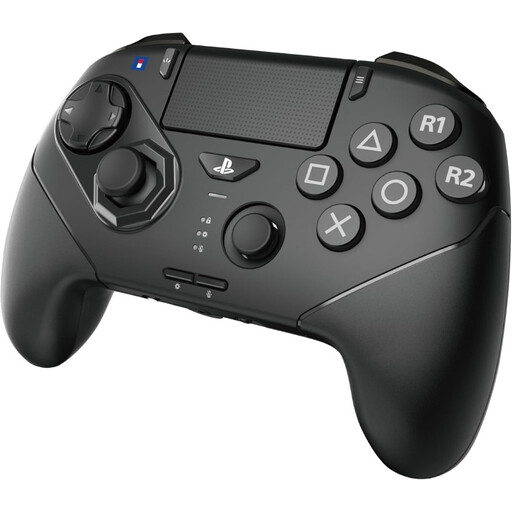
Hori Wireless Controller Fighting Commander Octa Pro for PS5/PC - Black

Hori Wireless Controller Fighting Commander Octa Pro for PS5/PC - Black

Controls designed for fighting games, for anyone who wants to practise combos with a fight pad rather than a traditional arcade stick.

The controller has six face buttons, a stick and three interchangeable D-pad options. You can play wirelessly or use wired USB-C, but the built-in battery needs charging. The product name lists PS5 and PC.

The controller supports programmable macros. Evo’s rules prohibit programmable hardware inputs, so practise without this feature if you’re entering that event.

Joybuy

Frequently asked questions

Do I need an extra power socket for a wired arcade stick?

Not for the connection described in Nacon’s Daija manual: the included cable plugs into a spare USB port on a PS5, PS4 or PC. For other models, check their specific connection and power requirements.

Will every officially licensed PS4 arcade stick work with my PS5 game?

No. Don’t rely on the licence alone. PlayStation warns that not every officially licensed or other peripheral works with every PS5 game, and recommends checking support for the exact model and game with the manufacturer.

Can I use macros or turbo when practising for a tournament?

It depends on the event rules. The Evo rules consulted prohibit programmable hardware inputs, rapid-fire and hardware macros, but allow macros available through the game’s settings menu. These are event rules, not general Dutch law or rules for every tournament.

How do I connect a Daija for the first time?

According to Nacon’s manual, select the mode for PS5, PS4 or PC, then connect the included USB cable to the stick and a spare USB port on your system. On PlayStation, press the PS button too. Nacon recommends checking the associated app regularly for firmware updates.

What are my rights when shopping online in the Netherlands?

For a distance contract with a business, you’ll generally have a 14-day cooling-off period, although exceptions apply. Products must also be of satisfactory quality. According to the Dutch Government, statutory guarantees in the Netherlands have no fixed duration, and the retailer is your point of contact if something goes wrong.
