
Vandaag of morgen in huis

Kwaliteit gegarandeerd

Welkomstaanbiedingen ontgrendelen: GRATIS bezorging | Tot 80% korting | Gratis 30 dagen JoyPlus-proefperiode
Download de app
AR glasses, also known as smart glasses, are no longer science fiction. The technology is evolving rapidly, offering practical solutions for work, entertainment, and travel. But with a growing number of options, the choice can be overwhelming. It's easy to make the wrong choice if you don't know what to look for. This article will help you ask the right questions and find the features that matter to you, whether you're an avid gamer, a professional seeking an extra screen, or a traveller in need of a translation assistant.
Before purchasing AR glasses, it's wise to compare their specifications. The details define the user experience. Here are the most important parameters.
The core of augmented reality glasses is the display. Pay attention to the following specifications:
AR glasses generally fall into two categories:
An AR headset is useless if it doesn't work with your existing devices. Check for compatibility with:
glasses for PS5, Xbox Series X/S, or Nintendo Switch? Verify if the glasses support a direct connection or if an adapter is required.Since you wear the glasses on your nose, weight and fit are crucial.
Rokid glasses, have built-in diopter adjustments. This allows users with myopia (nearsightedness up to -6.0D) to focus the glasses without needing to wear their own prescription glasses. Astigmatism is typically not supported.Based on the criteria above, we have selected two models that cater to different needs.
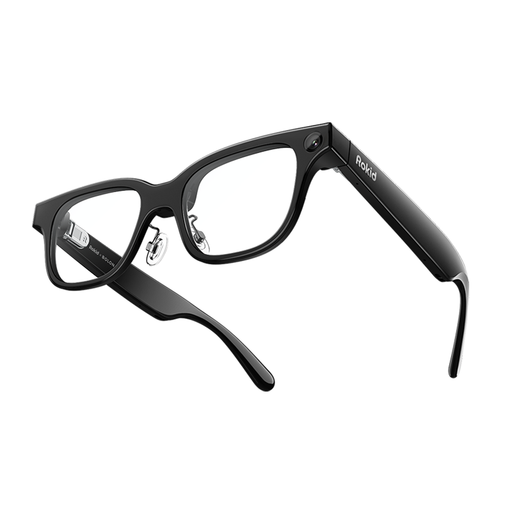
Why We Chose It These AI glasses are designed for productivity and interacting with the world around you. The integration of AI models like ChatGPT and Gemini makes them a powerful on-the-go assistant. They aren't gaming glasses, but rather a tool to make your daily life more efficient.
Benefits
translation glasses.Who It's For This model is ideal for professionals, frequent travellers, and tech enthusiasts looking for a smart assistant to help with translations, notes, and navigation.
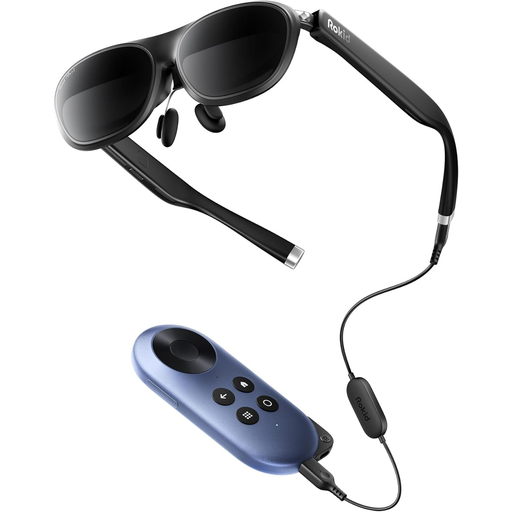
Why We Chose It The Rokid Joy 2, Max 2 is the ultimate portable display, focused on delivering an immersive entertainment experience. With its large virtual screen and high image quality, it's an excellent choice for gamers and movie lovers.
Benefits
Who It's For These AR glasses for gaming are perfect for gamers who want a big screen without lugging around a monitor, movie enthusiasts seeking a private cinema experience, and professionals who need an extra, portable display for their laptop.
The world of smart glasses extends beyond these two models and is constantly evolving. If you're looking for different features or another design, it's worth exploring the full range. Perhaps you're looking for a model with a built-in camera or a different type of display technology.
For a broader overview of available models and technologies, you can visit our main category. View All Tech Glasses Here
1. What is the difference between AR glasses and VR glasses? VR (Virtual Reality) glasses completely block out the outside world, immersing you in a fully digital environment. AR (Augmented Reality) glasses overlay digital information onto the real world. This means you can still see your surroundings, but enhanced with data, images, or a virtual screen.
2. Can I use AR glasses if I already wear prescription glasses? That depends on the model. Some AR glasses are large enough to fit over existing glasses. Other models, like the Rokid Joy 2, have a built-in diopter adjustment. This allows users with nearsightedness (myopia) to adjust the lenses to their prescription, eliminating the need for separate glasses.
3. Do AR glasses work with any smartphone or console? No, compatibility is crucial. Most AR glasses require a USB-C port with DisplayPort Alternate Mode for video output. Not all phones and laptops support this. For consoles like the PS5 or Xbox, a specific HDMI-to-USB-C adapter is often required. Always check the specifications of both the glasses and your own device before you buy AR glasses.
Written by the Joybuy Product Recommendation Officer
