
Vandaag of morgen in huis

Kwaliteit gegarandeerd

Welkomstaanbiedingen ontgrendelen: GRATIS bezorging | Tot 80% korting | Gratis 30 dagen JoyPlus-proefperiode
Download de app
Buying a wireless keyboard might seem straightforward, until you discover the layout doesn't match your UK keys, Touch ID doesn't work on your Mac, or the numeric keypad is missing. With an Apple Magic Keyboard with Touch ID and Numeric Keypad in particular, a few details matter more than a nice product photo or a general promise of comfort.
This buying guide will help you check whether the keyboard suits your workspace, your Mac and your daily use.
Not every Apple keyboard sold online as QWERTY has the same key layout. A QWERTY UK keyboard can differ from a US/QWERTY model in the placement of punctuation, the Enter key and symbols, among other things.
So always check:
For UK Mac users, the Apple Magic Keyboard UK version with a QWERTY layout is usually the most logical choice.
Touch ID on the keyboard does not work automatically with every Mac. According to the product listing, the model is intended for Mac models with Apple Silicon. If you have an older Intel Mac, you need to check compatibility beforehand.
According to the Apple product description, Touch ID can be used for logging in and confirming purchases. Treat this as a compatibility feature, not a reason to skip the technical requirements.
A full-size keyboard takes up more space than a compact model. On the other hand, an Apple keyboard with numeric keypad is practical for spreadsheets, accounting, administration and financial applications.
If you mainly work with text and have a small desk, the numeric section can take up unnecessary workspace. If you use numbers heavily every day, it saves you from having to keep using the top number row.
The white version in the product listing has a QWERTY layout and is described as EU Layout. The stated dimensions are approximately 41.87 cm wide, 11.49 cm deep and 1.09 cm high. The weight is around 369 grams.
Pay attention to the physical space behind your Mac. A keyboard with a numeric keypad is longer than a compact wireless Apple keyboard. So measure your desk before you order.
The Apple version works wirelessly via Bluetooth. According to the product description, the keyboard automatically connects to a compatible Mac once you've switched it on and paired it.
The built-in battery is charged via USB-C. A braided USB-C cable is included and can be used for charging and for connecting the keyboard to a USB-C port on your Mac. Check your own Mac to see if it has a suitable USB-C port; otherwise, an adapter may be needed.
The product information states a rechargeable battery with a battery life of around one month between charges. The actual duration depends on usage, connection and the condition of the battery.
An Apple keyboard with rechargeable battery means you don't need to keep spare batteries. Just remember to schedule a charging session now and then, for example during a break or when you're not using your Mac.
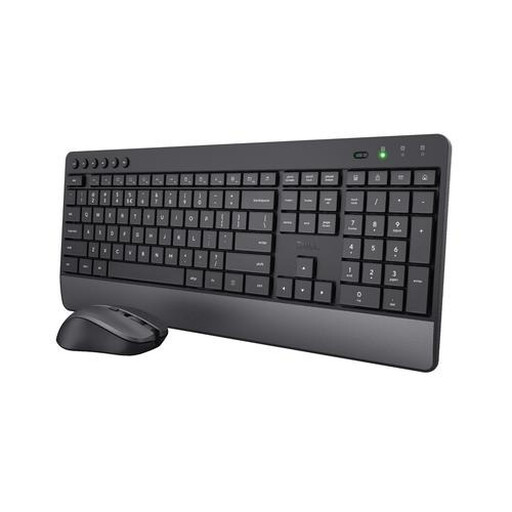
Why this fits the profile: An accessible combination for anyone who mainly wants to work wirelessly and doesn't necessarily need Touch ID. Note: this model has a US/QWERTY layout and is therefore not the same as an Apple UK keyboard.
The product information clearly states the US/QWERTY layout, wireless 2.4 GHz receiver and numeric keypad. This means you can assess the differences in advance.
Mouse included, quiet keys, integrated wrist rest and a stated battery life of up to 48 months for the keyboard.
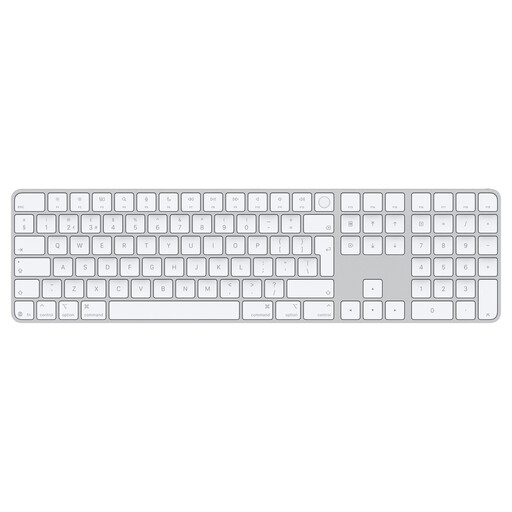
Why this fits the profile: This model suits Mac users with Apple Silicon who want a UK QWERTY layout, Touch ID and a full numeric keypad.
The listing explicitly mentions Mac models with Apple Silicon, Dutch, QWERTY, Bluetooth and numeric keypad. Just check your own Mac model.
Touch ID, Bluetooth, USB-C charging, a rechargeable battery and a stated battery life of around one month.
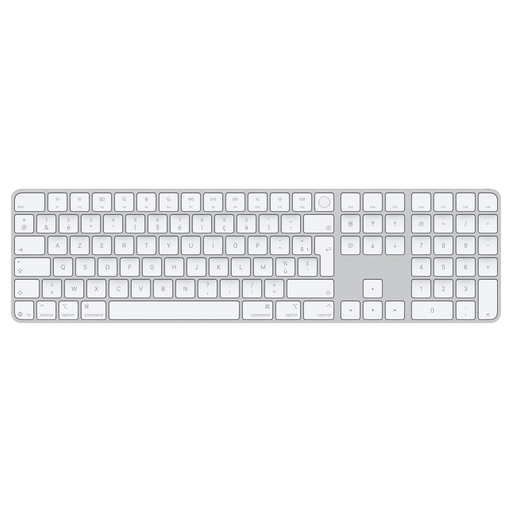
Why this fits the profile: An option for spreadsheet users, administrative staff and financial professionals who enter lots of numbers and want to use Touch ID on a compatible Mac.
The product information mentions the numeric keypad, Touch ID, USB-C and the rechargeable battery. The language layout is not stated in as much detail here; check this before purchasing.
Full-size format, document navigation keys, Touch ID and USB-C connection for charging and pairing.
We've put together a full, up-to-date list of products that fully meet these strict selection criteria and current European safety regulations.
No. The product listing links this feature to Mac models with Apple Silicon. Check which chip your Mac has via the Apple menu, 'About This Mac'. Also check whether your macOS version supports the keyboard function.
According to the product information, the battery life is around one month between charges. This is a stated indication from the manufacturer. The actual duration may vary depending on usage and battery condition.
The models described have a USB-C port for charging and pairing. The primary wireless connection is via Bluetooth. Use the included USB-C cable and check whether your Mac has a suitable port.
