
Vandaag of morgen in huis

Kwaliteit gegarandeerd

Welkomstaanbiedingen ontgrendelen: GRATIS bezorging | Tot 80% korting | Gratis 30 dagen JoyPlus-proefperiode
Download de app
A compact laptop can look like a good choice for studying, working from home and everyday use. But a few mistaken assumptions can lead to problems later on. With the Apple MacBook Neo 13-inch 2026, the memory, storage and included accessories are particularly important.
A model with 8GB RAM and a 256GB SSD can be a good fit for word processing, video calls, browsing and light photo editing. However, if you work with lots of large files, photo archives or several demanding apps at once, 256GB can quickly feel limiting.
Please note: the product specifications state that the memory cannot be upgraded. So you’ll need to choose between the MacBook Neo 8GB 256GB and the MacBook Neo 8GB 512GB before you buy. An external SSD or cloud storage can help, but both involve extra cost and management.
According to the product information, the MacBook Neo offers up to 16 hours of battery life. How long it lasts in practice depends on screen brightness, apps, video calls, wireless connections and AI applications. Treat this as a stated maximum under specific conditions, rather than a guaranteed runtime in every situation.
A MacBook with long battery life remains an appealing option for students and people working from home, but it’s still worth taking a suitable charger with you on long days.
The models mentioned come with a USB‑C cable, but no mains adapter. You’ll need a USB‑C adapter with USB Power Delivery and an output of at least 20 watts. Check whether your existing adapter provides enough power, too. That way, you can avoid an unexpected extra purchase after delivery.
According to the product specifications, the Apple MacBook Neo A18 Pro uses a 6-core A18 Pro chip with integrated 5-core graphics. It’s designed for everyday tasks, photo editing, spreadsheets and certain AI applications.
Apple’s product information says the chip and key components are designed to run AI tasks locally on the device. This is a claim about how the product works; the speed you experience will vary by programme and task. For office work and studying, 8GB is generally a sensible entry-level configuration. If you plan to do extensive, demanding video editing or work on large professional projects, it’s worth checking the software requirements in advance.
The MacBook Neo Liquid Retina display has a resolution of 2,408 × 1,506 pixels, brightness of up to 500 nits and support for 1 billion colours. According to the specifications, it’s an IPS panel with a 60 Hz refresh rate.
The laptop doesn’t have a touchscreen. If you mainly use a mouse, trackpad and keyboard, this is unlikely to be a problem. However, this model may not be the obvious choice if you want to draw or take handwritten notes on the screen.
The laptop weighs around 1.23 kg and is 1.27 cm thick. That makes it handy for lecture theatres, train journeys and shared workspaces. It has two USB‑C ports, one of which supports USB 3.2 Gen 2 and DisplayPort functionality. There’s no HDMI port, USB‑A port or memory card reader.
The models in this overview have a QWERTY keyboard. This is relevant if you’re used to the Dutch QWERTY layout, but always check the product photos and specifications when switching between models. The listed variants don’t have a backlit keyboard.

Why it suits this user: The 256GB model is aimed at people who mainly use documents, web apps, video calls and streaming. Its silver casing and weight of around 1.23 kg make it easy to carry every day.
The storage capacity and 8GB RAM are clearly stated. Just bear in mind that a mains adapter isn’t included and the memory can’t be upgraded.
13-inch IPS display, A18 Pro chip, 8GB RAM, 256GB SSD, two USB‑C ports and macOS.
Why it suits this user: The 512GB SSD gives you more room for photos, study projects and files stored offline, without having to use external storage straight away.
The larger SSD makes it less likely that you’ll run out of storage quickly. Check in advance whether you need a USB‑C or PD adapter.
512GB SSD, 13-inch Liquid Retina display, Wi‑Fi 6, Bluetooth 6.0 and an aluminium casing.
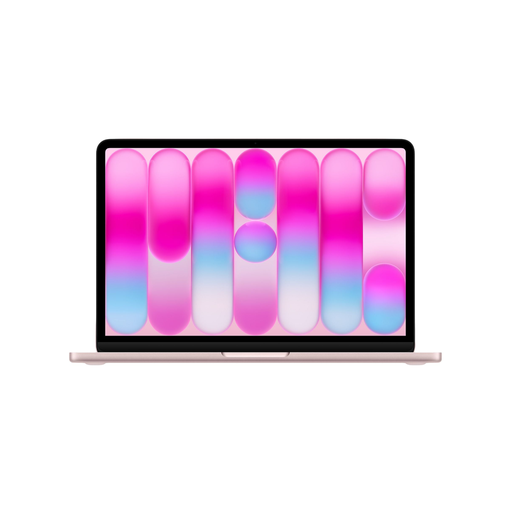
Why it suits this user: This model combines the larger storage capacity with a standout colour. It’s a good fit for people who often take their laptop with them and value storage space more than upgradeable RAM.
The 512GB storage gives you room for larger files stored locally. For demanding professional software, it’s still worth checking the system requirements and memory usage.
A18 Pro chip, 512GB SSD, 1080p FaceTime camera, two microphones and support for spatial audio.
According to the product information, a MacBook with macOS works with features in the Apple ecosystem. These include copying files between an iPhone and Mac, using Messages and making FaceTime calls. The features available may depend on software versions, settings and the Apple device you’re using.
Privacy and security features listed include FileVault, Find My and free software updates. Turn on security features during setup and back up important study or work files regularly.
We’ve put together a complete, up-to-date list of products that meet these strict selection criteria and the applicable European safety regulations.
256GB can be suitable for documents, presentations, browsing and cloud storage. If you keep lots of photos, videos or large applications on your device, the 512GB model or an external SSD is a better choice.
According to the product specifications, a USB‑C cable is included, but no mains adapter. Use a USB‑C adapter with USB Power Delivery and an output of at least 20 watts.
The product information states that battery life is up to 16 hours. This is a stated maximum. Actual battery life varies depending on brightness, software, connectivity and how intensively you use the laptop.
