
Vandaag of morgen in huis

Kwaliteit gegarandeerd

Welkomstaanbiedingen ontgrendelen: GRATIS bezorging | Tot 80% korting | Gratis 30 dagen JoyPlus-proefperiode
Download de app
A compact Apple MacBook Neo 13-inch 256GB might seem like a straightforward choice on paper. However, a few details could come as a surprise after you buy it. The storage might fill up sooner than expected, the keyboard layout may not suit your working environment, or there may be no charger in the box.
This buying guide helps students, home workers, professionals and Apple users assess the specifications in practical terms. You’ll be able to see whether this Apple laptop for work and study suits your everyday needs.
A MacBook with a 256GB SSD offers enough space for documents, web browsing, video calls and a typical collection of apps. However, macOS and pre-installed software already use some of that storage. Large photo libraries, video projects and films downloaded for offline viewing can quickly eat into the remaining space.
The internal storage on this model isn’t designed to be upgraded. If you work with large files, you may therefore need an external SSD or cloud storage.
The MacBook Neo has 8GB RAM and, according to the product specifications, its memory can’t be upgraded. That’s a relevant configuration for word processing, online shops, email, presentations, streaming and video calls. If you use demanding creative software, large spreadsheets and lots of browser tabs at the same time, you’ll need to take this limitation into account beforehand.
So don’t just look at the chip. The combination of A18 Pro, 8GB RAM and 256GB SSD determines how long the laptop will suit your needs.
According to the product description, a USB-C cable is included, but there’s no mains adapter. You’ll need a USB-C Power Delivery adapter rated at least 20 watts to charge the laptop. The maximum charging capacity is listed as 96 watts, but that doesn’t mean you automatically need an adapter with that much power.
Check before buying whether you already have a suitable adapter. Otherwise, the actual purchase price will be higher.
The 13-inch MacBook has a 13-inch Liquid Retina display with a resolution of 2,408 × 1,506 pixels. According to the product details, it has a maximum brightness of 500 nits and supports 1 billion colours. The screen has an IPS panel, a glossy finish and a 60Hz refresh rate.
The laptop measures approximately 29.75 × 20.64 × 1.27 cm and weighs 1.23 kg. That makes it practical for train journeys, lectures, hot-desking and working at the kitchen table. There’s no touchscreen or HDMI port, so you’ll need a suitable USB-C solution or dock to connect an external monitor.
The MacBook Neo A18 Pro uses a 6-core Apple chip with integrated graphics. The product description mentions support for tasks including photo editing, spreadsheets, study notes and entertainment. Whether the laptop is suitable for your software depends on the macOS version and whether each app is available.
Also check beforehand that your programmes run natively on macOS. Some Windows applications may require an alternative or an additional solution.
According to the product description, the laptop can offer up to 16 hours of battery life. This is the manufacturer’s stated maximum, not a guaranteed usage time. Screen brightness, video calls, connected accessories, software and wireless connections all affect power consumption.
If you need to get through a full working day without a power socket, it’s worth comparing your own usage with this claim. It’s still handy to keep a charger in your bag, especially if you make lots of video calls or take long train journeys.
This model has a non-backlit QWERTY keyboard and no numeric keypad. That’s worth noting if you’re used to a Dutch ISO layout or backlit keys.
For online meetings, there’s a 1080p FaceTime HD camera and two microphones. The laptop has two USB-C ports, one of which supports USB 3.2 Gen 2 according to the specifications. There’s no USB-A port, card reader or built-in HDMI port.
The selection below matches products to different use cases. The specifications and product claims mentioned are based on the available product information.

Why it suits this profile: This lightweight macOS laptop is designed for everyday work, study, video calls and entertainment, without the bulk of a larger screen.
The fixed configuration makes it clear upfront that the 8GB RAM and 256GB storage can’t be upgraded. It also states that a USB-C adapter isn’t included.
13-inch Liquid Retina display, 1.23 kg weight, A18 Pro chip and up to 16 hours of battery life as stated by Apple.
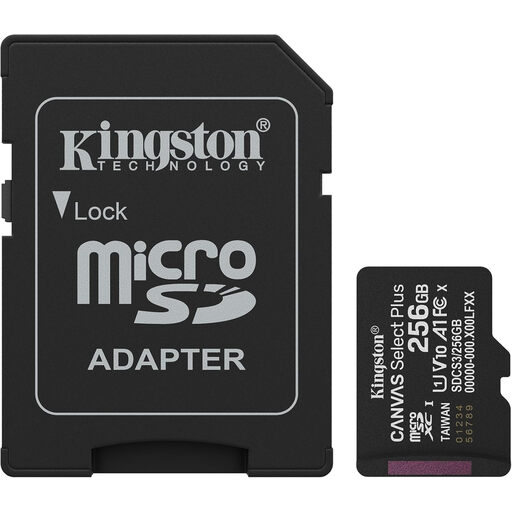
Why it suits this profile: Handy as extra storage for compatible cameras, Android devices or other devices you use alongside your MacBook.
The card provides extra storage beyond the MacBook’s fixed 256GB, but check beforehand that your device supports microSD; the MacBook Neo doesn’t have a built-in card reader.
256GB capacity, UHS-I Class 10, A1 rating and an included SD adapter. The stated read speed is up to 150MB/s.
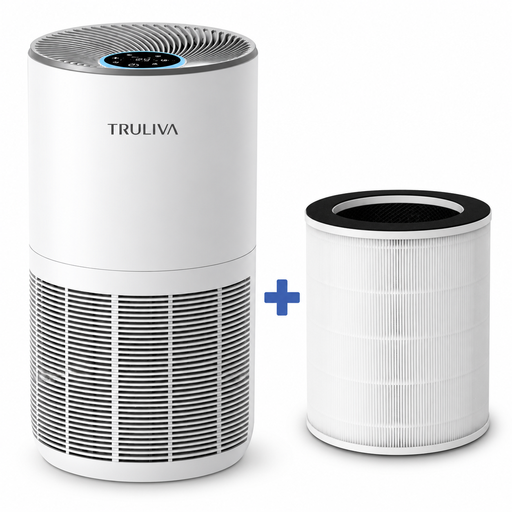
Why it suits this profile: A practical addition to a permanent home-working setup where long hours, a timer and a quiet mode matter.
The relevant usage limits are clearly stated: 450 m³/u CADR, 38 watts of power, a stated coverage area of 32–55 m² and filter maintenance as described in the manual.
Triple filtration, PM2.5 display, 24-hour timer, child lock and sleep mode. The stated filter performance comes from the brand’s product information.
We’ve put together a complete, up-to-date list of products that fully meet these strict selection criteria and current European safety regulations.
256GB may be enough for documents, web browsing, video calls and a few photos. If you store lots of videos, RAW photos, games or large project files, you’ll probably need external storage or cloud storage.
According to the product description, a USB-C cable is included in the box, but there’s no mains adapter. You’ll need a USB-C Power Delivery adapter rated at least 20 watts.
According to the product information, battery life is up to 16 hours. This is the manufacturer’s maximum claim. In practice, battery life varies depending on brightness, apps, video calls, wireless connections and connected accessories.
