
Vandaag of morgen in huis

Kwaliteit gegarandeerd

Welkomstaanbiedingen ontgrendelen: GRATIS bezorging | Tot 80% korting | Gratis 30 dagen JoyPlus-proefperiode
Download de app
Would you like to buy an Apple MacBook Neo 13-inch for studying, working from home or everyday use? The choice may seem straightforward, but a few details can have a significant impact on your experience and the total cost. These include the lack of a power adapter, the limited storage capacity and the fixed amount of RAM.
In this buying guide, we list the key points to check. This will help you compare the MacBook Neo’s specifications with the way you plan to use it and check the current price before ordering.
According to the product description, the MacBook Neo comes with a USB-C charging cable, but no mains adapter. You therefore need a USB-C adapter with USB Power Delivery that supplies at least 20 watts. Check whether you already have a suitable adapter before buying the laptop.
A phone charger may sometimes be suitable, but its power output and compatibility must match the laptop’s requirements. The product specification states a maximum charging capacity of 96 watts and a minimum of 20 watts.
This version has 8 GB RAM and, according to the product specifications, the memory cannot be upgraded. That is enough for tasks such as word processing, browsing the internet, video calls, streaming and light photo editing. If you regularly work with large files, lots of browser tabs or demanding creative software, you should take this limitation into account before buying.
Also be wary of marketing claims relating to artificial intelligence. According to Apple’s own information, the chip and key components are designed to perform certain AI tasks efficiently on the device. This does not mean that every professional AI or video-editing application will work without limitations.
The 256 GB SSD starts up quickly and provides space for documents, apps and a standard media library. However, files from photo and video projects can take up a great deal of space very quickly. As the storage capacity is limited, you may need an external SSD or cloud storage.
The MacBook Neo uses an Apple A18 Pro chip with 6 processor cores and integrated graphics processing. According to the product description, this configuration is intended for tasks including spreadsheets, photo editing, summarising lecture notes and entertainment.
For students and people working from home, the combination of macOS, low weight and compact dimensions is particularly practical. For demanding 3D software, extensive video editing or resource-intensive professional programmes, it is advisable to check your software’s system requirements first.
The screen measures 13 inches and has a resolution of 2,408 × 1,506 pixels, brightness of up to 500 cd/m² and a refresh rate of 60 Hz. According to the specifications, the screen is not touch-sensitive and has a glossy finish.
The compact size makes the laptop suitable for taking to lectures, on the train or to a flexible workspace. If you work with wide spreadsheets every day, you may find an external monitor more comfortable.
This version has a 13-inch MacBook QWERTY keyboard without a numeric keypad or keyboard backlighting. Check that the layout matches your preferences. A QWERTY layout is common in many international working environments, but may feel different if you have used AZERTY or another layout for years.
There are two USB-C ports, one of which supports USB 3.2 Gen 2 and DisplayPort functionality. USB-A and HDMI are not included. If you use older USB sticks, wired mice or an HDMI monitor, you may need a hub or adapter.
According to the product description, the MacBook Neo offers up to 16 hours of battery life. This is a stated maximum under certain conditions; brightness, software, video calls and network use all affect the actual battery life.
Weighing 1.23 kg and featuring an aluminium casing, the model is relatively easy to carry around. When transporting it, preferably use a suitable protective sleeve and avoid moisture, extreme temperatures and knocks.

Why it suits this profile: This compact laptop combines macOS, 8 GB RAM, a 256 GB SSD and a weight of 1.23 kg for studying, browsing, streaming and basic office work.
The product specifications clearly state that it has fixed 8 GB RAM, 256 GB of storage and no adapter included. This means you can factor in any additional costs in advance.
13-inch Liquid Retina display, A18 Pro chip, Wi-Fi 6, Bluetooth 6.0 and a stated battery life of up to 16 hours.
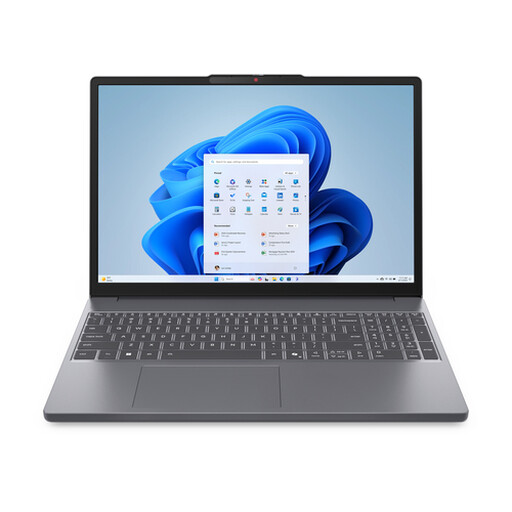
Why it suits this profile: This Windows laptop offers 16 GB RAM, 512 GB SSD storage, a larger 15.3-inch screen and several connections for work and study.
The 16 GB RAM and 512 GB SSD provide more room for multitasking and files. Please note: the charger is not included as standard with this model.
Ryzen 7 8840HS, 16 GB DDR5, 512 GB NVMe SSD, HDMI, SD card reader and USB-C with DisplayPort.
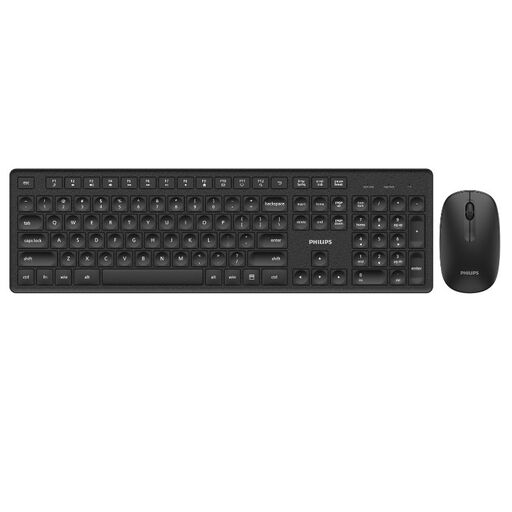
Why it suits this profile: Ideal if you mainly use your MacBook at a desk and would like to add a full-size keyboard with a wireless mouse.
An external keyboard means you are not limited to the compact built-in keyboard. However, check the UK QWERTY layout in advance.
104 keys, wireless connection via a single receiver, a range of up to 10 metres and a stated battery life of up to 12 months.
We have put together a complete, up-to-date list of products that fully meet these strict selection criteria and the applicable European safety regulations.
For word processing, video calls, browsing the internet, presentations and spreadsheets, the combination of the A18 Pro chip, 8 GB RAM and macOS may be suitable. Check in advance that the programmes used by your educational institution or employer are available for macOS.
No. According to the product information, the packaging includes a USB-C cable but no AC adapter. You need a suitable USB-C Power Delivery adapter of at least 20 watts.
According to the product description, Apple states a battery life of up to 16 hours. The actual battery life depends on screen brightness, apps, video calls, streaming and wireless connections. So do not just check the stated maximum duration; consider your own usage pattern too.
