
Testers without a spare socket
You’re looking for an extra screen that can draw power from a suitable computer port. Check both the video output and power supply: a compatible connector alone doesn’t guarantee that both will work.


A portable monitor can save you using an extra socket if your computer provides the required video output and USB power. For example, Philips Netherlands specifies DP Alt Mode as a requirement for USB-C video on the 16B1P3302D/00. If you need more room for test windows, or your computer lacks a suitable port, a model-specific USB-A video connection or a mains-powered monitor could be a good fit. Check the driver requirements and remember that a mains-powered monitor needs its own power supply.
You’re looking for an extra screen that can draw power from a suitable computer port. Check both the video output and power supply: a compatible connector alone doesn’t guarantee that both will work.
If your computer may not support USB-C video output, check whether the specific monitor model supports an alternative video connection and what software it requires.
If you want to assess the app alongside your tools, weigh up the screen space you need against the room and power supply required by a larger, mains-powered display.
Choose this if: your computer can provide video and power through the same suitable port, and a compact extra screen is all you need.
Bear in mind: Philips Netherlands requires DP Alt Mode for USB-C video on the 16B1P3302D/00. A USB-C connector alone isn’t enough.
Choose this if: your computer doesn’t have a suitable USB-C video output and the model you choose supports a compatible USB-A video connection.
Bear in mind: DisplayLink or a driver may be required for some models. ASUS also warns that protected content may not appear on the MB16ACV when using USB 3.0.
Choose this if: your testing would benefit from more room for multiple windows and you have a suitable spot for the mains power supply.
Bear in mind: the power delivery from a USB-C hub monitor to connected devices doesn’t mean the monitor itself is powered by the computer.
| Concern | What to look for when buying | Who is this important for? |
|---|---|---|
| No spare socket | Check how the monitor receives its picture and power, and whether the computer port supports both. | If I don’t have a spare socket, I want to know whether my computer can provide both the picture and power for the monitor. Around 36% of consumers prioritise avoiding an extra socket. |
| Connecting to the computer | Check the video output, USB power and any driver requirements for the exact model. | When the available ports are limited, I want to be sure in advance that the connection I choose will work with my computer and testing app. For around 29% of consumers, compatibility is the main concern. |
| Room for test windows | Decide which windows and resolutions you want to assess, then weigh up the screen size against the power requirements. | Workspace matters when you need to view the app, documentation and tools side by side. Around 21% of consumers put this ahead of other purchasing needs. |
| Set-up and aftercare | Check the model’s stand and positioning options, and what any service plan includes. | If my desk has limited space, I want a screen that will work well there, and to know who to contact if it develops a fault. Around 14% of consumers prioritise set-up and aftercare. |
The power Dell specifies for the P2425E is intended for connected devices. It doesn’t mean the monitor itself draws power from the computer.
Check separately how the monitor itself is powered and which devices receive power via USB-C.
The Philips 16B1P3302D/00 has separate requirements for USB-C video and USB power. The capabilities of the specific computer port are therefore important.
Compare the specifications for both the monitor and computer before choosing a connection.
ASUS warns that certain protected content may not appear on the MB16ACV when using USB 3.0.
If you test protected content, check in advance whether this model-specific limitation affects your work.
An additional service plan doesn’t replace your statutory rights if a product is faulty. According to the Government of the Netherlands, the retailer must provide a solution under the statutory guarantee.
Check what the plan covers and who you should contact if something goes wrong.
For the 16B1P3302D/00, Philips describes USB power and USB-C video via DP Alt Mode. For the separate 16B1P3302/00, Philips specifies DisplayLink via a USB-C to USB-A cable.
According to ASUS, the ZenScreen MB16ACV combines power and video via USB-C. ASUS also provides a driver for use via USB 3.0.
Lenovo lists the ThinkVision M14d as having a 14-inch screen with a 16:10 aspect ratio, 2240 × 1400 resolution and two USB-C ports with DP Alt Mode.
For the portable I1601FWUX, AOC describes a 15.6-inch screen that receives video and power via a single USB-C cable.
According to Dell, the fixed Dell P2425E is a 24-inch USB-C hub monitor with a 16:10 aspect ratio.
These portable monitors are designed to give you an extra screen for app testing. Check that each model’s video connection, power supply and any additional ports are suitable for your computer.
 No image available
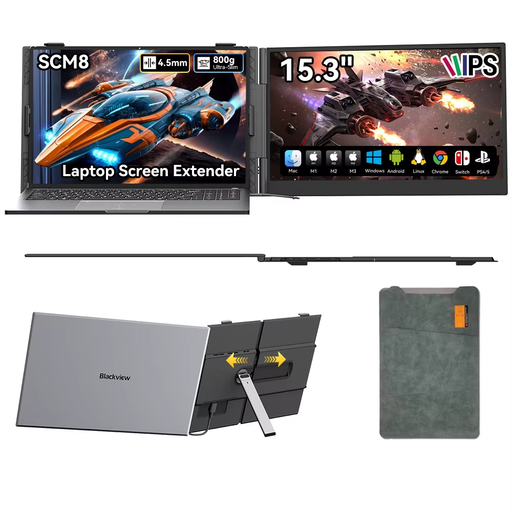
The product information lists a single USB-C cable for picture and power, worth considering if you’re looking for a compact extra screen.
15.3 inches; 1920 × 1200; 16:10; IPS.
 No image available
The product information lists picture and power via a single USB-C cable, and a stand that adjusts through 180°. Check that the connection works with your computer.
Built-in speakers; protective case included.
 No image available
The product information lists USB-C with DisplayPort Alt Mode. Check that your computer supports this video output.
16 inches; WUXGA (1920 × 1200); 16:10; IPS; USB-C with DisplayPort Alt Mode and 65 W Power Delivery.
 No image available
The product information lists touchscreen controls and USB-C and mini-HDMI connections. Check which connection works with your computer and test set-up.
Full HD.
 No image available
The product information lists picture and power via a single USB-C cable. Check that your computer port supports the required functions.
15.6 inches; 1920 × 1080; IPS.
No. For USB-C video on the 16B1P3302D/00, Philips Netherlands requires DP Alt Mode and lists USB power separately. Check the specifications for both the computer port and monitor model.
Only if the specific model supports a USB-A video connection. Philips lists DisplayLink via a USB-C to USB-A cable for the 16B1P3302/00; ASUS provides a driver for using the MB16ACV via USB 3.0. Check that the driver and system support your testing app.
Not necessarily. Dell lists up to 90 W of charging power for connected devices on the P2425E, but that doesn’t mean the monitor itself is powered by the computer. Check how the screen itself receives power.
The Netherlands Fire Service advises plugging high-power appliances, such as electric heaters, directly into a socket where possible, and fully unwinding any cable reel in use. This advice isn’t a general ban on using an extension lead for a monitor.
According to the Government of the Netherlands, the retailer, not the manufacturer, must provide a solution under the statutory guarantee. The Netherlands has no fixed statutory guarantee period; a manufacturer’s warranty or additional service plan comes on top of your statutory rights.