
Vandaag of morgen in huis

Kwaliteit gegarandeerd

Welkomstaanbiedingen ontgrendelen: GRATIS bezorging | Tot 80% korting | Gratis 30 dagen JoyPlus-proefperiode
Download de app
As a Joybuy Product Recommendation Officer, I see a lot of spec sheets and marketing promises. Especially in the world of 3D printing, it's easy to get lost in claims about speed and functionality. For advanced hobbyists and professionals looking for an efficient and reliable FDM printer, it's crucial to cut through the hype.
Before you invest in an advanced 3D printer, it's important to be aware of a few common pitfalls. Many users pay for features that underwhelm in practice.
multicolor 3D printer sounds fantastic, but many systems are external add-ons that are unreliable, waste a lot of filament when changing colours, and require a complex calibration process. A non-integrated system can cause more frustration than creativity.A good purchase is based on specifications that actually solve a problem. Let's look at the core parameters that make the difference between a marketing promise and a productive workhorse.
For designers, engineers, and small business owners, efficiency and reliability aren't luxuries; they're requirements. Pay attention to the following specifications to determine if a fast 3D printer is also a genuinely good printer.
The maximum speed is less relevant than the recommended print speed at which quality remains high. A printer that can print stably at 300 mm/s is more valuable than one that peaks at 600 mm/s with poor results. This is made possible by two crucial technologies:
If you want to create complex, multi-colour models, an integrated system is a must. Unlike separate add-ons, an integrated system is designed to work seamlessly with the printer and its software. This leads to:
multi-colour 3D printer model in the slicer software is typically much more straightforward.A smart FDM printer saves you time and material. Features like a 3D printer with auto-levelling are standard, but the implementation varies enormously. Look for systems that automate the entire process, including Z-offset calibration. Additionally, AI features are no longer a gimmick. A camera with AI detection that recognises "spaghetti" (a failed print) or other issues and automatically pauses the print can save hours of wasted time and hundreds of grams of filament.
Based on these criteria, we have made a selection for different user profiles. These recommendations are based on objective product specifications that align with the needs of professionals and serious makers.
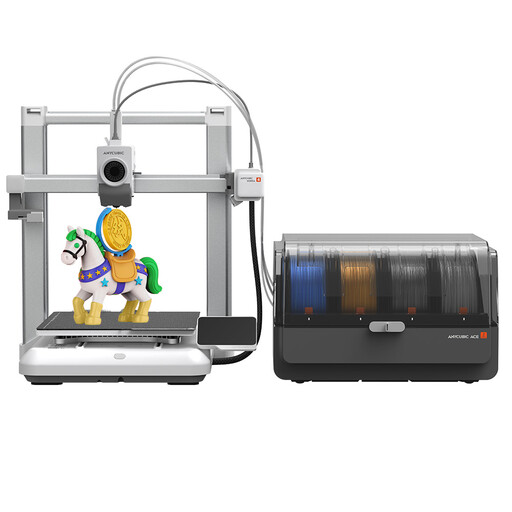
Why This Fits Their Persona: Perfect for engineers, designers, and small business owners who need to produce functional prototypes and complex models in multiple colours. The focus is on efficiency, reliability, and a streamlined workflow to complete projects faster.
The integrated 4-colour system (expandable to 8) avoids the unreliability of external add-ons. The recommended speed of 300 mm/s is practical and supported by vibration compensation. The LeviQ 3.0 auto-levelling system is fully automatic.
Integrated multi-colour printing combined with AI detection for failed prints. The 300°C hotend and hardened steel nozzle allow for printing with a wide range of materials, including engineering-grade filaments.
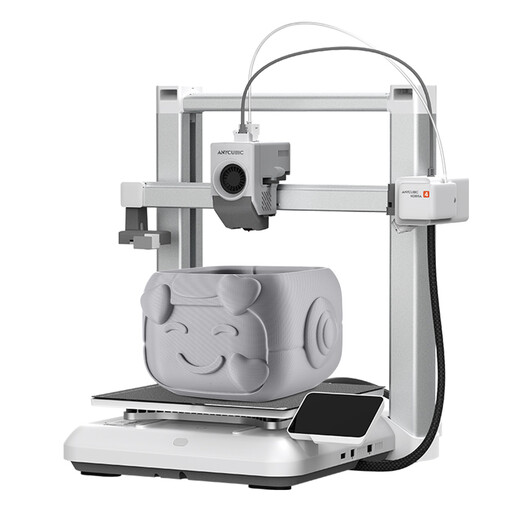
Why This Fits Their Persona: Ideal for the advanced hobbyist or professional who needs maximum speed and precision for single-colour projects. Think large functional parts, batch production, or detailed models where colour is not a priority.
This printer delivers the same high, practical speed and smart features (AI detection, LeviQ 3.0) as the Combo version, but without the added cost and complexity of a multi-colour system. You only pay for the performance you need.
Focus on pure speed and precision. The combination of a recommended 300 mm/s speed, vibration compensation, and a large build volume (260x260x260 mm) makes it a highly productive machine for single-colour prints.
We have compiled a complete, real-time list of products that fully satisfy these strict selection criteria and UK safety regulations.
Setting up multi-colour prints is significantly simplified thanks to the integrated system. The Anycubic Slicer software is designed to make assigning colours to different parts of a model intuitive. While there is always some learning curve, the process is much more accessible than with older, external multi-colour solutions.
Thanks to the nozzle, which can reach temperatures up to 300°C, and a heated bed up to 100°C, the printer is compatible with a wide range of materials. In addition to standard filaments like PLA, PETG, and ABS, it can also handle more demanding engineering-grade materials. The included hardened steel nozzle is also suitable for printing abrasive filaments, such as those with carbon fibre or wood fill.
The hardened steel nozzle is very durable, especially when using standard filaments. Its lifespan can be many hundreds of printing hours. With frequent use of abrasive materials (like filaments with carbon, metal, or glow-in-the-dark particles), wear and tear will be faster. You can recognise a worn nozzle by a decline in print quality, such as irregular lines or under-extrusion. It's a good idea to visually inspect the nozzle if print quality deteriorates.
