
当日/次日达

品质保障

开启新人专享福利: 全场免邮 | 低至 2 折 | 免费试用 30 天 JoyPlus 会员
下载 Joybuy
If you're considering purchasing an advanced 3D printer, you've likely come across the name Anycubic Kobra 4 Combo. The promises of high speeds and multi-color printing are appealing, but the 3D printer market is filled with marketing claims that often fall short in practice. Before you make a decision, it's crucial to know what to look for to avoid a costly mistake.
As a Joybuy Product Recommendation Officer, I'm here to help you decipher the specifications and recognise the common pitfalls. We'll look past the marketing and focus on the facts that determine whether a printer is truly worth the investment for your projects.
Technology is evolving rapidly, but not every innovation is equally useful. Many users invest in an expensive printer only to be disappointed. These are the most common problems:
multi-color 3D printer sounds fantastic, but many systems are external modules that are complex to install, waste significant amounts of filament during changes, and drastically slow down the printing process. A non-integrated system often leads to more frustration than creativity.automatic bed leveling, but in practice, this often means a sensor merely tells you how skewed the bed is, leaving you to correct it manually with adjustment knobs. This is time-consuming and leads to an unreliable first layer—the primary cause of failed prints.To avoid these pitfalls, you need to look beyond the headlines. Focus on these three technical specifications when buying an FDM printer.
A fast 3D printer isn't defined by its top speed, but by how quickly it can reach and maintain that speed without sacrificing quality. Therefore, pay attention to:
For a true multi-color 3D printer, an integrated system is crucial. Examine the specifications of the multi-color module. A system that merges filaments before they reach the print head (extruder) is typically more efficient and reliable. The ability to expand the system (e.g., from 4 to 8 colors) offers future-proofing.
A modern, professional 3D printer takes the work off your hands. True automatic leveling means the printer compensates for the Z-axis itself, without you needing to turn any knobs. Furthermore, AI features are no longer a gimmick.
Based on these objective criteria, we've identified which product fits different user profiles.
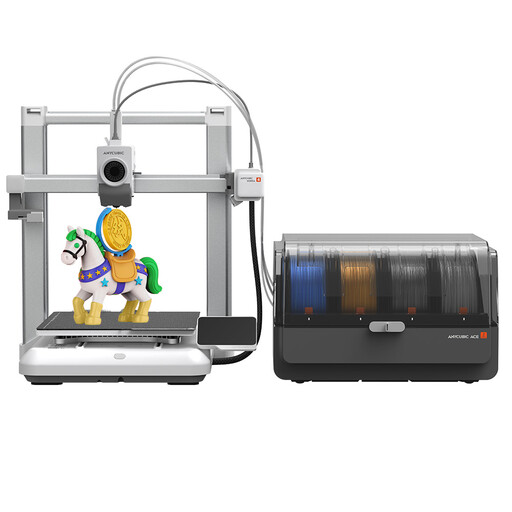
Why This Fits Their Persona: Ideal for makers who want to print complex, colorful models without paying a premium. The combination of speed and an integrated 4-color system enables creative projects that were previously impractical.
The integrated multi-color system is designed for efficiency, avoiding the complexity and waste of separate modules. The automatic leveling is completely hands-free.
Recommended print speed of 300 mm/s with vibration compensation for high-quality prints. Standard 4 colors, expandable to 8.
Why This Fits Their Persona: Perfect for rapidly producing functional, multi-color prototypes. The high speed drastically shortens iteration cycles, while support for engineering filaments allows for testing end-use parts.
The AI camera with spaghetti detection minimises the risk of failed prints during long, unattended print jobs. This prevents wasting expensive engineering materials.
Nozzle up to 300°C and a heated bed up to 100°C for compatibility with materials like PETG, ABS, and PA. Large build volume of 260x260x260 mm.
We have compiled a complete, up-to-date list of products that fully meet these strict selection criteria and regulations.
While the printer has many automatic features that enhance ease of use, such as automatic leveling and app connectivity, it is aimed at the advanced user. The capabilities of multi-color printing and high speeds are best utilised if you already have some basic knowledge of 3D printing and slicing software. For an absolute beginner, a simpler Anycubic 3D printer model might be a better starting point.
The integrated system is designed to minimise waste compared to older systems. With each color change, a small amount of filament is used to 'purge' (flush) the previous color from the nozzle. The exact amount is adjustable in the slicing software and depends on the colors being swapped (e.g., changing from black to white requires more purging than from yellow to orange).
The Kobra 4 Combo comes with a hardened steel nozzle. This means that in addition to standard materials like PLA and PETG, you can also print abrasive filaments, such as those containing carbon fiber or wood particles. This offers significantly more possibilities for creating strong, functional parts.
