
Student editing and mixing to picture
You want to sync music with animation footage. First, check whether your DAW can open the video format you’ve been given; Ableton explains which formats Live can import and when conversion may be needed.


Start by checking that your DAW, plug-ins and animation video file work together. Then work out how much memory, storage and how many connections your project needs. A Mac mini suits a compact macOS setup, while a Windows mini PC is a space-saving option for a Windows workflow. Choose a larger desktop if expandability matters more than a small case; specifications alone can’t guarantee how your own project will run.
You want to sync music with animation footage. First, check whether your DAW can open the video format you’ve been given; Ableton explains which formats Live can import and when conversion may be needed.
If you use lots of tracks, effects or sample libraries, compare the processor, memory and SSD configuration with the way you work. Ableton notes that your computer needs depend on the number of tracks and the plug-ins and instruments you use.
A compact computer can free up desk space, but it still needs to work with your monitor, audio interface and other equipment. Check the dimensions and ports of the exact configuration.
A good fit if: you use macOS software and want a very small desktop.
Keep in mind: choose memory and SSD capacity to suit your project; Apple’s Dutch website lists 16 GB of memory and a 256 GB SSD for the base M6 configuration.
A good fit if: your DAW or existing workflow requires Windows, but you want to use very little desk space.
Keep in mind: check the ports on your chosen configuration and the driver for your audio interface. Ableton recommends an ASIO driver for Live on Windows; this doesn’t guarantee any particular PC performance.
A good fit if: future internal upgrades matter more than a minimal footprint.
Keep in mind: check the upgrade options for the specific model and make sure its case will fit in your workspace.
First compare software and video compatibility, then the capacity you need for your session, and finally how the computer will fit into your workspace.
| What to consider | What should you check? | Who is this important for? |
|---|---|---|
| DAW and video compatibility | Make a note of your DAW version, plug-ins, operating system and the codec used by your project file. If possible, test a representative clip; Ableton explains that video conversion may sometimes be needed. | If I want to check my music against animation footage, I first need to know that my software and file work together. Around 40% of consumers put project and video compatibility first. |
| Tracks, effects and samples | Compare a representative session with your DAW’s requirements and the exact processor, memory and SSD configuration. Ableton links computer requirements to the size and contents of projects. | If I work with several tracks, effects or sample libraries, I want to match the configuration to my own session. Around 30% of consumers give session performance top priority. |
| Space and connections | Measure the available space and compare the ports on the exact configuration with those on your monitor, audio interface and other devices. | At a small desk, I want to connect my monitor and audio equipment without losing sight of the space available. Around 20% of consumers focus mainly on footprint and connections. |
| Upgrades and total cost | Check whether the specific model can be upgraded internally later, and which essential equipment or connection accessories are included. The seller must state any extra costs, such as delivery or installation charges. | If my projects grow over time, I want to know what I can upgrade in the configuration I’ve chosen and which parts I’ll still need. Around 10% of consumers put future upgrades and the total cost first. |
Minimum system requirements don’t automatically tell you how a project with lots of tracks, plug-ins or instruments will run. Ableton distinguishes between the requirements for running Live and what larger projects may need.
Compare the exact configuration with a representative session and the recommendations for your DAW.
Whether a video file can be imported depends partly on its format. Ableton lists MP4 and MOV as possible formats to convert to if a video can’t be imported.
Ask which file format you’ll receive and test a sample in your own software before buying. Conversion may take extra preparation time.
Port types and optional connections can vary by model and configuration. A small case won’t solve the problem if it lacks a connection for your monitor or audio interface.
Make a list of your devices and compare it with the ports on the exact configuration; allow for the possibility that you’ll need extra connection accessories.
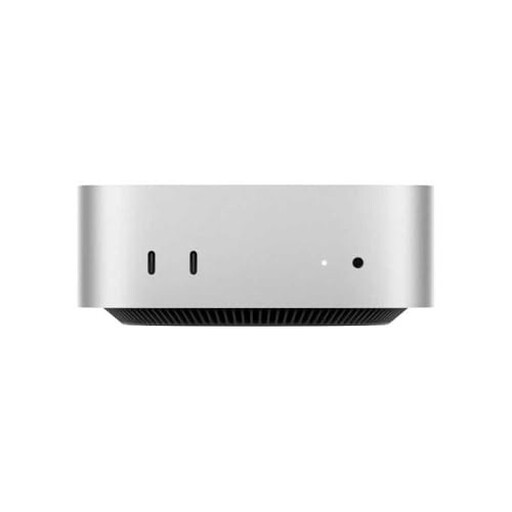
Mac mini configurations for anyone looking for a small macOS desktop.
The Pro Micro QCM1250 is a compact Windows desktop range.
The ThinkCentre M70q Gen 5 is a family of Tiny desktops available in different configurations.
The Pro Mini 400 G9 is a compact Windows product range to compare by configuration.
This selection at Joybuy includes compact desktops for a small workspace, with Mac mini configurations and a Windows mini desktop.
 No image available
A compact desktop option for anyone looking for a small workspace and a macOS setup.
Apple M6 chip; 16 GB memory; 256 GB SSD.
No image available
A compact desktop option for anyone looking for a small workspace and a macOS setup.
Apple M6 chip; 16 GB memory; 512 GB SSD.
No image available
A compact desktop option for anyone looking for a small workspace and a macOS setup.
Apple M6 chip; 24 GB memory; 512 GB SSD.
 No image available
A Windows mini desktop option for anyone looking for a compact Windows setup.
16 GB LPDDR5X; 512 GB PCIe 4.0 SSD; Windows 11 Home.
 No image available
A compact desktop option for anyone looking for a small workspace and a macOS setup.
M4 chip; 10-core CPU; 10-core GPU; 16 GB memory; 512 GB SSD.
First check the DAW version, plug-ins and animation file you’ll be using. Ableton publishes requirements for Live on Windows and macOS and explains which video formats can be imported; test your file’s codec separately.
For best results, use the appropriate ASIO driver for your audio interface. Ableton says ASIO can allow for a smaller buffer and lower latency, but a smaller buffer doesn’t guarantee that a demanding session will play without interruptions.
Check which essential parts, software and connection accessories are included with the offer you’ve chosen. For a purchase agreement in the Netherlands, the seller must state any extra costs, such as delivery or installation charges.
According to the Dutch government, when you buy online from a business you’ll often have a 14-day cooling-off period; the same distance-selling rules don’t apply in the same way when buying from a private seller. You’re also entitled to a product that’s fit for purpose. If there’s a fault, the seller is your point of contact.