
Vandaag of morgen in huis

Kwaliteit gegarandeerd

Welkomstaanbiedingen ontgrendelen: GRATIS bezorging | Tot 80% korting | Gratis 30 dagen JoyPlus-proefperiode
Download de app
An AM5 motherboard is the foundation of a PC with an AMD Ryzen processor. But it’s not wise to focus only on the chipset or the number of USB ports. A motherboard may look feature-packed on paper, yet still not fit your case, memory, processor or cooler.
There are three common pitfalls for PC builders in the UK:
AM5 motherboards use an AMD socket that supports several Ryzen generations. The product information for the selected models lists support for AMD Ryzen 7000, 8000 and 9000. Even so, check the manufacturer’s current processor support list before buying, especially if you’re choosing a newer CPU or a motherboard that was manufactured some time ago.
The chipset determines factors such as the available PCIe lanes, storage options, overclocking features and networking:
A DDR5 motherboard won’t work with DDR4 modules, so make sure you buy memory explicitly listed as DDR5. Four memory slots offer more room to upgrade than two. Also check the maximum memory capacity and supported speed.
The models listed have some clear differences:
Higher memory speeds often depend on overclocking profiles such as AMD EXPO or XMP. How well they work can vary depending on the memory kit, processor and BIOS, so check the motherboard’s compatibility list.
For storage, M.2 slots matter more than a long list of SATA ports when you’re building a modern PC. Check the PCIe generation for each M.2 slot: not all slots offer the same speed or share bandwidth with other connections.
A Wi-Fi 7 motherboard may be worth considering if your router and network support it. Otherwise, a Wi-Fi 6 motherboard can still provide a practical wireless connection, depending on your surroundings and network equipment. Also check the Ethernet speed: 1G, 2.5G or 5G mainly makes a difference on a compatible wired network.
Before buying, also check:
An AIO CPU cooler that supports AM5 won’t necessarily fit every case. Measure the available space and check the radiator and tubing positions. ARGB lighting will also work best if the motherboard has the right 5V ARGB header or comes with a controller.
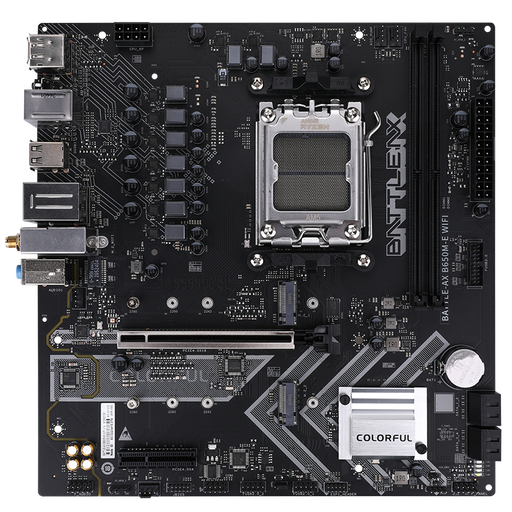
Why it suits this profile: Its micro-ATX form factor is a good fit for a compact PC with an AMD Ryzen processor and DDR5 memory. Built-in Wi-Fi 6 means you won’t need a separate network card.
The product information clearly lists two DDR5 slots, two M.2 slots, AM5 support and a micro-ATX form factor. This makes it easier to check the space and upgrade options you’ll have before you buy.
AMD B650 chipset, support for Ryzen 7000/8000/9000, Wi-Fi 6 and up to 96 GB DDR5.
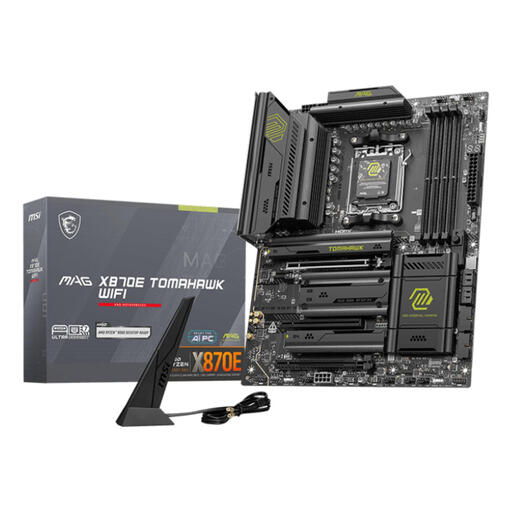
Why it suits this profile: Ideal for a feature-rich ATX build with multiple storage devices, fast networking and plenty of DDR5 memory.
The key expansion options are clearly specified: an X870E chipset, four DDR5 slots, multiple M.2 and SATA connections, and an ATX form factor.
Up to 256 GB DDR5, Wi-Fi 7, Bluetooth 5.4 and 5 Gigabit Ethernet, according to the product details.
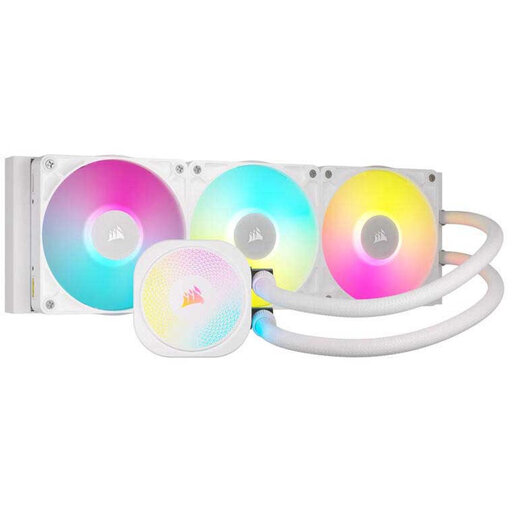
Why it suits this profile: This AIO cooler is designed for users looking for an AM5 CPU cooler with a 360mm radiator, PWM control and RGB integration.
The product information lists AM5 support, three fans, PWM control and a 360 mm radiator. Still, check that it fits your case before ordering.
Supports AMD AM5/AM4, with three 120mm fans and a stated six-year pump warranty, according to the product description.
We’ve put together a complete, up-to-date list of products that meet these strict selection criteria and the applicable European safety regulations.
Choose a model with Socket AM5 and check that your Ryzen series is on the processor support list. Also consider the form factor, number of DDR5 slots, and the storage and networking features you need. A B650M motherboard may suit a compact PC, while an ATX model usually offers more room for upgrades.
Not always. The right choice depends on your processor, how you use your PC and how quiet you want it to be. An AIO CPU cooler may be worth considering for sustained heavy workloads or a PC with space for a 360mm radiator. Always check that the cooler includes an AM5 mounting kit and that your case supports the radiator.
Its lifespan depends on how you use it, the power supply, temperature, dust and the quality of the installation. A motherboard with multiple M.2 slots, four DDR5 slots, and enough fan and ARGB connections will generally leave you more room for future upgrades. Keep the documentation too, and check for BIOS updates from the manufacturer.
