
Vandaag of morgen in huis

Kwaliteit gegarandeerd

Welkomstaanbiedingen ontgrendelen: GRATIS bezorging | Tot 80% korting | Gratis 30 dagen JoyPlus-proefperiode
Download de app
An AM5 DDR5 motherboard is the foundation of a PC with an AMD Ryzen 7000, 8000 or 9000 Series processor. But checking the socket and number of memory slots alone isn’t enough. A motherboard might look modern on paper, yet leave too little room in your case, lack the Wi-Fi you need or fail to support your preferred storage standard.
The most common buying mistakes are:
AM5 is the processor socket for several AMD Ryzen generations. The product information for the models in this selection lists support for Ryzen 7000, 8000 and 9000 Series processors. Always check the manufacturer’s latest processor and BIOS support list before buying.
An AMD B650 motherboard is suitable for many mainstream gaming and all-round systems. An AMD B850 motherboard in this selection offers features including PCIe 5.0 functionality and support for higher DDR5 speeds. However, the chipset alone doesn’t tell you everything: connectivity and expansion options vary by model.
Look for a BIOS update feature, too. Some models have a button for updating the BIOS, which can be useful when installing a newer Ryzen processor.
Check the number of memory slots, the maximum capacity and the supported speeds.
A model with four slots and a higher maximum capacity is a better fit if you plan to upgrade later. However, a motherboard with two slots may be enough for a budget gaming PC.
For fast storage, the number of M.2 slots matters more than the word “gaming” alone. Check whether the slot supports PCIe 4.0 or PCIe 5.0, whether it connects directly to the processor and whether any limitations apply when several devices are in use at the same time.
A PCIe 5.0 x16 slot leaves room for future hardware, but a graphics card won’t automatically benefit from the newer standard. The Ryzen processor can also affect the available PCIe mode. According to the product specifications for some models, for example, Ryzen 8000 processors use a different PCIe configuration from Ryzen 7000 or 9000 processors.
Built-in Wi-Fi is handy for online gaming. Look out for the differences between:
The following models were selected based on verifiable product specifications, including form factor, chipset, memory slots, storage, networking and expansion slots.
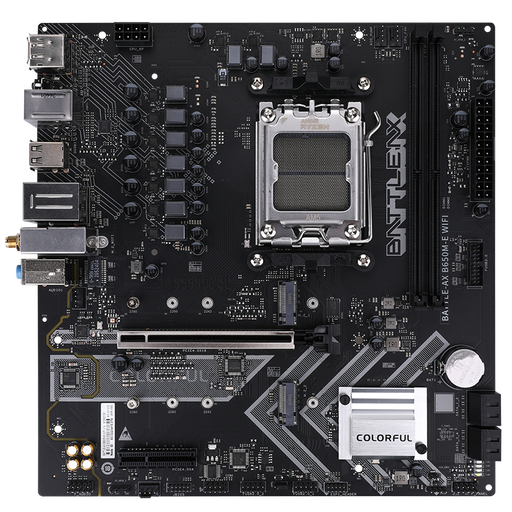
Why it suits this profile: This micro-ATX motherboard combines an AM5 socket with two DDR5 slots, two M.2 slots, Wi-Fi 6 and Bluetooth 5.2. It’s a good fit for a compact PC with a straightforward setup.
The specifications explicitly list DDR5, AM5, Wi-Fi 6 and the micro-ATX form factor. Check that a maximum of 96 GB and two memory slots meet your plans for future upgrades.
AMD B650 chipset, two M.2 PCIe 4.0 slots, four SATA connections and built-in Wi-Fi 6.
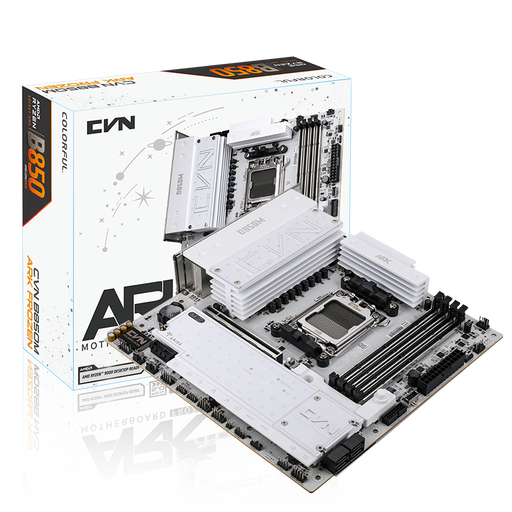
Why it suits this profile: This model is designed for a well-equipped micro-ATX build, with four DDR5 slots, three M.2 slots, 2.5Gbps networking and Wi-Fi 7.
The storage and networking features are clearly specified. For Wi-Fi 7, you’ll need to take router support, your operating system and regional 6GHz rules into account.
B850 chipset, PCIe 5.0 x16, three M.2 slots, Wi-Fi 7 and a Realtek ALC1220 audio chip.
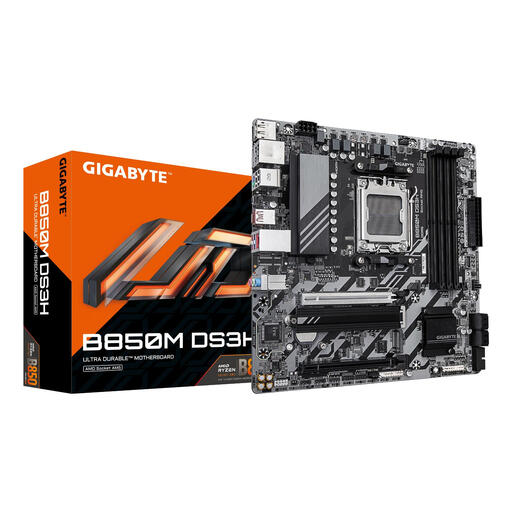
Why it suits this profile: A practical foundation for a powerful Ryzen build, with four DDR5 slots, support for up to 256 GB of memory, 2.5Gbps Ethernet and a PCIe 5.0 slot.
The product information distinguishes between M.2 PCIe 4.0 and PCIe 5.0. Check which Ryzen processor you’re using, as it can affect the PCIe mode.
Support for DDR5 up to 8200 MT/s (OC), one M.2 PCIe 5.0 slot and one M.2 PCIe 4.0 slot.
We’ve put together a complete, up-to-date list of products that meet these strict selection criteria and the applicable European safety regulations.
No. The AM5 motherboards in this selection use DDR5 memory. DDR4 and DDR5 modules have different electrical properties and notches. You therefore can’t reuse existing DDR4 modules with a DDR5 motherboard.
Yes, both chipsets can form the basis of a gaming PC with a suitable Ryzen processor and graphics card. Focus on the connections you need, the number of M.2 slots, networking features and BIOS support. Gaming performance isn’t determined by the motherboard alone.
Its lifespan depends on installation, power supply, temperatures and the connected components. A model with four DDR5 slots, several M.2 slots and a recent PCIe standard will generally leave more room for future upgrades. Always check processor, memory and BIOS compatibility when upgrading.
