
Vandaag of morgen in huis

Kwaliteit gegarandeerd

Welkomstaanbiedingen ontgrendelen: GRATIS bezorging | Tot 80% korting | Gratis 30 dagen JoyPlus-proefperiode
Download de app
An all-in-one PC combines the computer components and screen in a single case. This saves space and reduces the number of cables on your desk. It can be a neat solution for working from home, studying, video calls and office work. However, a slim design doesn’t tell you much about performance or upgrade options.
So don’t just look at the screen size or processor name. Check the RAM, storage, connections, webcam and what’s actually included in the box. Below, you’ll find the key things to consider, along with a selection based on verifiable product specifications.
An Intel Core i7 or AMD Ryzen 7 sounds appealing, but your day-to-day experience also depends on the RAM. With 8 GB, you can browse the web, work with documents and make video calls, but lots of open tabs, large spreadsheets and creative software need more memory.
For a PC for working from home or studying, 16 GB RAM is a practical benchmark. You may need more if you work with photos, video, virtual machines or several demanding programmes. Also check whether the memory can be upgraded. On some models, the RAM is onboard and can’t be replaced later.
A 27-inch all-in-one PC gives you more workspace than a 24-inch PC, but a larger screen doesn’t automatically mean a higher resolution. A 27-inch Full HD screen has the same 1920 x 1080 pixels spread over a larger area. Text and windows may therefore look less sharp than on a 24-inch screen with the same resolution.
So always check:
Several models in this selection state that the charger isn’t included as standard and must be purchased separately. Check this before you buy. Also look at the USB ports, HDMI, Ethernet, Wi-Fi and Bluetooth. It can be difficult to replace an all-in-one PC if you later want to connect extra peripherals.
An SSD PC will usually start up faster than a model with a traditional hard drive. For documents and office software, 512 GB is often enough. If you store lots of videos, photos or projects, 1 TB gives you more space, or you’ll need to use external storage.
An office PC for email, word processing, online meetings and admin software will usually need:
A business PC with Windows 11 Pro may suit users who need organisation management features or a business computing environment. However, check that the PC is compatible with your network, security policy and software. The LG AIO 24CQ651N-6N, for example, is a thin-client solution. According to the product description, it’s designed for cloud and VDI environments, so check in advance whether your organisation uses that infrastructure.
As well as RAM and storage, consider the screen resolution and colour reproduction. According to the product specifications, the Apple iMac 24-inch has a 23.5-inch Retina display with 4480 x 2520 pixels, an Apple M3 chip, 24 GB RAM and a 512 GB SSD. Graphics performance and support for specific software can vary between operating systems. So check that your programmes work on macOS before switching from a Windows 11 PC.
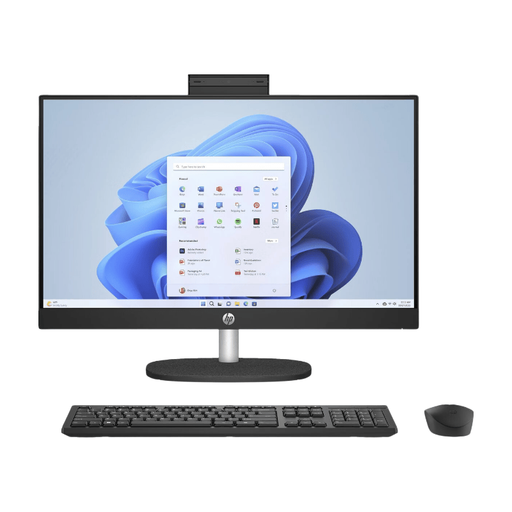
Why it suits this user: A 23.8-inch Full HD IPS screen, 8 GB LPDDR5X, 512 GB SSD and Windows 11 Home make it a good fit for everyday internet use, studying and basic office software.
The product information clearly states that the memory is onboard. This helps avoid unrealistic expectations about future upgrades, although 8 GB is still an entry-level configuration.
Built-in webcam, microphone and speakers; 512 GB SSD; wireless connectivity via Wi-Fi 6 and Bluetooth 5.3.
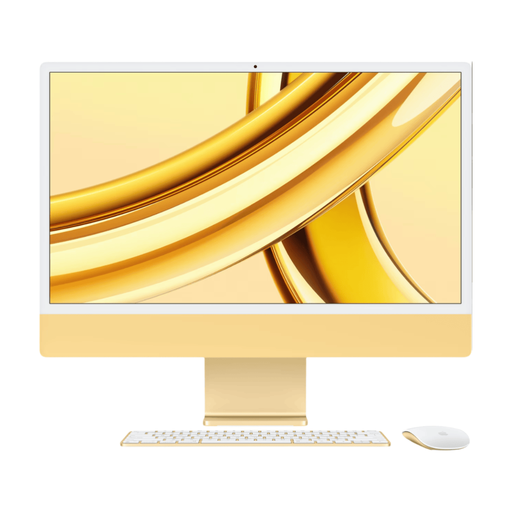
Why it suits this user: A good choice if you’re looking for an integrated workstation with a high-resolution screen, macOS and extra RAM.
The specifications list both 24 GB RAM and a 512 GB SSD. That’s more RAM than many entry-level models with 8 GB.
23.5-inch Retina display with 4.5K resolution; Apple M3 chip; 1080p FaceTime HD camera and six speakers.
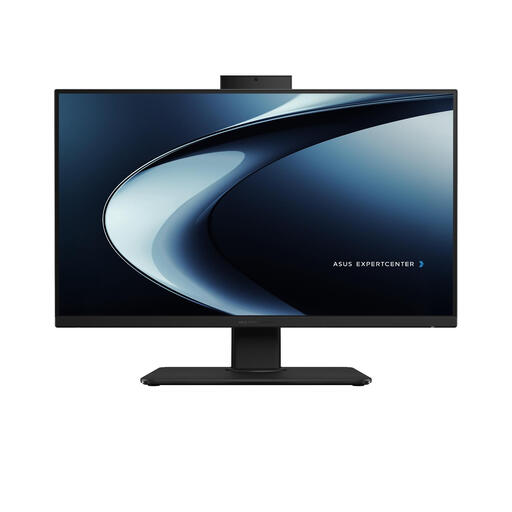
Why it suits this user: The 27-inch screen gives you more physical workspace for spreadsheets, dashboards and several windows side by side.
The product specifications list 16 GB DDR5 and a maximum expandable capacity of 32 GB. Bear in mind that the screen is still Full HD, despite its larger size.
Intel Core i7-13620H; 16 GB DDR5; 512 GB SSD; Windows 11 Home; built-in webcam with privacy shutter.
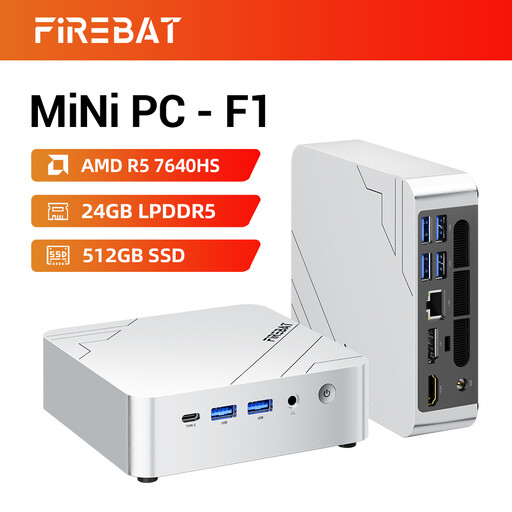
Why it suits this user: If you already have a monitor, keyboard and webcam, a mini PC can save a lot of desk space.
There’s no built-in screen in the case. This means you don’t pay twice for a display, but you’ll need to check that your monitor has the connections you want.
AMD Ryzen 5 7640HS with 6 cores and 12 threads; 24 GB LPDDR5; 512 GB PCIe 4.0 SSD; support for three 4K screens according to the product listing.
We’ve put together a complete, up-to-date list of products that meet these strict selection criteria and the applicable European safety regulations.
Yes, as long as the model has enough RAM, an SSD, a webcam and the right connections. 8 GB is enough for many users, but 16 GB RAM gives you more headroom for video calls, large documents and several browser windows. Also check whether the camera has a privacy shutter or can be disabled in software.
Its lifespan depends on the processor, cooling, storage and software requirements. An SSD may not provide enough storage later on as files build up. If a model’s RAM can’t be upgraded, it’s important to choose the right memory configuration from the start. Keep the ventilation openings clear and install security and system updates as instructed by the manufacturer.
Power consumption varies depending on the processor, screen, brightness and how you use it. An all-in-one PC combines the computer and monitor, so you don’t need to run two separate devices. For a more accurate estimate, check the power rating of the adapter, and turn off the screen or PC when you’re not using it for an extended period.
