
Vandaag of morgen in huis

Kwaliteit gegarandeerd

Welkomstaanbiedingen ontgrendelen: GRATIS bezorging | Tot 80% korting | Gratis 30 dagen JoyPlus-proefperiode
Download de app
A tidy desk is a tidy mind. An all-in-one computer, like the ASUS ExpertCenter All-in-One PC, promises just that: a powerful system without the cable clutter and a separate computer tower. But the market is full of models that look good at first glance but fall short in practice. Before you invest in a new PC for your home office, it's wise to know what to look for.
Many buyers fall into a few common traps:
A smart purchase starts with seeing through these marketing tricks and focusing on the specifications that truly matter.
To avoid a bad purchase, it's helpful to understand three key components of an all-in-one computer. These determine whether the device is right for your needs.
The processor (CPU) is the brain of the computer. For a home office PC where you want to multitask smoothly—think video calls while working in a spreadsheet with your email open—a modern processor is a must. An Intel Core i7 processor, like the one in the ASUS ExpertCenter, provides a solid foundation for both business use and more demanding home tasks.
Combine this with sufficient RAM. 16 GB DDR5-SDRAM is a good standard today, ensuring you can switch smoothly between different programs without the computer lagging.
The era of slow, rattling hard disk drives (HDD) is over. A Solid State Drive (SSD) is essential for a modern computing experience. An SSD ensures your computer and programs start up in seconds. Opt for a model with at least 512 GB SSD of storage. If you store many files, photos, or programs locally, a 1 TB SSD is a comfortable and future-proof choice.
With an all-in-one, the screen is integrated, so its quality is crucial. A 24-inch all-in-one PC with a Full HD (1920 x 1080) resolution offers a sharp and pleasant workspace. A matte screen coating helps reduce reflections, which is easier on your eyes.
Don't forget the practicalities. A computer with a built-in webcam is essential for online meetings. Pay attention to the availability of sufficient and modern ports, such as USB-C, and fast wireless connections like Wi-Fi 6.
Not everyone has the same needs. Below are a few options that fit different user profiles, based on their specifications.
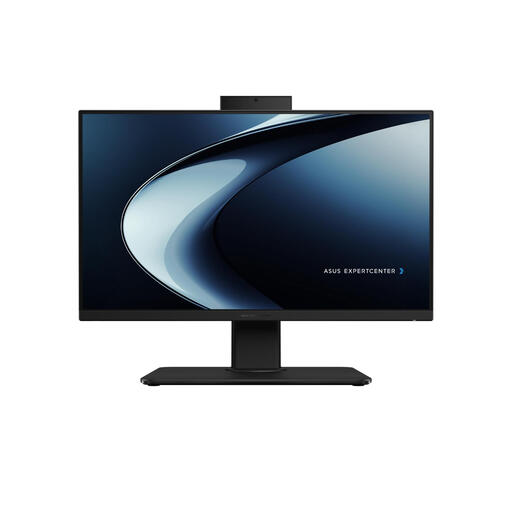
Why This Fits Their Persona: Ideal for the professional who wants a reliable, complete, and tidy workspace. This system is ready for productivity right out of the box, from intensive multitasking to video conferences, without the hassle of separate components.
This model combines a powerful all-in-one desktop i7 processor with fast 16 GB DDR5 memory and a 1 TB SSD. The Full HD screen and built-in webcam with a privacy feature make it a truly complete package.
Balanced, powerful specifications for smooth workflow. Includes a mouse, keyboard, and a webcam with a physical privacy shutter.

Why This Fits Their Persona: For the user seeking maximum power in a minimal form factor and the freedom to choose their own monitor. This mini-PC is barely larger than a stack of coasters but delivers top-tier performance.
By decoupling the computer from the screen, you avoid the pitfall of a mediocre integrated display. You get extreme performance (Intel Core Ultra 7) and can choose a monitor that perfectly suits your needs.
Very powerful and extremely compact. Offers flexibility in the choice of peripherals and can drive up to four displays.
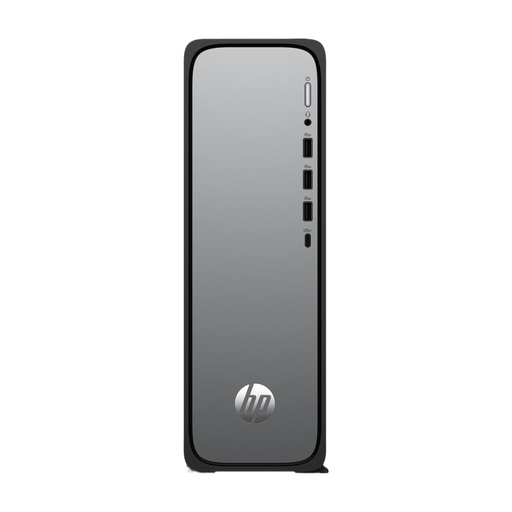
Why This Fits Their Persona: A great starting point for families or students who need a reliable computer for daily tasks like browsing, email, and word processing, without the budget for a high-end model.
This compact desktop focuses on a solid foundation: a responsive Intel Core i3 processor and a fast 512 GB SSD. By pairing it with a separate monitor, you maintain control over the total cost and screen quality.
A reliable and affordable foundation for everyday tasks. The slim design takes up little space on or under the desk.
We have compiled a complete, up-to-date list of products that meet these selection criteria and local regulations.
Generally, all-in-one PCs are less easy to upgrade than traditional desktops. The RAM and storage (SSD) can often be replaced or expanded, but the processor and display are fixed. This is the trade-off you make for the compact and integrated design.
With normal use and care, a quality business-grade all-in-one PC like the ASUS ExpertCenter can last for years, typically around 5 to 7 years for general productivity tasks. Its performance will remain dependent on the demands of future software.
No, an all-in-one is often more energy-efficient than a traditional desktop computer with a separate monitor. The components, much like in a laptop, are efficiently matched and integrated into a compact chassis. This generally leads to lower power consumption.
