What should you consider when choosing?
All-in-one PC
A good fit if: you don’t have a monitor yet and want to buy the computer and screen as one setup.
Bear in mind: compare the screen size and the complete setup. An integrated screen doesn’t automatically make a separate monitor unnecessary.
Mini PC with an existing monitor
A good fit if: you already have a suitable screen and the connections are compatible.
Bear in mind: the computer and monitor each need their own power socket. Factor in cables and any software you may need too.
Tower PC with a separate monitor
A good fit if: being able to replace components matters more to you than having a compact setup.
Bear in mind: the separate monitor still needs to be included in your power and cost calculations. Assess the specific configuration.
If you have few power sockets, start by comparing the complete workspace: computer, screen and any other devices.
| What to consider |
What should you check? |
Who is this important for? |
| Power sockets |
Count the plugs needed for the computer, screen and other devices. Check cables and extension leads for damage, and don’t connect extension leads to one another. |
If I have few spare power sockets, I want to know in advance how many the complete workspace will need. Around 39% of consumers say the number of power sockets is their main concern when buying. |
| Spreadsheet software and screen |
Choose the software you want and check which operating system it supports, how the screen connects and what’s included with the specific model. |
I want to create household spending charts and view them on my existing screen, so I’ll check that the software and computer are compatible. Around 31% of consumers prioritise spreadsheets and screen use. |
| Complete setup |
Compare the computer, any screen you still need, cables and the spreadsheet software you want on a like-for-like basis. Consider the energy use of the complete setup, not just the computer itself. |
If I’m putting together a complete workspace, I want to know which parts I still need. Around 15% of consumers say the total purchase and running costs are their main concern when buying. |
| Keeping files safe |
Decide how you’ll restore your files. If you use cloud storage, check the terms, costs and security options. |
I want to be able to restore my budget files if anything happens to my computer, so I’ll plan a backup as well as storage. Around 15% of consumers prioritise keeping their files safe. |
Joybuy products for a setup without a separate monitor
These Joybuy products are all-in-one desktops with integrated screens, for anyone who wants to use the computer and monitor as one setup.
 No image available
LG AIO 24CQ651N-6N All-in-One
The integrated screen suits a setup where you don’t want to use a separate monitor. Before buying, check that the operating system works with your spreadsheet software.
24-inch Full HD IPS screen. The description lists a built-in webcam, microphone and speakers.
Joybuy
 No image available
MSI Modern AM273QP AI 1UM-061EU
This all-in-one combines the computer and screen, so you don’t need a separate monitor for this setup.
Intel Core Ultra 5 125H, 16 GB DDR5 memory and 1 TB SSD. The 27-inch Wide Quad HD IPS screen has a resolution of 2560 × 1440 pixels. The description lists Windows 11 Pro.
Joybuy
 No image available
MSI Modern AM273Q AI 1UM-058EU
The computer and screen are combined in one all-in-one device, designed for a setup without a separate monitor.
Intel Core Ultra 7 155H, 32 GB DDR5 memory and 1 TB SSD. The 27-inch Wide Quad HD IPS screen has a resolution of 2560 × 1440 pixels. The description lists Windows 11 Pro and Wi-Fi 6E.
Joybuy
 No image available
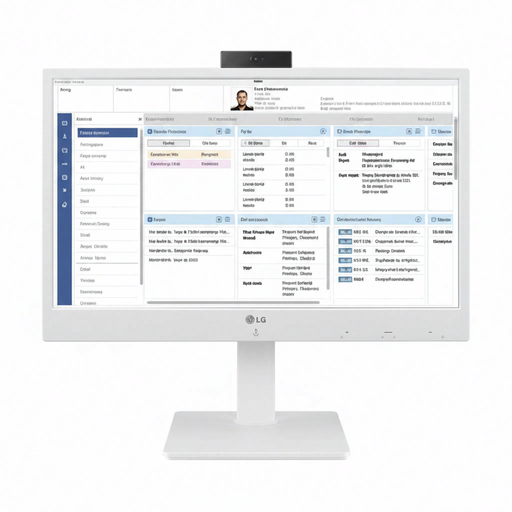
LG All-in-One Thin Client 24CR670N-6P
The integrated screen combines the computer and display in one unit. The product description positions this model for cloud and VDI applications in business, healthcare and professional environments. Check that this type of workplace suits your needs.
24-inch Full HD IPS screen. The description lists built-in speakers, a webcam and a microphone.
Joybuy
 No image available
Apple iMac 24-inch M3, 24 GB, 512 GB, Dutch Yellow (2023)
The integrated screen suits a setup where you want to use the computer and monitor together. Check that the spreadsheet software works with the macOS configuration on offer.
The product details list an M3 chip, 24 GB memory, 512 GB storage and a 4.5K Retina display.
Joybuy
Frequently asked questions
Can I create charts of household spending in Excel on a Windows PC or Mac?
Yes. Microsoft offers Excel for home use on Windows and Mac, and lists tools for visualising data. Check the requirements for the version you want to use and the operating system on the computer you choose.
How can I safely connect a desktop if I have few power sockets?
First, count the plugs needed for the complete setup. The Dutch Fire Service advises checking cables and extension leads for damage and not connecting extension leads to one another. Remember to include both the computer and any separate screen.
How can I stop my budget file from getting lost?
Back up your files regularly, for example to an external drive or the cloud. If you use cloud storage, check where your data is stored, what terms and costs apply, and which security options are available.
Do I also need a screen and spreadsheet software for a mini PC?
That depends on what you already own and what’s included in the offer. Lenovo states that the screen, keyboard and mouse are sold separately for the ThinkCentre M70q Gen 4 Tiny. Also check that your chosen spreadsheet software works with the computer.
Am I always entitled to only a two-year warranty on a desktop in the Netherlands?
No. According to the Dutch government, the Netherlands has no fixed statutory warranty period. You’re entitled to a product that works properly for as long as you can reasonably expect it to. If there’s a problem, the seller must provide a solution. Any manufacturer’s warranty is in addition to this.


