
Editor who spends long periods at a screen
You read, compare and proofread longer texts, and want to position the screen comfortably for every work session. The Arboportaal advises adjusting the workstation to suit the user.


For long editing sessions at a shared desk, an all-in-one makes sense if you also need a screen and want the computer and screen together. A mini PC is a better fit if you already have a suitable screen or want to choose the components separately. With either option, check how adjustable the screen is, which accessories are included, whether your editing software is compatible and whether you can set up separate user accounts. The Arboportaal advises adjusting the workstation for each user and workplace.
You read, compare and proofread longer texts, and want to position the screen comfortably for every work session. The Arboportaal advises adjusting the workstation to suit the user.
You want a desktop without unnecessary equipment taking up space on your desk, so you’re comparing an all-in-one with a mini PC and separate screen.
Several people use the same desktop but want to keep their own files and settings. Microsoft Support and Apple Support explain how to use separate user accounts.
Start with the screen and the space available on your desk. Then decide whether you want a complete all-in-one setup or a separate computer with a screen you choose yourself.
| What to consider | What should you check? | Who should pay particular attention? |
|---|---|---|
| Readability and screen position | Check how text looks, the light in the room and how adjustable the screen is. Tilting the screen is not the same as adjusting its height. | If I spend a long time proofreading, I want to be able to read the text clearly and position the screen to suit each user. Around 33% of consumers would put readability and adjustability at the top of their list. |
| Desk space and setup | Measure the space available for the screen, its stand and the computer. With a mini PC, also check how it connects to the screen and which accessories you’ll need. | If I have a small shared desk, I want to know how much space the complete setup takes up and what will be left on the desk after use. Around 27% of consumers would put desk space first on their list. |
| Accounts and documents | Check the operating system and set up separate accounts for regular users. Agree where to save documents and how to back them up. | When other people use the same computer, I want to keep my files and settings separate. Around 20% of consumers would be most concerned about having separate user accounts. |
| Complete setup and software | Compare what’s included and check that your editing software works with the operating system. If you’re considering an older Windows computer, also check what support is available. | If I want to know in advance what else I’ll need and whether my software is compatible, I look at the complete workstation rather than just the computer. Around 20% of consumers would put the total cost and software compatibility first on their list. |
A screen may be sold separately with a mini PC. The HP OmniStudio setup described here includes a screen and input devices, so you can’t compare the two options fairly without taking the included components into account.
Compare everything you need for a fully usable workstation: a screen, compatible cables and, if necessary, a keyboard and mouse.
A separate screen and any input devices also take up space and need to fit your setup.
A tilting stand doesn’t necessarily let you adjust the screen’s height. This can make a difference when several people need to position the screen to suit their own workstation.
Check the adjustment options for the exact model and make sure you can achieve the screen position you want.
ACM ConsuWijzer explains that you have statutory rights in addition to any seller’s or manufacturer’s warranty. A commercial warranty period doesn’t automatically limit your legal rights.
Read about your statutory rights, then check separately what extra cover an additional warranty provides.
Check what additional warranty cover includes before paying for it.
Microsoft ended regular support for Windows 10 on 14 October 2025. The computer will keep working, but the usual security updates will no longer necessarily be available.
Check which supported version of Windows or other update option is available for the specific device.
Switching to a supported version or another computer may involve extra costs or setup.
HP offers both all-in-ones and separate mini desktops to compare for a shared desk.
The ThinkCentre neo 50q Gen 5 is a compact Windows desktop designed to be used with a separate screen.
The Mac mini uses a separate screen, while the iMac has a built-in screen. Both are macOS options to consider in relation to your software and workstation.
The OptiPlex Micro is a compact business Windows option to compare with a separate screen.
This selection includes all-in-ones with a built-in screen and compact mini PCs that need a separate screen. For each configuration, check that the included components and connections suit your workstation.
 No image available
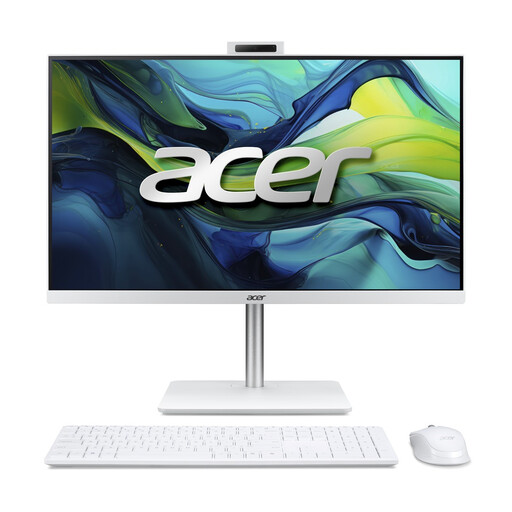
This all-in-one combines the computer and screen in one setup, which could suit you if you want to buy both together.
23,8-inch Full HD IPS screen, Intel Core 5 120U, 16 GB DDR5, 1 TB SSD and Windows 11 Home. A wireless keyboard and mouse are included, according to the product description.
 No image available
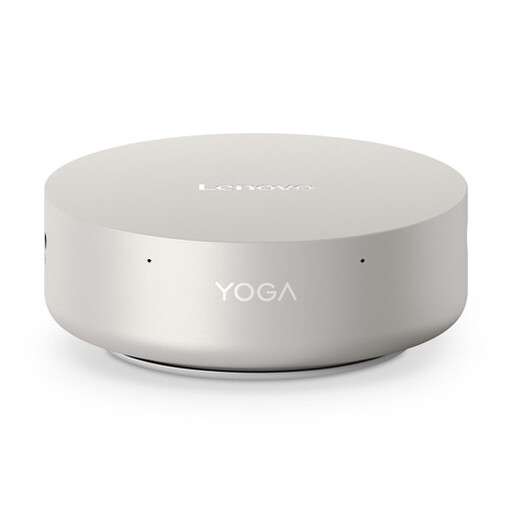
This mini PC could suit you if you already have a suitable separate screen or want to choose one separately.
Intel Core Ultra 5 325, 16 GB LPDDR5X, 512 GB SSD, Wi-Fi 7 and Windows 11 Home. According to the product description, this model supports up to four screens. Check that its connections are compatible with your screen.
 No image available
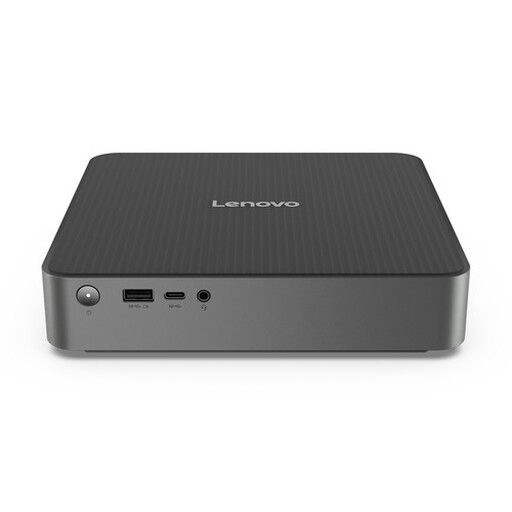
A compact separate desktop to consider if you already have a suitable screen or want to choose one separately.
The product description lists a 1-litre case, 16 GB DDR5, a 512 GB SSD and Windows 11 Home. It also lists HDMI, DisplayPort and Thunderbolt 4 connections. Check that they’re compatible with the screen you plan to use.
 No image available
This mini PC can be used with a separate screen. Check in advance that the screen and the cables you need are compatible.
Intel Core Ultra 7 155H, 16 GB DDR5, 1 TB SSD and Windows 11 Pro. The product description lists support for up to four screens and VESA mounting behind a screen or underneath a desk.
 No image available
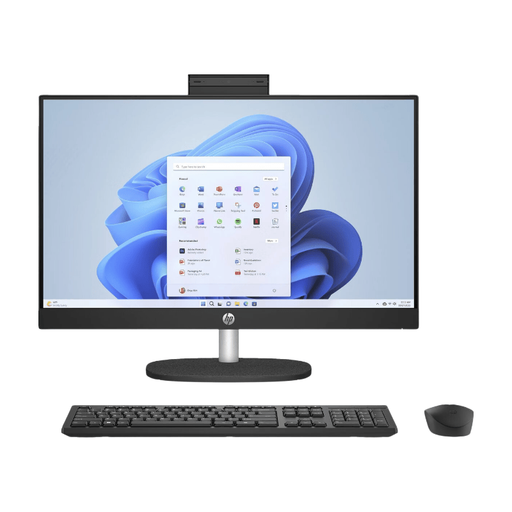
This all-in-one combines the computer and screen, but its fixed screen height is worth considering at a desk shared by several people.
23,8-inch Full HD IPS screen with a matte finish, AMD Ryzen 5 7520U, 8 GB memory, 512 GB SSD and Windows 11 Home. According to the product description, the stand is not adjustable.
Create separate accounts for regular users. Microsoft Support explains how each Windows account can have its own files and browser favourites; Apple Support explains how to set up separate user accounts on a Mac. Also agree where to save documents and how to back them up.
Adjust the screen and workstation to suit each user, and pay attention to readability, the light in the room and glare. This is the advice given by the Arboportaal. It also sets out specific requirements for employees who work with screens for more than two hours a day; these requirements don’t automatically apply to every buyer.
According to ACM ConsuWijzer, you have statutory rights in addition to any manufacturer’s or seller’s warranty. If a product breaks sooner than you could reasonably expect with normal use, the seller must offer an appropriate free solution. A stated manufacturer’s warranty period doesn’t automatically limit your legal rights.
According to the Dutch government, many distance purchases come with a 14-day cooling-off period, although there are exceptions. Check the terms for the specific purchase. A purchase from a private individual isn’t necessarily covered by the same rules.
Yes, a Windows 10 computer will keep working, but Microsoft ended regular support on 14 October 2025. Before buying, check which supported version of Windows or other update option is available for the specific device.