
Vandaag of morgen in huis

Kwaliteit gegarandeerd

Welkomstaanbiedingen ontgrendelen: GRATIS bezorging | Tot 80% korting | Gratis 30 dagen JoyPlus-proefperiode
Download de app
A compact mechanical keyboard may seem like a quick choice on paper. However, small differences in layout, switches and connections can have a significant impact on everyday use. Anyone looking for the AJAZZ AK820 mechanical gaming keyboard is usually after a 75% model with function keys, a volume knob and room for personal customisation.
Before buying, pay particular attention to these three common pitfalls:
According to the product information, the AJAZZ AK820 is a 75% mechanical keyboard with 82 keys; some product variants are listed as having 83 keys. It measures approximately 327 × 136 × 40 mm and weighs around 0.8 kg. This gives you more functionality than a 60% model, while still leaving out a numeric keypad.
A 75% layout is practical for:
Do check the key layout, though. A US layout is useful for gaming and programming, but may take some getting used to if you normally work with a Dutch ISO layout.
The AJAZZ variant mentioned uses linear switches. These switches generally do not have a noticeable click when pressed. This can feel comfortable during repeated movements in games and when typing quickly. The noise level depends not only on the switches, but also on the keycaps, stabilisers, case and underlying dampening.
The hot-swappable keyboard uses a PCB that supports 3- and 5-pin switches. This means you can replace compatible switches without having to solder straight away. Bear in mind the practical limitation: hot-swappable does not mean that every switch will automatically fit. Check compatibility and do not use excessive force when changing switches.
The stated lifespan of 50 million keystrokes is a product specification provided by the manufacturer. It is not a guarantee that every component will last exactly that long. Regular cleaning, careful switch replacement and keeping liquids away from the keyboard can help prevent unnecessary wear.
A gasket mount keyboard uses cushioning material between parts of the mounting system. The AK820 is described as having Poron and IXPE dampening layers, among others. According to the product description, the aim is to provide a softer key feel and reduce resonance. The actual experience will still depend on your desk, typing force and personal preference.
The OEM-profile PBT keycaps are another practical consideration. PBT is known as a material that generally develops shine less quickly than ABS during intensive use. That does not mean the keycaps are indestructible; PBT can also wear or discolour through use and exposure to sunlight.
The connection is via a wired USB-C connection. This eliminates the need to change batteries and is straightforward for a permanent PC setup. However, you will need a cable and have less freedom of movement than with a wireless model. For consoles such as PS4, PS5 or Xbox, a converter may be required according to the product information; this is not included.
The choices below are based on the stated layout, connection, switch technology and other verifiable product specifications. Brand claims about speed, comfort or noise reduction are presented as product claims, not guaranteed results.

Why it suits this profile: This model combines a compact 75% layout with a wired USB-C connection, linear switches and a physical volume knob. You get plenty of features without immediately stepping up to a larger or wireless model.
The stated hot-swap function allows for later customisation. However, check the colour variant you want and the exact lighting description before ordering.
75% layout, CNC volume knob, PBT keycaps and 3/5-pin hot-swap support.
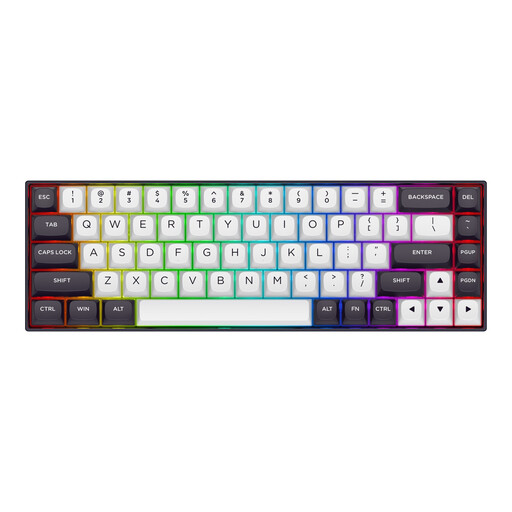
Why it suits this profile: The 68-key layout and magnetic switches will appeal to gamers looking for a very compact model with adjustable actuation.
The product specification states adjustable actuation from 0.2 to 4.0 mm. This is a different system from the AK820’s conventional hot-swap mechanism and needs to suit the way you use your software.
Magnetic linear switches, aluminium top plate, USB-C and RGB lighting.
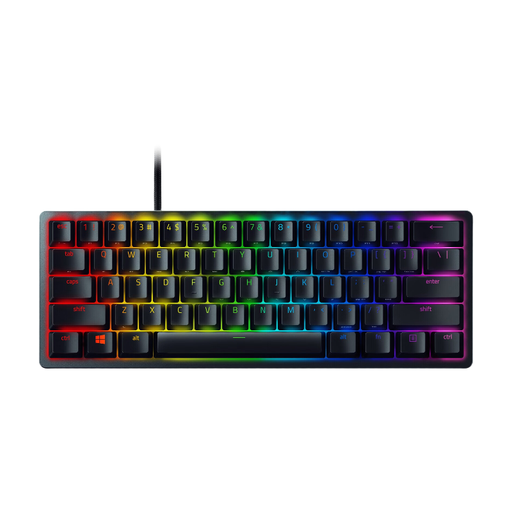
Why it suits this profile: The 60% layout is particularly suitable for players with a minimalist setup and plenty of mouse space. This model uses optical clicky switches, so the key feel differs from that of linear switches.
The product page clearly states that it has 61 keys, a US International layout and a wired USB connection. This allows you to check in advance whether the lack of arrow keys suits the way you work.
PBT keycaps, individually lit RGB keys, built-in profile memory and detachable USB-C cable.
We’ve put together a complete, up-to-date list of products that fully meet these strict selection criteria and the applicable European safety regulations.
Use this quick checklist before choosing a compact gaming keyboard:
Yes, according to the product information, the 75% layout includes arrow and function keys, while leaving out the numeric keypad. The QWERTY US layout can be useful for programming languages, but users accustomed to a Dutch ISO layout should be aware that the key arrangement is different.
The manufacturer states a lifespan of up to 50 million keystrokes for the AK820. This is a stated product specification, not a fixed period of use. Switches, keycaps, cable, stabilisers and electronics can all wear at different rates. A hot-swappable design allows compatible switches to be replaced later.
A wired keyboard draws power via USB. RGB lighting can affect consumption, but no battery is required. Turning the lighting off or dimming it can reduce energy use further. USB-C is generally straightforward for a permanent PC setup, but check that your computer has a suitable USB port.
