
Vandaag of morgen in huis

Kwaliteit gegarandeerd

Welkomstaanbiedingen ontgrendelen: GRATIS bezorging | Tot 80% korting | Gratis 30 dagen JoyPlus-proefperiode
Download de app
A lightweight wireless mouse can make a big difference in fast-paced FPS games, MOBA titles and everyday PC work. However, a high DPI figure does not tell the whole story. An 8K polling rate is not automatically useful for every user either. Anyone who focuses mainly on marketing figures could end up with a mouse that does not fit their hand well, runs out of charge quickly or requires software that is not compatible with their computer.
In this buying guide, we examine the AJAZZ AJ159 APEX wireless gaming mouse using verifiable product specifications. We also compare several alternatives for different hand sizes, budgets and use cases.
According to the product information, the AJAZZ AJ159 APEX has an adjustable resolution of up to 42,000 DPI. That provides plenty of technical headroom, but most players use a much lower setting in games. DPI mainly determines how far the cursor moves in response to a particular hand movement. The right setting depends on your screen resolution, game and play style.
So, also pay attention to the sensor, software and ability to fine-tune DPI steps. A gaming mouse with 42,000 DPI is mainly interesting if you want plenty of freedom when configuring it, not because you necessarily need to play at the maximum value.
A gaming mouse with an 8K polling rate sends up to 8,000 updates per second, according to the product specification. The AJ159 APEX supports this in wireless mode and lists a response time of 0.125 ms. In practice, your PC must be able to process the additional reporting effectively. Game settings, processor load and screen refresh rate also play a part.
Also check whether 8K is available in your chosen connection mode. The product information specifies 8K for wireless use; Bluetooth is mainly intended for everyday work and energy-efficient use.
With a stated weight of 56 grams, the AJ159 APEX falls into the ultralight gaming mouse category. A low weight can feel comfortable when making large arm movements in FPS games, but some users may find an overly light mouse less stable. The shape, width and button placement remain important.
The AJ159 APEX has a symmetrical design which, according to the product description, is intended for small and medium-sized hands and for both left- and right-handed use. However, check that the dimensions and button layout suit your grip: palm, claw or fingertip.
The AJ159 APEX uses a PAW3950 gaming mouse sensor. According to AJAZZ's own product information, this sensor supports up to 42,000 DPI, a maximum speed of 750 IPS and 50G acceleration. These are technical figures from the product description and do not guarantee that every player will automatically perform better.
For everyday use, stable tracking, a suitable surface and a correctly configured lift-off distance are often more important than maximum DPI. According to the manufacturer, the included software allows you to adjust DPI, LOD and button functions, among other settings.
The AJ159 APEX is a tri-mode gaming mouse. You can choose from:
This flexibility is useful if you use the same mouse for gaming and work. Check your PC's available USB port in advance and make sure the driver is compatible with your operating system.
The package includes a magnetic charging dock with RGB lighting, an integrated receiver and a TFT colour display. According to the product information, the display can show DPI, polling rate, LOD, battery status and custom animations, among other details.
A charging dock means you do not have to connect a loose cable every time. However, make sure the mouse makes proper contact with the dock and place it within range of your PC. RGB is mainly a style choice and has no direct effect on tracking or input speed.
AJAZZ lists Huano switches with a stated lifespan of more than 100 million clicks. This is a claim from the brand's product information; actual lifespan depends on use, dust, moisture and mechanical stress. The ETFE/PTFE feet are designed to glide smoothly over a suitable mouse mat.
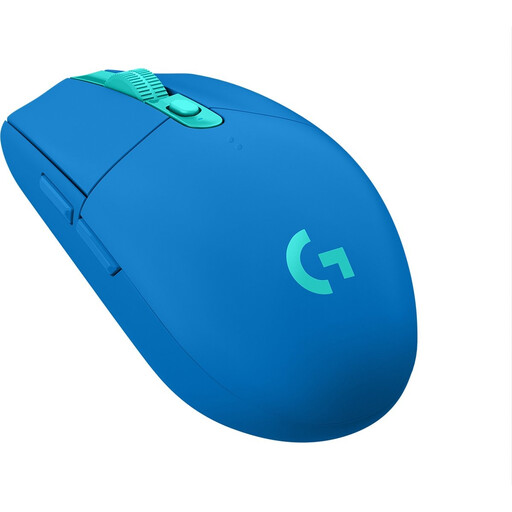
Why it suits this profile: A practical entry-level choice for gamers who want to play wirelessly without immediately needing features such as 8K polling or a charging dock.
The product specifications are straightforward: 12,000 DPI, a 1 ms response time and an AA battery. There is no high polling rate requiring additional configuration.
RF connectivity, up to 12,000 DPI and a stated battery life of up to 250 hours with an AA battery.
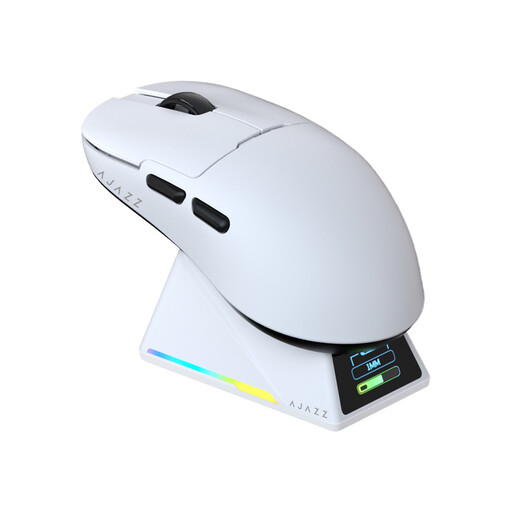
Why it suits this profile: Designed for users looking for a lightweight, symmetrical mouse with extensive settings and a wireless charging dock.
Alongside high sensor specifications, this model offers three connection modes, USB-C and a charging dock. It is therefore not based solely on one marketing figure.
56 grams, PAW3950 sensor, up to 8,000 Hz polling rate, tri-mode connectivity and a magnetic RGB charging dock with TFT display.
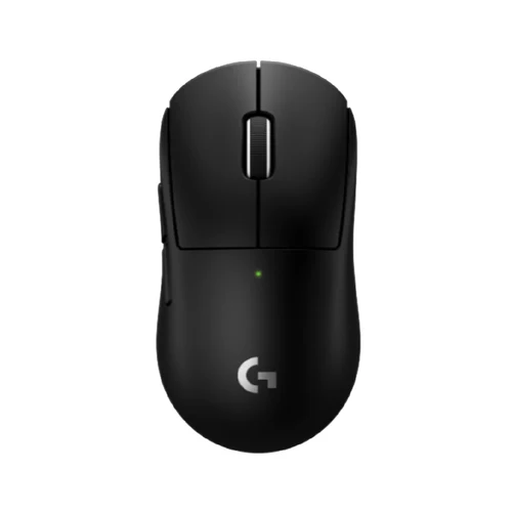
Why it suits this profile: A compact wireless option for FPS players who value low weight and a high reporting rate.
The stated 53-gram weight is combined with a compact design. This means the mouse is focused not only on DPI, but also on size and freedom of movement.
53 grams, HERO 2 sensor, up to 44,000 DPI, a maximum polling rate of 8,000 Hz and support for both left- and right-handed use.
We have put together a complete, up-to-date list of products that fully meet these strict selection criteria and the applicable European safety regulations.
Use a suitable USB-C power supply for charging. Stop using the mouse if the battery swells, leaks or becomes unusually hot. Do not open the mouse or battery yourself.
Not always. The mouse may technically support 8K, but the PC, game and settings must be able to process the additional reporting. For office work and Bluetooth use, a lower polling rate is usually sufficient.
The high DPI range offers plenty of configuration options, but most players use a lower setting. Hand control, sensor tracking, mouse shape and a suitable mouse mat often have more influence on the experience than the maximum DPI.
The manufacturer lists Huano switches with a stated lifespan of more than 100 million clicks. This is a brand claim rather than a fixed service life. The mouse's lifespan also depends on charging habits, moisture, dust, software use and mechanical stress.
