
Vandaag of morgen in huis

Kwaliteit gegarandeerd

Welkomstaanbiedingen ontgrendelen: GRATIS bezorging | Tot 80% korting | Gratis 30 dagen JoyPlus-proefperiode
Download de app
An AIO (All-in-One) water cooler can significantly lower your processor's temperatures, leading to more stable performance and a quieter PC. But the market is flooded with marketing claims and technical specifications that create more confusion than clarity. Many PC builders fall into the trap of buying a cooler that's too expensive, too loud, or simply incompatible.
As a Product Recommendation Officer at Joybuy, I see where things go wrong every day. These are the most common pitfalls:
This guide will help you avoid these problems by focusing on what really matters.
Before choosing a model, there are three technical aspects you need to check. These determine the performance, noise level, and whether the cooler will fit in your system at all.
The radiator is responsible for dissipating heat. Its size is usually indicated in millimetres, based on the fans that fit on it (e.g., 2x 120mm = 240mm).
A CPU cooler must be able to physically mount onto the motherboard. These mounting points are called 'sockets'. Modern processors use specific sockets. When making your choice, ensure the cooler explicitly supports your socket.
Always check the product page for the list of supported sockets. This will prevent one of the most frustrating problems when building a PC.
The pump circulates the liquid, and the fans cool the radiator. The specifications that matter are:
Not everyone has the same needs. Below are some popular choices, matched with specific user profiles.
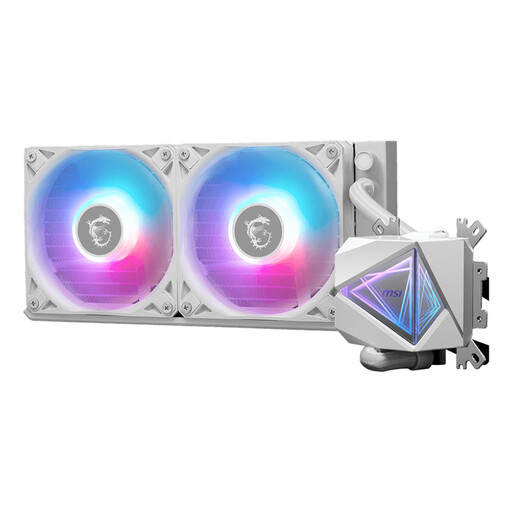
Why This Fits Their Persona: Ideal for those creating a sleek, all-white PC build. This white water cooler combines a minimalist design with customisable RGB lighting, allowing the build's aesthetics to take centre stage without compromising on the core functionality of a good CPU water cooler.
This model doesn't just focus on looks. The specifications clearly state broad support for sockets like AM5 and LGA 1700, and the 240mm radiator is a practical size that fits in most cases.
Stylish white design with RGB options. The specifications indicate a noise level of 20 dB, which points to a focus on quiet operation under normal conditions.
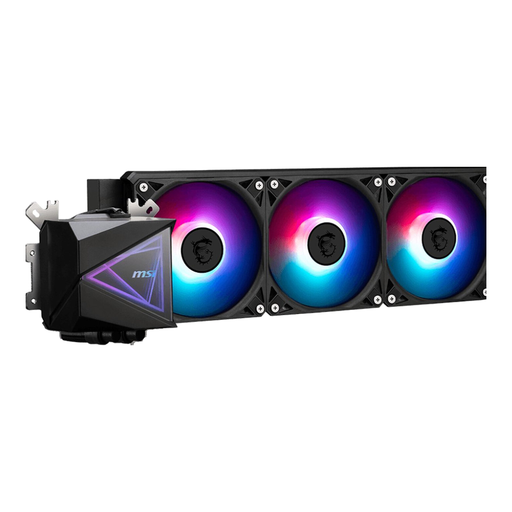
Why This Fits Their Persona: For users who push their high-end CPU to the limit with overclocking. This 360mm water cooler from MSI is designed for maximum heat dissipation, which is essential to prevent performance loss (thermal throttling).
This model avoids the compatibility trap by being upfront: you need a large case. It's not an impulse buy, but a deliberate choice for those who have the space and need the cooling power.
Large 360mm radiator with three fans for maximum cooling capacity. The pump has a high maximum speed of 3,400 RPM for efficient circulation.
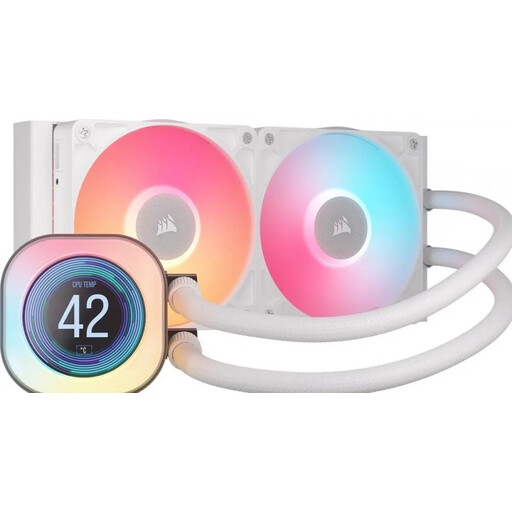
Why This Fits Their Persona: Perfect for the user who loves to see system information in real-time. This Corsair water cooler features a built-in LCD screen on the pump head, where you can display temperatures, fan speeds, or even your own custom images.
The LCD screen is a clear, functional addition, not a vague marketing claim. The underlying cooling performance of the 240mm radiator is solid, so you're not just paying for a gimmick.
Built-in 2.1-inch LCD screen for real-time data. Corsair's iCUE LINK system simplifies cabling, which makes installing this PC water cooling system easier.
We have curated a complete, up-to-date list of products that fully meet these strict selection criteria.
An AIO is a closed-loop system and requires no maintenance. The average lifespan is between 5 and 7 years. The two most common points of failure are the pump, which can stop after years of continuous operation, and permeation, where a minuscule amount of coolant evaporates through the tubing over a long period. However, modern AIOs are very reliable.
Compared to a full custom water-cooling loop, an AIO is relatively easy to install. The main steps involve mounting the radiator and fans in the case and attaching the pump head to the CPU. The biggest challenge is often checking the dimensions. Measure the space in your case beforehand and verify socket compatibility to prevent issues.
For most gamers and general users, a 240mm water cooler is more than sufficient to keep a modern CPU cool and quiet. Only step up to a 360mm water cooler if you are using one of the most powerful processors on the market (like an Intel Core i9 or AMD Ryzen 9), have serious plans for overclocking, or work with highly intensive tasks like video rendering. For a standard gaming PC, the extra cooling power of a 360mm model is often unnecessary.
