
Vandaag of morgen in huis

Kwaliteit gegarandeerd

Welkomstaanbiedingen ontgrendelen: GRATIS bezorging | Tot 80% korting | Gratis 30 dagen JoyPlus-proefperiode
Download de app
An AIO CPU cooler can be a practical choice for a gaming PC, workstation or compact build with a powerful processor. Its closed loop is generally easier to install than a custom-built CPU water-cooling system. However, an all-in-one liquid cooler won’t automatically prevent every purchasing mistake. A radiator that doesn’t fit your case, a missing socket bracket or an overly loud fan profile can make it less enjoyable to use.
As a Joybuy Product Recommendation Officer, I filter the key product specifications and turn marketing terms into practical points you can check. That way, you can compare CPU coolers based on the features that really make a difference in your PC.
An RGB CPU cooler can look great in a white or black build, but lighting tells you nothing about cooling capacity. Instead, check the radiator size, number of fans, maximum airflow and control method. ARGB and RGB connectors can also differ. Check whether your motherboard has a suitable 5V 3-pin connector or whether you’ll need a separate controller.
A 240mm AIO cooler usually has two 120mm fans. A 360mm AIO cooler typically uses three 120mm fans and needs more space at the top or front of the case. The stated size isn’t the only thing to check: radiator length, tube position, RAM height and clearance around the CPU socket can all matter too.
A cooler may be compatible with AMD AM5, but that doesn’t mean it will work with every Intel processor. Before buying, check that the mounting kit lists your socket, for example AM5 CPU cooler, LGA 1700 CPU cooler or LGA 1851 CPU cooler. Also check the instructions and the bracket supplied. Product details can vary between versions.
A larger radiator offers more surface area for dissipating heat, but that doesn’t mean every 360mm cooler will fit every PC or perform better in every build. Consider the following together:
According to the product specifications, the Corsair Nautilus 240 RS ARGB has two fans with a maximum speed of 2100 rpm, airflow of up to 74.37 cfm and static pressure of up to 4.91 mmH2O. Its stated noise level at high speed is 34 dB. Treat these figures as points of comparison under the specified test conditions, not as a guarantee of the noise level in every PC.
Check not just your processor’s name, but also the socket on your motherboard. The models in this selection list support for AMD AM4, AMD AM5, Intel LGA 1700 and Intel LGA 1851, among others. The right socket fit helps avoid installation problems, and correct installation is also essential for good contact between the cold plate and the CPU.
Use only the mounting hardware supplied and follow the installation instructions. Don’t bend the tubes sharply. Connect the pump to the designated header and check that the radiator and fans have enough clearance for airflow.
A lower minimum speed can help keep things quiet under light loads, while PWM control lets the fans adjust automatically. Some Corsair models use iCUE for lighting and settings. MSI models may support RGB features through Mystic Light. Check in advance how much software you want to use and whether your motherboard has the right connectors.
An LCD screen is an extra feature for anyone who wants to display temperatures, images or animations. It doesn’t replace the need to check the radiator, pump, socket and case.
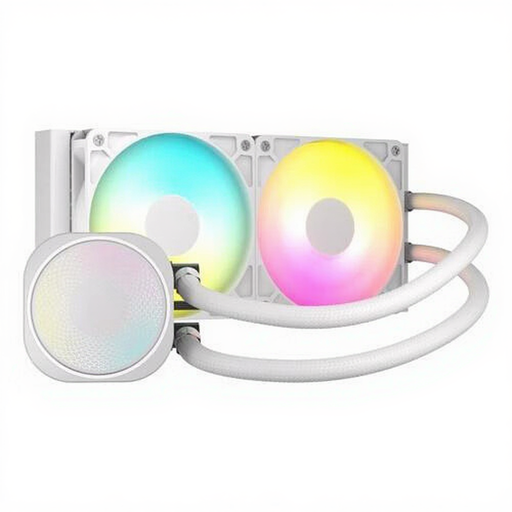
Why it suits this user: A straightforward 240mm solution with two 120mm fans and PWM support, ideal for a typical gaming PC.
The radiator size, compatible sockets and noise level are clearly listed. Do check that your case supports a 240mm radiator.
Two fans running at up to 2100 rpm, airflow of up to 74,37 cfm, ARGB lighting and support for AM4, AM5 and LGA 1700/LGA 1851.
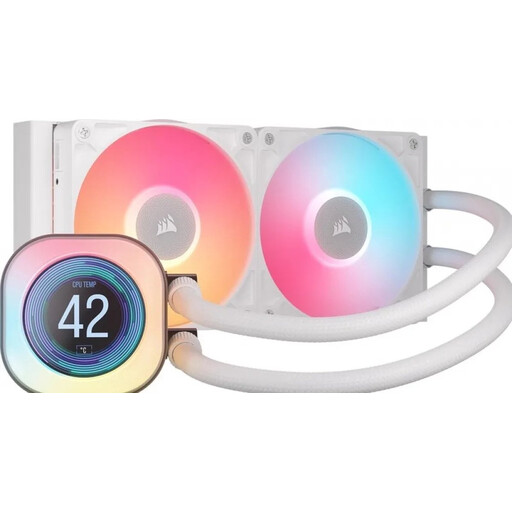
Why it suits this user: A good fit for PC builders who want to pair a 240mm radiator with software controls and a prominent LCD screen.
The product specifications list the 240mm size, two fans, PWM support and compatibility with AM4, AM5, LGA 1700 and LGA 1851.
2.1-inch LCD display, two 120mm fans and iCUE control, according to the product description.
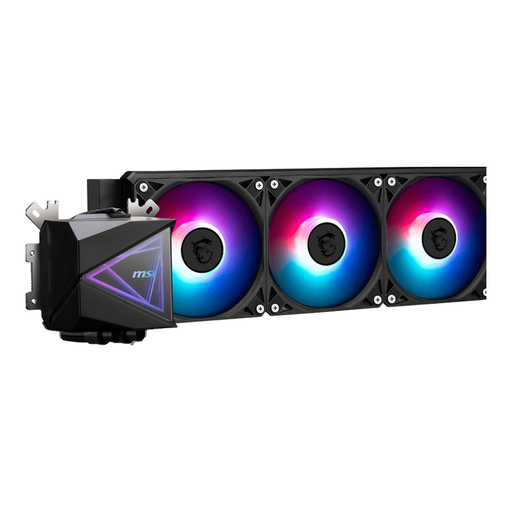
Why it suits this user: A 360mm configuration for users with a case that can accommodate three 120mm fans and who put their processor under sustained load.
The 394 mm radiator length and socket list are specified. Measure the mounting space in your case before ordering.
Three 120mm fans, PWM support, a pump running at up to 3400 rpm and support for AM4, AM5, LGA 1700 and LGA 1851.
We’ve put together a complete, up-to-date list of products that meet these strict selection criteria and the applicable European safety regulations.
No. Check the socket list and the mounting kit supplied. A model must be specifically compatible with your socket, such as AM5 or LGA 1700. You’ll need to make the same check for LGA 1851, even if the product supports similar Intel sockets.
Not necessarily. A 360mm radiator has three fans and may be able to run them at lower speeds for the same cooling demand, but overall noise depends on the fan profile, pump settings, case and fan curve. Compare the stated dB rating and check whether PWM or software control is available.
Its lifespan depends on the pump, fans, hours of use, dust and installation. You shouldn’t open a sealed system yourself. Check regularly for unusual noises, loose cables and dust around the radiator. If there’s a leak or the pump won’t start, switch off your PC and follow the seller’s warranty and service procedure. Products are covered by at least the statutory guarantee under the applicable EU consumer rules; additional manufacturer terms may vary by model.
