
Vandaag of morgen in huis

Kwaliteit gegarandeerd

Welkomstaanbiedingen ontgrendelen: GRATIS bezorging | Tot 80% korting | Gratis 30 dagen JoyPlus-proefperiode
Download de app
Having a conversation in another language, asking for directions abroad or following a business meeting: AI translation earbuds can help. However, not every model works in the same way. Some earbuds are mainly standard Bluetooth audio devices that work with a translation app, while others offer their own app and dedicated translation features.
So don’t just focus on promises such as “real-time translation”. Above all, check how the device connects, which languages are available and what you need in order to use the feature.
A product description may say that a device translates 150 languages, but that does not automatically mean that every language is available in every mode. Online translation, for example, may support more languages than offline use. Speech recognition, text translation and photo translation may also have different language sets.
So check:
Bluetooth 5.4 or Bluetooth 6.0 describes the wireless connection between your phone and the device. It does not, by itself, mean that an earbud can translate independently. With various models, you first need to download an app, pair the device and then start the translation feature in the app.
A Bluetooth translation earbud is therefore usually part of a system: earbuds, smartphone, app and sometimes an internet connection. On a plane, in the underground or in a remote area, that distinction can be important.
Noise cancelling, sound isolation and microphone noise reduction can make conversations more comfortable, but they do not guarantee error-free speech translation. Background noise, dialects, multiple speakers and a poor internet connection can all affect the result.
Use a translation headset as an aid, not as a substitute for important written or professional communication. For business meetings, always double-check important names, amounts and terms and conditions.
Look for a clear indication of the number of languages and the functions available. “Translation in 150 languages” may refer to online translation and not all the device’s features. A standalone AI translation device may sometimes offer several input methods, such as speech, text and photos.
For example, the Rexsun Smart Voice Translator states that it supports online translation in 139 languages and offline translation in 17 languages. The product information also mentions speech, photo and text translation. This makes a standalone device appealing to travellers who do not always want to wear earbuds.
For a full day of travel, battery capacity and the role of the charging case are important. Pay attention to the difference between:
The VoxorAI M76 and M113 models state a battery life of approximately 5 to 7 hours, with a 300 mAh charging case. The stated usage time is a product specification; actual battery life may vary depending on volume, app usage and connection quality.
Check whether the app is suitable for Android and iOS. Also see whether translation works via the internet and which permissions the app requests, such as access to the microphone, Bluetooth or location. For work- or study-related conversations, it is sensible to review the app’s privacy policy in advance.
A standard translation app on your phone may be sufficient in some situations. Wireless translation earbuds mainly add convenience, allowing you to listen to audio without having to hold your phone constantly.
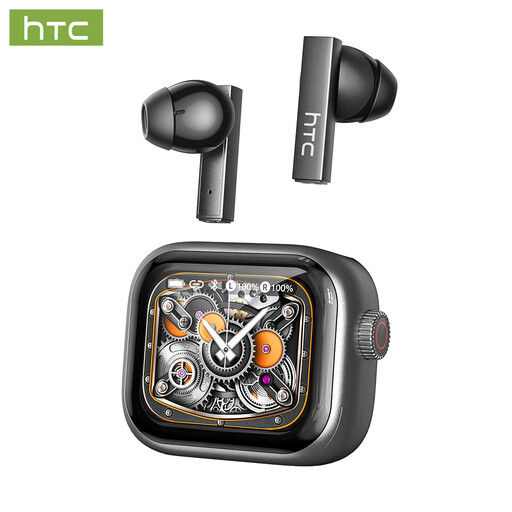
Why it suits this profile: This model is ideal for anyone who wants to try translation via a smartphone while also looking for earbuds for calls, studying and everyday listening.
The product information clearly states that translation requires an external app and an internet connection. You therefore know in advance that this is not a fully standalone translation device.
Bluetooth 6.0, built-in microphone, touch controls and a charging case offering up to 24 hours of total usage time according to the specifications.
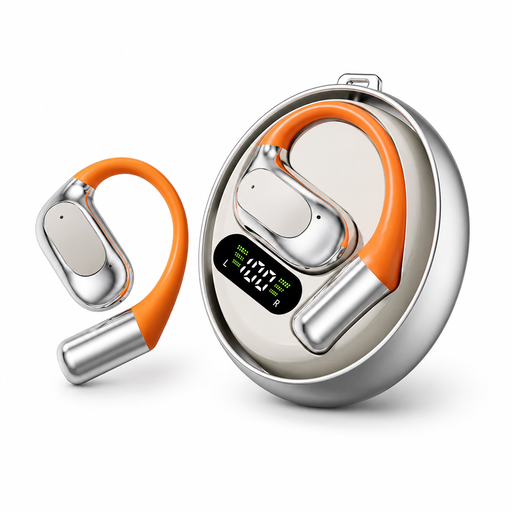
Why it suits this profile: A suitable choice for travellers, students and professionals looking for a compact in-ear model with touch controls and broad language coverage.
According to the product description, this model supports approximately 150 languages. Before buying, check the app to see which languages are available online.
Bluetooth 5.4, approximately 5 to 7 hours of playback time, a 300 mAh charging case and a stated range of up to 15 metres.
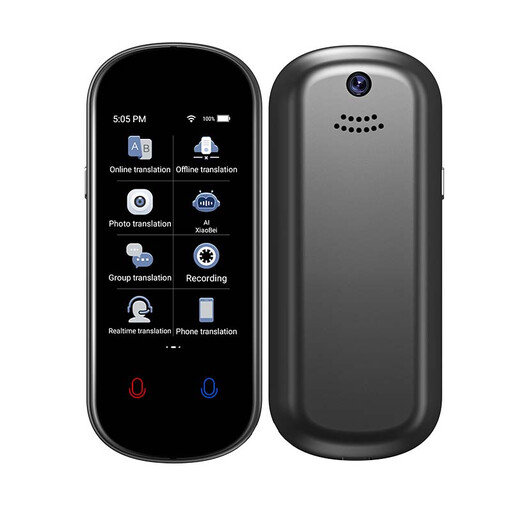
Why it suits this profile: This standalone AI translation device is ideal for business travellers and tourists who want to combine speech, photo and text translation in one device.
The product information distinguishes between online and offline languages: 139 online and 17 offline. This helps you plan how to use the device without internet access.
According to the product description, it supports speech, photo and text translation, as well as connections via Wi-Fi, hotspot and offline modes.
We’ve compiled a complete, up-to-date list of products that fully meet these strict selection criteria and the applicable European safety regulations.
It depends on the model. Many wireless translation earbuds use a smartphone app for speech recognition and translation. A standalone device such as the Rexsun Smart Voice Translator also states that it offers offline translation for some languages. Always check the manual and app requirements before placing your order.
Battery life varies depending on the model, volume and translation usage. Product descriptions for some VoxorAI models state approximately 5 to 7 hours. The charging case extends total usage time. Batteries lose capacity over time, while intensive use of the microphone, Bluetooth and translation app can drain the battery more quickly.
Not always. Some products work with an app that provides online translation; the terms may vary from one app to another. Check whether subscription fees, data usage or an internet connection are required. For occasional holidays, a translation app may be sufficient, while a dedicated translation headset offers greater convenience during regular international conversations.
