
Vandaag of morgen in huis

Kwaliteit gegarandeerd

Welkomstaanbiedingen ontgrendelen: GRATIS bezorging | Tot 80% korting | Gratis 30 dagen JoyPlus-proefperiode
Download de app
A powerful computer no longer has to be a large, bulky tower humming under your desk. The rise of the mini PC offers the performance of a full-fledged desktop in a compact form factor. The MSI Cubi NUC AI Mini PC is a popular example, but when buying a mini PC, it's easy to fall for marketing promises. We'll break down the key points to consider, ensuring you choose a model that truly fits your needs.
The compact PC market is filled with models that look great on paper. Watch out for these common issues to avoid having to replace your purchase after just a few months.
To make the right choice, focus on the specifications that truly matter for a modern, professional workspace.
Look beyond just the name. A modern compact PC with an Intel Core Ultra 7 processor, like the 155H variant, offers a combination of Performance-cores (for heavy tasks) and Efficient-cores (for background processes). The addition of an NPU (Neural Processing Unit), a dedicated NUC with an AI processor, is a major step forward. This chip accelerates AI tasks, such as real-time video enhancement or data analysis in software, without burdening the main processor. This makes your PC faster and smarter for today's applications and those of the future.
A powerful mini PC for business use must be equipped with the right ports. A PC with Thunderbolt 4 is a key factor here. A single Thunderbolt 4 port can transfer data at 40 Gbps, drive two 4K monitors, and charge a device simultaneously. This allows you to create a clutter-free desk with just one cable to your dock or monitor. Also, look for Wi-Fi 6E for the fastest, most stable wireless connection and at least one 2.5Gbps Ethernet port for a reliable wired network connection. Furthermore, a Windows 11 Pro mini PC provides the necessary security and management features for a business environment.
One of the biggest advantages of a mini PC is the ability to create a minimalist workspace. A VESA mount PC can be mounted directly onto the back of a compatible monitor. The computer is then completely out of sight, while all cables can be neatly tucked away. This not only saves desk space but also creates a professional and serene look. The MSI Cubi NUC is a great example of a workstation mini PC that offers this flexibility.
Not every user has the same needs. Here are a few options tailored to different profiles.

Why This Fits Their Persona: Ideal for the professional who needs top performance for data analysis, heavy multitasking across multiple screens, and wants to leverage the latest AI technology for maximum productivity.
This model features a specified Intel Core Ultra 7 155H (high-performance) processor, dual Thunderbolt 4 ports, and a cooling system from a reputable brand, avoiding performance issues and connectivity limitations.
The integrated NPU with AI processor accelerates modern software, and the ability to drive up to four displays makes this a true workstation.
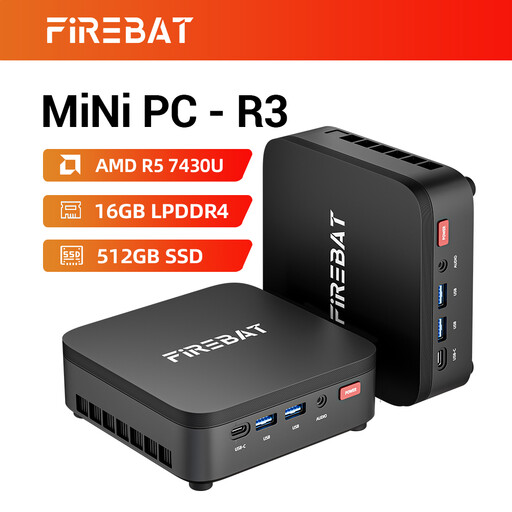
Why This Fits Their Persona: An excellent choice for remote workers and students who need a capable and affordable PC for office tasks, video calls, and media consumption, without paying for top-tier specifications.
This model offers a modern AMD Ryzen 5 processor, 16GB RAM, and a fast SSD, thereby avoiding the performance issues common in cheap mini PCs with slow storage or outdated CPUs.
A balanced package with a great price-to-performance ratio. Support for a 4K triple display setup is a bonus in this price range.
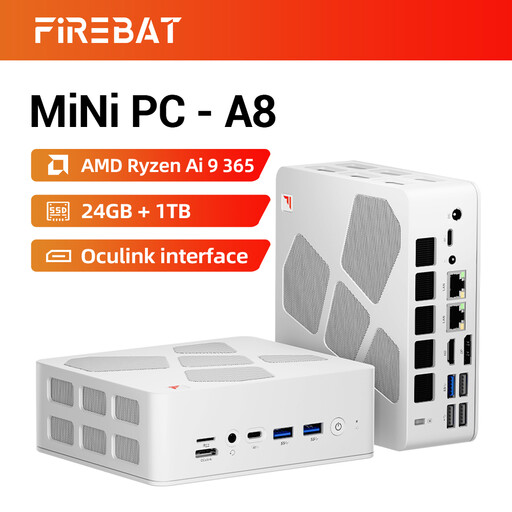
Why This Fits Their Persona: Aimed at creative professionals and tech enthusiasts who need maximum computing and graphics performance for video editing, 3D rendering, or complex programming tasks.
This PC bypasses the performance trap with a top-tier AMD Ryzen AI 9 processor, a generous 24GB of DDR5 RAM, and future-proof ports like USB4 and dual 2.5G Ethernet. This is pure power.
Massive computing power with 10 cores/20 threads and a powerful integrated Radeon 880M graphics card, suitable for demanding graphical tasks.
We have compiled a complete, up-to-date list of products that fully meet these strict selection criteria and local regulations.
Yes, absolutely. Modern models with high-performance processors like the Intel Core Ultra 7 155H are specifically designed as a powerful mini PC for business use. They are more than capable of handling demanding applications, data analysis, driving multiple monitors, and heavy multitasking. They function as a full-fledged workstation mini PC.
An NPU (Neural Processing Unit) is a piece of hardware specifically designed to accelerate AI tasks. Think of features like real-time background blur in video calls, smart photo organization, or using AI features in programs like Photoshop. Because the NPU takes on this work, the main processor remains free for other tasks, which improves the overall speed and efficiency of your PC.
Yes, many compact PCs, including the MSI Cubi NUC series, are compatible with a VESA mount. This is a standard mounting system that allows you to screw the PC directly onto the back of a compatible monitor or a wall bracket. This is an ideal solution for a tidy and space-saving workspace.
