
Vandaag of morgen in huis

Kwaliteit gegarandeerd

Welkomstaanbiedingen ontgrendelen: GRATIS bezorging | Tot 80% korting | Gratis 30 dagen JoyPlus-proefperiode
Download de app
An ergonomic workspace does not have to be complicated. Yet many home workers and office professionals buy a desk accessory that proves less practical than expected after a few weeks. Limited height adjustment, insufficient load capacity or a laptop that is still positioned too low can make everyday use unnecessarily difficult.
Use these checks to compare an height-adjustable desk, a sit-stand desk and additional accessories based on verifiable specifications. This will help you choose an adjustable workspace that suits your space, equipment and way of working.
A product may be adjustable, but not every height will be suitable for every user. So check the actual height range and how the height is adjusted. A desk with an electric motor works differently from a workstation with fixed positions.
For simply alternating between sitting and standing, a desk riser may be sufficient. If you switch several times a day, an electric height-adjustable desk with memory settings may be more suitable.
A laptop, monitor, keyboard, docking station and speakers weigh more together than you might initially think. Do not look only at the weight of one device; check the total load capacity of the desk or riser.
Also note the difference between the maximum static load and the weight you can safely use while adjusting the height. Position heavy equipment centrally and always follow the manufacturer's safety instructions.
A laptop stand must be suitable for the size and weight of your laptop. For example, a model for 10-17 inches is not automatically suitable for every heavy gaming laptop. Also check that there is enough space for ventilation, cables and an external keyboard.
A monitor stand or computer riser must stand securely on a stable, level desk. An unstable surface makes an adjustable workspace less practical, even if the specifications appear suitable on paper.
First decide how often you want to alternate between sitting and standing. A workstation with five fixed height settings is straightforward and easy to move. An electric desk generally offers greater flexibility. Memory presets are useful when several people use the same workspace or when you want to save fixed sitting and standing heights.
When choosing a desk for working from home, also check the available space. A 140 × 60 cm desktop provides room for a monitor and laptop, but cables and accessories take up part of the surface.
Compare the maximum load capacity with your complete setup. A desk with a static load capacity of 70 kg has ample capacity for office equipment, but must not be loaded beyond that limit. With smaller workstations, the difference is more significant: 5 or 8 kg can be decisive when you use multiple screens.
A steel frame can contribute to stable positioning, but the surface remains important. Always place a riser on a level desk and lock adjustable positions according to the instructions.
Aluminium is lightweight and suitable for a laptop stand that you want to move regularly. An open design can allow air to circulate around the laptop. Non-slip feet also help prevent movement and scratches on the desk.
Cable grommets, hooks, organisers and a USB-C port cannot replace proper adjustment, but they can help keep your ergonomic desk accessories more organised. Fewer loose cables mainly mean a more practical desk and easier maintenance.
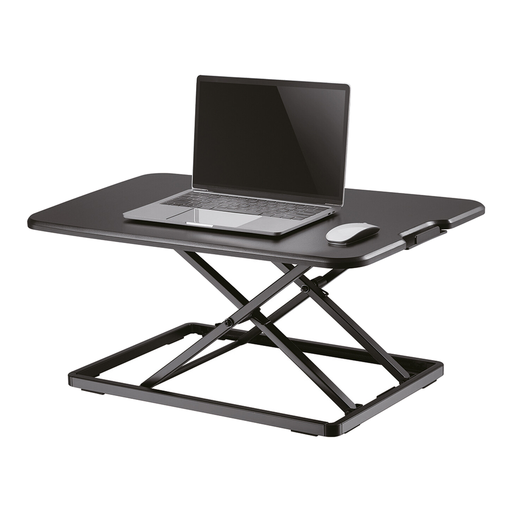
Why it suits this profile: This compact sit-stand workstation is suitable if you want to adapt your existing desk without replacing it completely.
The five height settings and 8 kg load capacity make the key usage limits clear. Place the workstation on a stable, level desk and do not exceed the load limit.
Steel frame, low-profile design, lightweight construction and a five-year warranty according to the product information.

Why it suits this profile: This desk is ideal for business users and home workers who regularly change position and want to create a fixed, complete workspace.
The product information lists four memory presets, a maximum static load capacity of 70 kg and a sensor that detects obstacles. Take account of the stated cool-down period when making prolonged adjustments.
140 × 60 cm desktop, USB-C port, cable management and a steel frame. The stated height range extends up to 120 cm; check the current product details for the exact lower limit.
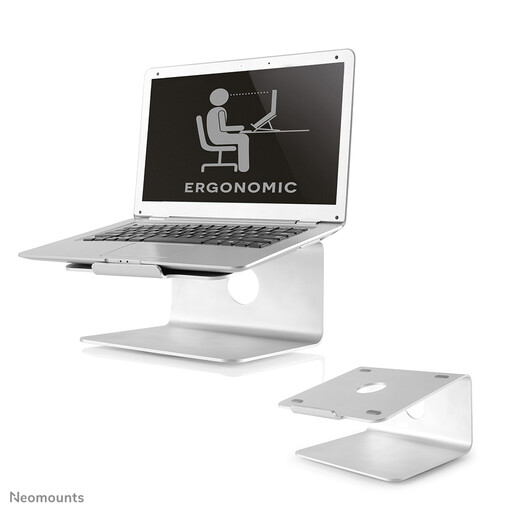
Why it suits this profile: A practical choice for flexible workers, students and users who regularly move their laptop between workspaces.
Compatibility with laptops from 10 to 17 inches and a maximum weight of 5 kg are clearly specified. This allows you to check in advance whether your laptop falls within the limits.
360-degree rotating base, aluminium construction, non-slip feet and a cable opening. The stated dimensions are 24 × 24 × 14 cm.
We have put together a complete, up-to-date list of products that fully meet these strict selection criteria and the applicable European safety regulations.
A well-chosen computer riser or laptop stand can adapt an existing table. For a permanent home workspace with several devices, an electric sit-stand desk is the more obvious choice. The right option mainly depends on your equipment, available space and desired freedom of movement.
Start with a stable desk, a screen positioned at a suitable viewing height and a chair that suits your height. When using a laptop, a laptop stand and external keyboard are often practical additions. Always check the dimensions and load capacity before ordering.
Energy consumption depends on the motor power, how often you adjust the desk and its standby mode. The motor usually operates only while the desk is moving up or down. For exact details, consult the technical specifications of the model you have chosen.
Service life depends on the load, assembly, frequency of use and maintenance. A product used within its stated load capacity and placed on a level surface is less likely to develop problems caused by overloading. Keep the instructions and regularly check the screws, cables and adjustment mechanisms.
