
Vandaag of morgen in huis

Kwaliteit gegarandeerd

Welkomstaanbiedingen ontgrendelen: GRATIS bezorging | Tot 80% korting | Gratis 30 dagen JoyPlus-proefperiode
Download de app
An adjustable-height desk can be useful if you want to switch regularly between sitting and standing while working, studying or gaming. However, an electric frame or modern control panel doesn’t automatically mean a desk will suit your space and the way you use it. The right choice depends mainly on its dimensions, weight capacity, height range and practical details.
A sleek white or oak desktop might suit your interior, but make sure you check the construction too. A desk with a large top can wobble without sturdy legs and a stable frame, especially if you use a monitor arm, multiple screens or heavy equipment.
So, check:
Not every desk or table with an adjustable top is electric. The URBAN MEUBLE Lift-Top Coffee Table, for example, has a mechanism that raises the top from 48 to 63 cm. It’s designed as a coffee table with storage, not as a full-sized electric sit-stand desk. It has no electric height adjustment and measures 96 x 50 cm.
A table like this may suit a small living room or occasional working from the sofa, but it doesn’t meet the same requirements as an electric sit-stand desk.
A USB-C port, memory function or cable tray can be useful, but these features won’t make up for a desktop that’s too small or a height range that isn’t right for you. First, check that the desk goes high enough for standing and low enough for a comfortable seated posture. Then consider extras such as memory settings, hooks and cable management.
A desk needs to suit your height, chair and working posture. The models in this selection have a height range of approximately 72 to 120 cm. The JoySelect adjusts from 72 to 118 cm; the two JOYFURNOS models adjust from 72 to 120 cm.
An adjustable-height desk measuring 120 x 60 cm is practical for a laptop, one monitor, a keyboard and documents. For two screens, speakers or creative equipment, an adjustable-height desk measuring 160 x 70 cm gives you more space. Also measure the available space in your room, allowing for room behind the desk for cables and movement.
Check the stated static weight capacity and add up the weight of your equipment. According to the product information, a desk with a capacity of 70 kg can hold items such as monitors, a laptop, books and accessories. This doesn’t mean you should put the maximum weight on one small area of the desktop.
A steel frame, level floor and properly adjusted feet all help create a stable set-up. Once assembled, check that all the connections are secure. For electric models, you’ll also need to allow for the stated movement clearance: don’t place the desk directly against a wall when adjusting its height.
An adjustable desk with a memory function can be useful if several people use the same desk or you want to switch quickly between two working heights. According to the product descriptions, the JOYFURNOS models have a memory function. The JoySelect has a digital control panel with two memory settings.
A desk with a USB-C port can help keep your workspace tidy, but check what the port is intended for and what charging function is specified. Cable holes, an organiser and a hook help keep wires and accessories off the desktop.
Also check the electrical safety information. The product descriptions state that the motor may temporarily stop moving after prolonged continuous use because of overheat protection. For the JOYFURNOS models, a waiting time of 18 minutes is specified. Keep electrical components away from liquids and follow the assembly instructions.

Why it suits this profile: Its compact size makes it a good fit for a study, bedroom or home office. According to the product information, the desk is suitable for office work, studying and gaming.
The specifications list an electric height range of 72–118 cm, two memory settings and a weight capacity of 70 kg. So you can look beyond appearance and standalone marketing features.
120 x 60 cm desktop, digital control panel, two hooks and a stated weight capacity of 70 kg.

Why it suits this profile: The spacious desktop is ideal for a fully equipped home office, a multi-monitor set-up or a large study area.
The product information lists a steel frame, adjustable feet, two cable holes and a controller with a locking function. These are practical details you can check to help assess stability and everyday usability.
160 x 70 cm, height range of 72–120 cm, memory function, USB-C connection, cable management and a stated static weight capacity of 70 kg.
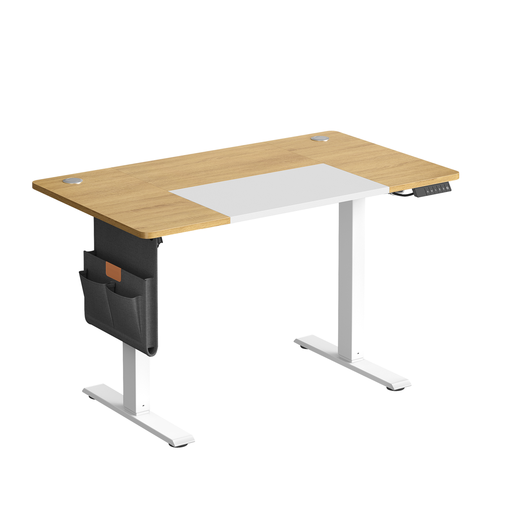
Why it suits this profile: This model combines a compact desktop with memory settings, a USB-C port and handy storage features. It’s a good fit for people working from home and students who use their workspace every day.
The manufacturer lists a quiet motor, cable management and a maximum static load of 70 kg. Before buying, make sure the available 120 x 60 cm surface is large enough for your equipment.
Height range of 72–120 cm, memory function, USB-C port, organiser, three hooks and labelled parts for assembly.
Allow plenty of time for assembly and lay out all the parts first. Put the frame on a level surface and check all cable connections before use. Make sure there are no obstacles above or below the desktop when adjusting its height. A desk with cable holes will only keep things tidy if the cables are long enough to accommodate the full range of movement.
For an ergonomic desk, the rest of your set-up matters too. Adjust your chair, monitor and keyboard separately. Use the memory settings to help you switch between working heights, but don’t force yourself into a position that doesn’t feel comfortable.
It varies from person to person and depends on your chair. When sitting, start with relaxed shoulders and your elbows at roughly a right angle. When standing, adjust the desktop so you don’t have to hunch your shoulders forwards. The model’s stated height range will determine whether this is practical.
Power consumption depends on how often and for how long you use the motor. The motor only runs while the desk is being adjusted. A model with an energy-saving mode, such as the one listed for the JOYFURNOS 160 x 70 cm, may reduce consumption when not in use. Always check the supplied adapter and don’t use one with an unsuitable voltage.
A 120 x 60 cm desktop is often practical for a laptop, one monitor and basic accessories. For two monitors, a desktop PC, documents or gaming accessories, 160 x 70 cm gives you more room to move. Measure your equipment in advance and allow for cables and monitor stands.
We’ve put together a complete, up-to-date list of products that meet these strict selection criteria and the applicable European safety regulations.
