
Vandaag of morgen in huis

Kwaliteit gegarandeerd

Welkomstaanbiedingen ontgrendelen: GRATIS bezorging | Tot 80% korting | Gratis 30 dagen JoyPlus-proefperiode
Download de app
An adjustable desk can be handy if you want to switch regularly between sitting and standing. But an electric frame or a modern control panel doesn’t automatically mean a desk suits your space and your needs. In particular, home workers, students and gamers sometimes pay attention to stability, dimensions and motor limitations only when it’s too late.
With these practical checkpoints, you can compare an electric height-adjustable desk using verifiable specifications rather than marketing terms.
A budget desk looks attractive, but first check what’s included. Think about a controller, power adaptor, cable management, hooks and assembly instructions. A desk without a memory function can also be less practical if several people use it or you switch positions frequently.
A 120 x 60 cm desktop gives space for a laptop, monitor and keyboard, but cables and documents can soon get in the way. For two screens or a larger gaming set-up, 140 x 60 cm or 160 x 70 cm makes more sense. Also measure the clearance behind the desk: during adjustment, the top mustn’t bump into a wall, windowsill or cabinet.
The stated load capacity usually refers to the maximum static load. That isn’t the same as a completely wobble-free desk at full height. Look at the frame, adjustable feet, the weight of the desk and the distribution of your equipment. A heavy monitor arm or desktop PC places more demand on the frame than a laptop alone.
Check the minimum and maximum range, for example 72–120 cm. That range needs to suit your chair, your height and your preferred standing working height. A sit-stand desk with electric controls is especially practical if you want to switch several times a day.
A desk with a memory function stores fixed heights. Some models offer two, others four memory positions. Digital controls display the selected height, but always check which functions are actually listed in the product description. A reminder to move is a usability feature; it isn’t a medical claim.
The models mentioned in this selection have a maximum static load of 70 kg, unless stated otherwise. Distribute the weight evenly across the top and do not exceed the limit. Also check whether the desk is intended for indoor use only and keep the adaptor and electrical components away from liquids.
For several JOYFURNOS models, the product information states that overheating protection can activate when the desk moves up or down continuously for two minutes. An 18‑minute waiting time is then stated. That’s a practical consideration for intensive use.
For a compact home-working desk, 120 x 60 cm is often sufficient. If you use multiple screens, speakers or a desktop, 140 x 60 cm is more useful. The 160 x 70 cm size gives extra depth for monitors and accessories.
Cable grommets, a storage pouch and hooks help keep your workspace tidy. A desk with a USB‑C port can connect a phone or other compatible device directly at the control panel. Do check the charging function and power output in the product specifications; USB‑C doesn’t automatically mean every device will fast charge.

Why this fits the profile: A tidy size for a student room, bedroom or compact home workspace. The model offers electric adjustment from 72 to 118 cm and two memory presets.
The product description lists the range, the two presets and a 70 kg load capacity. That lets you check in advance whether the core features suit your usage.
120 x 60 cm top, digital controls, two memory positions, two hooks and, per the product information, CE and European standard certification.

Why this fits the profile: For users who, besides height adjustment, also want memory presets, USB‑C, cable management and storage in a compact size.
The specs state a 72 to 120 cm range, four memory positions and a maximum static load of 70 kg. The limitations of the overheating protection are also clearly stated.
USB‑C port, four memory positions, cable grommets, a storage bag and three hooks. The product information notes a steel frame and a quiet motor.

Why this fits the profile: The generous size suits professionals, gamers and home workers with multiple screens or a larger computer set-up.
At 160 x 70 cm you’re less likely to stack equipment on top of each other. According to the product description, the adjustable feet, cable grommets and lockable controls are designed for a stable and organised workspace.
160 x 70 cm, height range of 72 to 120 cm, USB‑C connection, memory function, two cable grommets and up to 70 kg static load.
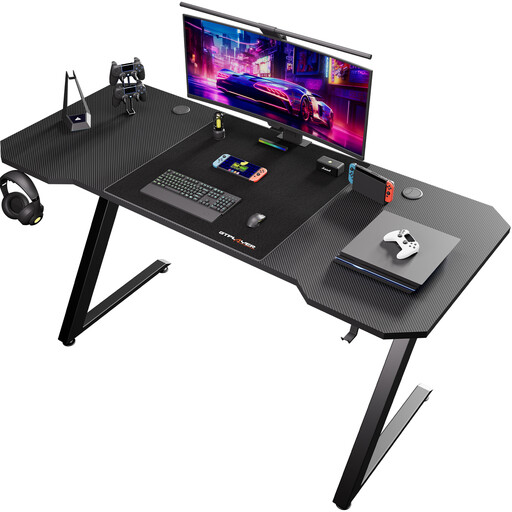
Why this fits the profile: A compact computer desk for a gaming nook or student room where a fixed working height is sufficient.
This isn’t an electric standing desk. You don’t pay for features you don’t need, but you must accept that the height isn’t electrically adjustable.
120 x 60 cm, carbon-look desktop and an included headphone hook according to the product listing.
We’ve compiled a comprehensive, up-to-date list of products that fully meet these strict selection criteria and current European safety regulations.
Start with a comfortable sitting height where your feet rest on the floor and your arms rest relaxed on the top. Then set a standing height that keeps your shoulders low and the screen directly in front of you. Check that cables have enough slack and that the top doesn’t hit anything while moving.
Lifespan depends on the motor, frame, load and how often you use it. Stick to the stated maximum load and avoid continuous up-and-down movement. For models with listed overheating protection, factor in the specified pause after prolonged adjustment.
Power is mainly used during height adjustment; at rest, the controller typically uses little energy. How often you change height matters more than the mere presence of a motor. An energy-saving mode, as on some models in this selection, can limit standby consumption. Check the product specifications for details.
