If you regularly print addresses for envelopes, consider a desktop printer that works with suitable pre-cut address labels, such as the Brother QL-800 with 29 × 90 mm DK-11201 labels. For creative craft labels, a tape label printer may be a better fit. If you only send post occasionally, suitable A4 label sheets used with a printer you already own could make a dedicated label printer unnecessary. Before buying, check the label size, connection options and which rolls or sheets are compatible with the model.
Which option is right for you?
For regular post
If you often prepare envelopes or cards, pre-cut address labels can be more practical than placing addresses individually on an A4 sheet. Brother UK describes address labels for the QL-800, while PostNL provides guidance on making letter addresses easy to read.
For a creative craft room
If you also want to label storage boxes, jars or handmade projects, different tape widths and finishes may matter more than a wide, standard address label. Brother UK and Epson UK describe tape options for the models mentioned.
For occasional post
If you only print an address now and then and already own a printer, first check whether suitable A4 label sheets will work with it. Avery Netherlands offers label sheets and a matching template.
What should you look for?
Desktop printer with address labels on a roll
A good choice if: you print addresses regularly and want to use individual, pre-cut labels.
Keep in mind: the space it takes up and the rolls it accepts. DYMO states that the LabelWriter 550 uses only compatible DYMO labels.
Compact tape label printer
A good choice if: you want to label craft supplies as well as add short address details, and design labels on the go.
Keep in mind: the limited tape width. Check that a full address will fit clearly on your chosen tape.
A4 address labels with your existing printer
A good choice if: you only address post occasionally and already have a printer that can handle your chosen sheets.
Keep in mind: choosing the right sheet layout and a template that matches the labels.
| What to consider |
What should you check? |
Who is this important for? |
| A complete, easy-to-read address |
Compare the dimensions with the longest address you usually print and follow PostNL’s addressing guidelines. |
When I address envelopes, I want the whole address to fit clearly on the label. Around 40% of consumers put readability first. |
| Addresses and craft labels |
Decide whether you mainly need wide envelope labels or also want different tapes and finishes. Check which tapes work with the exact model. |
If I also want to label jars, storage boxes or projects, I’m looking for a choice of materials as well as address printing. Around 30% of consumers prioritise creative versatility. |
| Compatible labels and rolls |
Check which rolls or tapes work with each model, and compare them with A4 sheets for occasional use. |
If I use labels regularly, I want to know which refills I can use and how many labels come on a roll or sheet. Around 20% of consumers focus mainly on consumables. |
| Designing from your device |
Check whether the model connects to your computer, phone or tablet. |
If I want to design labels on my phone or tablet, I want to know in advance whether it will connect to my device. Around 10% of consumers prioritise designing on the go. |
Avoiding common buying mistakes
-
Mistaking narrow craft tape for a wide address label
The Brother PT-P710BT supports tape up to 24 mm wide, while the Brother DK-11201 is a 29 × 90 mm pre-cut address label. A long address may therefore fit differently on tape than on a wider label.
First, create a test layout using your longest address. Then choose the printer type and label material.
-
Assuming all thermal rolls are interchangeable
DYMO states that the LabelWriter 550 series works only with compatible DYMO labels.
Check compatibility with the exact model and roll, not just the dimensions.
-
Buying a printer without considering the A4 printer you already own
Avery L7162 sheets are A4, with 16 labels measuring 99,1 × 33,9 mm and a matching template. If you only use labels occasionally, it may be worth checking first whether these sheets work with your existing printer.
Before you decide, compare suitable label sheets with a dedicated label printer and its associated consumables.
Brands to consider
Brother
The models mentioned from Brother include both a desktop printer for address labels and a Bluetooth tape label printer for creative uses.
- According to Brother, the QL-800 has an automatic cutter and supports labels up to 62 mm wide; the connection described is USB.
- The PT-P710BT uses tape up to 24 mm wide. Check that your preferred address layout will fit.
DYMO
The LabelWriter 550 is a thermal desktop printer for printing items including postage labels.
- DYMO offers LabelWriter address labels measuring 28 × 89 mm.
- DYMO states that the LabelWriter 550 series works only with compatible DYMO labels.
Epson
The LabelWorks LW-C610 is worth considering if tape for craft and project labels is a priority.
- Epson lists LK tapes in widths of 12, 18 and 24 mm.
- For long postal addresses, check that your chosen width leaves enough room for a clear layout.
Avery
Avery offers A4 address labels and templates as an alternative to a dedicated label printer.
- For L7162, Avery lists 16 labels measuring 99,1 × 33,9 mm per sheet, along with a matching design template.
- Check that your chosen label sheets are suitable for your existing printer.
Joybuy products for labels and addressing
This Joybuy selection focuses mainly on compact, creative label printers, as well as models whose product descriptions mention address labels. Check the supported label width and compatible materials to make sure they suit your address layout.
 Image unavailable
Phomemo P15 Bluetooth Ribbon Label Printer
Well suited to creative projects where you want to print labels and personalised ribbon.
Bluetooth is listed, and the product name mentions one label refill. Ribbon tape for personalised ribbon is sold separately.
View at Joybuy
 Image unavailable
Phomemo M110
The product description mentions address labels and designing from a mobile device.
Bluetooth, the Print Master app and label widths of 20–50 mm are listed. Check which labels are compatible with this model.
View at Joybuy
 Image unavailable
Phomemo D30
A compact option for custom labels that, according to the product description, you can design from a phone or tablet.
The stated label width is 0.59 inch; check that it suits the labels you have in mind.
View at Joybuy
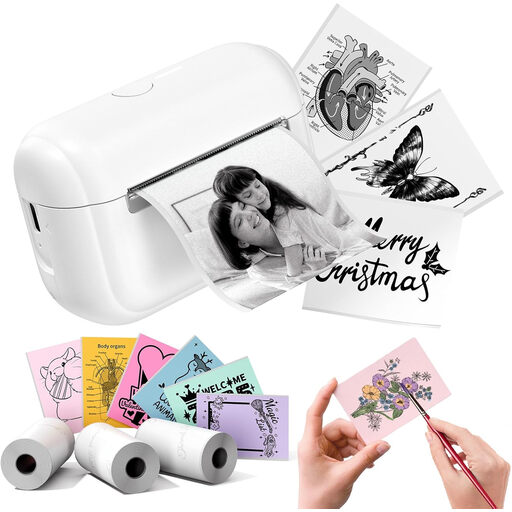 Image unavailable
Phomemo Q02E Pocket, white
A good fit for creative sticker and label projects where you want to design wirelessly.
The product description mentions ink- and toner-free thermal printing and Bluetooth control via the Memo Label app.
View at Joybuy
 Image unavailable
DYMO LetraTag 200B
A compact option for craft labels and getting organised.
The product description mentions Bluetooth, app control and a maximum label width of 1,2 cm. It lists one roll of white paper labels.
View at Joybuy
Frequently asked questions
How can I make a printed address on a Dutch letter easy to read?
PostNL recommends a sans-serif font at 10–12 points for printed addresses, without underlining or italics. Check the label printout and make sure decorative formatting doesn’t crowd out the address details.
Can I use any label rolls in a DYMO LabelWriter 550?
No. DYMO states that the LabelWriter 550 series works only with compatible DYMO labels. Before buying, check that the roll is suitable for your exact model.
Do I always need a separate label printer for occasional address labels?
No. Avery offers A4 address labels with a matching print template. Just check that the specific sheets are suitable for your existing printer.
Is CE marking relevant to an electric label printer sold in the Netherlands?
Yes. According to the European Union, electrical and electronic equipment must comply with the applicable EU product rules, including those on CE marking. The manufacturer is responsible for meeting the relevant requirements.
What can I do if my label printer develops a fault after purchase?
For consumer purchases, the Dutch Government describes the right to a free repair or replacement if a product does not meet the terms of the agreement; this depends on the circumstances. Keep your proof of purchase and model details, and report the problem to the seller.


