
PC gamer with a small desk
Wants to check that the game and controller work together first, then decide whether a cable or USB receiver will fit their setup.


Start with your console or PC and check that the action RPG supports the controller and features you want to use. Then choose between wired play, which requires space for the cable, and wireless play, where the connection and power supply need to suit your device.
Wants to check that the game and controller work together first, then decide whether a cable or USB receiver will fit their setup.
Wants controls for their console without a controller cable crossing the desk, and also considers the power supply and supported features.
Wants to be able to map buttons for combat and checks whether the controller, platform and game support those settings.
First, check the connection and compatibility with your device and game. Then choose a wired or wireless setup, and finally consider which controls and power supply will work for you.
| Consideration | What should you check? | Who should consider this? |
|---|---|---|
| Platform and game | Check the exact console or PC version, the connection mode, and whether the game supports the buttons and features you want. | If I’m choosing a controller for my device and action RPG, I want to know first that they work together. Around 36% of consumers put compatibility first. |
| Cables and desk space | Decide where the cable or USB receiver will go and whether there’s a suitable USB port available. | If my desk also needs to accommodate other devices, I don’t want a cable route or receiver getting in the way. Around 29% of consumers prioritise the space available. |
| Action buttons | Check which buttons you want to assign and whether the game or accompanying software supports that layout. | If I want quick access to certain actions during combat, I look at the buttons and the options for customising them. Around 21% of consumers choose controls as their first consideration. |
| Power supply | Check the battery type, what’s included in the box, and whether you’ll need to buy a particular cable or charging solution separately. | If I don’t want to find myself needing batteries or a cable unexpectedly, I want to know in advance what my chosen version requires. Around 14% of consumers focus mainly on the power supply and any additional essentials. |
For the 8BitDo Ultimate 2C Wireless, 8BitDo lists Bluetooth for Android and 2.4GHz or a cable for Windows. So the connection mode determines how you connect the controller.
Check which connection is intended for your platform for the exact model you’re considering.
A 2.4GHz receiver needs a suitable, free USB port.
PowerA says the wired Nano doesn’t support HD rumble, infrared or amiibo NFC. That matters if your game or the way you use your Switch relies on those features.
Check which features you use and whether playing with the Switch docked suits your setup.
The Xbox Wireless Controller is an option for Xbox and Windows PC. Microsoft also lists button mapping through the Xbox Accessories app.
DualSense is worth considering for PS5 users who also want to check whether their PC game supports the controller’s features.
According to GameSir, the G7 SE is an officially licensed wired controller for Xbox and PC.
According to 8BitDo, the Ultimate 2C Wireless offers a 2.4GHz or wired connection for Windows, and Bluetooth for Android.
The Switch Pro Controller is designed for Switch players who want to keep the Nintendo features listed.
According to PowerA, the wired Nano for Nintendo Switch has full-size buttons and sticks in a more compact frame.
This selection includes controllers for PS5, Xbox and Windows PC, as well as models that also list other devices, with a range of wired and wireless options. Check that each model’s connection and game features suit your setup.
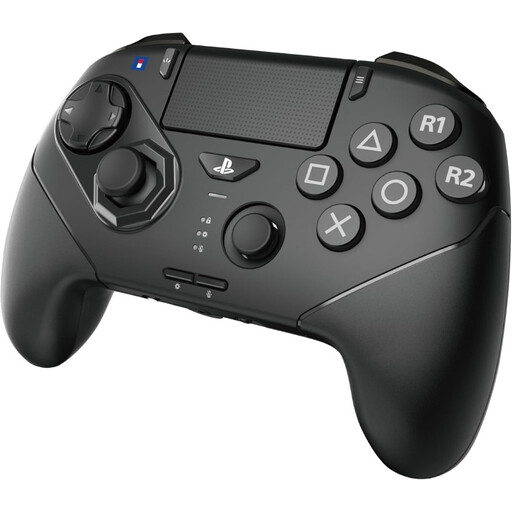 Image unavailable
An option to compare if you play on PS5 or PC and want to customise the action buttons.
The listed features include six microswitch front buttons, an 8-direction analogue stick and interchangeable D-pads. The description also mentions programmable buttons on the back.
A USB-C cable is listed for wired use, so consider how it’ll run across your desk.
 Image unavailable
An option for Xbox or Windows PC if you want to play wirelessly and customise the buttons.
The description lists Xbox Wireless, Bluetooth and USB-C, plus customisation through the Xbox Accessories app. It also mentions textured triggers, rubberised grips on the back and a headset socket.
The stated power supply is two AA batteries; check what’s included with the version you choose.
 Image unavailable
An option for PS5 and the listed PC, Mac and mobile devices; check which features are available for each game.
Sony lists haptic feedback and adaptive triggers for compatible games. The description also mentions a built-in microphone, speaker and motion sensor.
A USB-C cable is used for connecting or charging; according to the product description, it isn’t included.
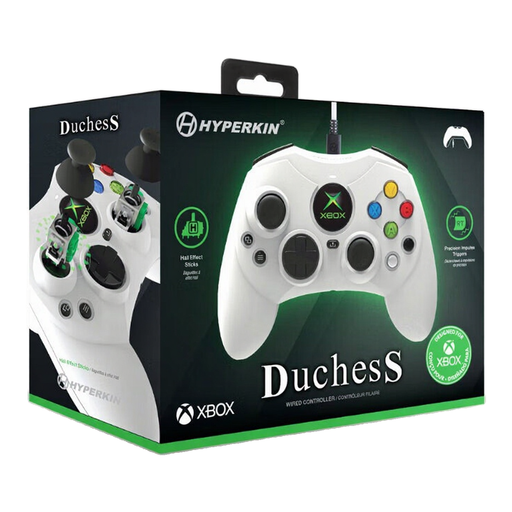 Image unavailable
A wired option for the listed Xbox consoles and Windows versions if you can make room for a cable on your desk.
The description lists Hall Effect sticks, impulse triggers, a Share button and 18 buttons.
According to the description, the detachable cable is 3 metres long; plan where it’ll run across your small desk.
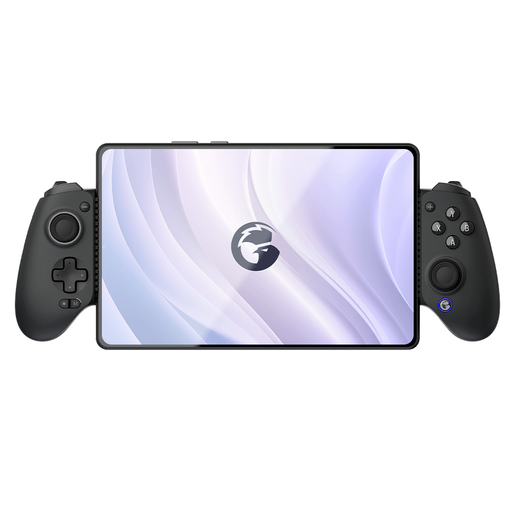 Image unavailable
An option to compare if you use one of the listed devices and want programmable rear buttons.
The product name lists Switch, iOS, Android, tablet and PC. The description mentions Hall Effect triggers, analogue sticks, programmable rear buttons and an adjustable phone holder.
First, check that the controller works with your console or PC and see which connection modes are available. Then check whether the game supports the buttons and extra features you want to use. Steam Input can configure controls, but it doesn’t confirm that every feature will work in every game.
No. Sony says haptic feedback and adaptive triggers are only available when a game supports them; a USB connection may be required.
No, the standard Xbox Wireless Controller can use AA batteries. If you want a rechargeable option, you can consider the separate Xbox Rechargeable Battery + USB-C Cable, which Microsoft says is designed for Xbox Wireless Controllers with a USB-C port. Check what’s included with the version you choose.
The Dutch Authority for Digital Infrastructure states that equipment must meet the applicable requirements and carry the required CE marking; wireless equipment must also meet European radio requirements. Check the marking on the specific item: a product page alone doesn’t confirm that it meets the requirements.
According to ACM ConsuWijzer, online purchases generally come with a statutory cooling-off period of up to 14 days after delivery, subject to legal exceptions. If a product doesn’t meet what you could reasonably expect under normal use, the seller must put things right free of charge, for example by repairing or replacing it, or giving you a refund.