
Console player on the sofa
You play an action RPG on Xbox, PS5 or Switch through your TV and want to check first that the controller works with your console. Microsoft, Sony and Nintendo set out compatibility by system and model.


First, choose a controller that works with the console or PC you play on and is supported by your game; a big screen doesn’t automatically make a controller compatible. If you’re playing from the sofa, connection and power are important considerations. With a wired controller, you’ll also need to check the cable route. Sony says that haptic feedback on PC requires both game support and a USB connection.
You play an action RPG on Xbox, PS5 or Switch through your TV and want to check first that the controller works with your console. Microsoft, Sony and Nintendo set out compatibility by system and model.
Your PC is connected to a big screen, and you want to check whether your game supports the controller features you want and whether the connection works from where you sit. Sony, for example, lists specific requirements for haptic feedback on PC.
You want to customise buttons or profiles for combat, and weigh up extra controls against platform support, connection options and any software settings for the exact model.
First, check that your platform and game work with the controller. Then consider whether wireless or wired play, power and customisable controls suit your big-screen setup.
| What to consider | What should you check? | Who should consider this? |
|---|---|---|
| Platform and game | Check compatibility with your exact console or PC, and whether the game supports the features you want. Nintendo says the Switch 2 Pro Controller does not work with the original Switch. | If I’m playing from the sofa, I want to know before buying whether the controller works with my system and game. Around 36% of consumers put compatibility first. |
| Connection from the sofa | For wired play, measure the cable route to your console or PC; the GameSir G7 SE is listed with a 3 m cable. For wireless use, check that your system supports the connection. | If you don’t want a cable across the floor, or prefer to play wired, choose a connection that suits where you sit. Around 29% of consumers prioritise connection. |
| Power and long sessions | Compare the power requirements of the exact version. Nintendo estimates the Switch Pro Controller’s battery life at around 40 hours, depending on use; the Xbox Robot White version lists an AA battery. | For long gaming sessions, I want to know how the version I choose is powered and when it might need charging or a battery replacement. Around 21% of consumers put this first. |
| Buttons and feedback | Check which buttons can be customised and whether the game supports the feature you want. For haptic feedback with DualSense on PC, Sony specifies both game support and a USB connection; Nintendo’s Switch 2 Pro Controller is for Switch 2. | If I want to reassign actions during combat or feedback is important to me, I also check the platform and game requirements. Around 14% of consumers make controls or feedback their main priority. |
The names Switch Pro Controller and Switch 2 Pro Controller don’t mean they support the same platforms. 8BitDo also lists different platform compatibility for its various Ultimate 2 versions.
Check the full model name and the platform requirements for the exact version you’re considering.
Sony says the game must support the feature, and that haptic feedback on PC requires a USB connection.
Check your game’s support and the connection before relying on this feature.
The GameSir G7 SE is specified with a 3 m cable; whether that’s long enough depends on the route between where you sit and the connected system.
Measure the cable route in your room before choosing wired play.
According to the Dutch government, there is no fixed statutory warranty period in the Netherlands. If a product is faulty, the retailer must provide a solution.
Check what additional rights an extra service provides, and contact the retailer if your product is faulty.
An option for Xbox consoles and Windows PCs. Check the features of the exact model and the connection you plan to use.
DualSense is the PS5 option and may also suit PC games that support the controller.
The Switch Pro Controller is designed for Switch and, according to Nintendo, can also pair wirelessly with Switch 2. The Switch 2 Pro Controller is a separate version.
The G7 SE is a wired option for the Xbox systems and Windows 10/11 listed by GameSir.
The Ultimate 2 Bluetooth is a customisable option for Windows and Switch; the Ultimate 2 Wireless is a different model.
These controllers suit a range of action RPG setups for Switch, Xbox, PS5 and PC. Check that each model is supported by your system and game.
 No image available
A wireless option for the listed Switch systems, with programmable rear buttons.
The product information lists Bluetooth, two programmable rear buttons, four RGB modes and battery life of up to 40 hours. Compatible systems listed include Switch 2, Switch, Switch Lite and Switch OLED.
 No image available
A wireless option for the listed Xbox consoles and Windows PCs. Check which connection suits your system.
The product information lists Xbox Series X|S, Xbox One and Windows PCs, as well as Xbox Wireless and Bluetooth. The Robot White version lists an AA battery.
 No image available
An option if you want to customise controls on PC or Nintendo Switch. Check the connection and compatibility with your specific setup.
The product information lists six programmable buttons, Bluetooth, a 2.4GHz wireless connection and wired use. Haptic feedback and adjustable stick resistance are also listed.
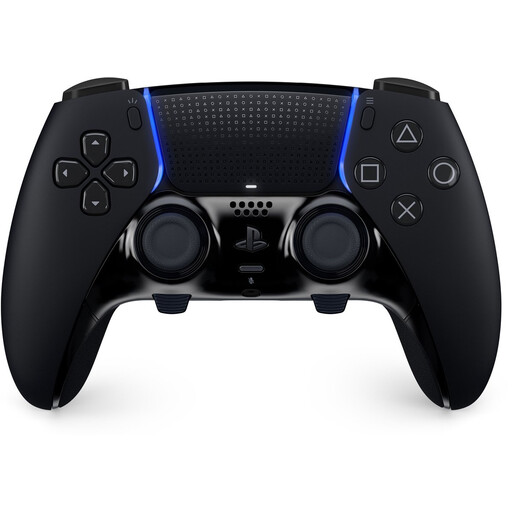 No image available
A PS5 controller for players who want to customise controls and profiles. Check that your game supports the features you want to use.
The product information lists haptic feedback, adaptive triggers, customisable profiles and interchangeable rear buttons. Replaceable joystick modules are sold separately.
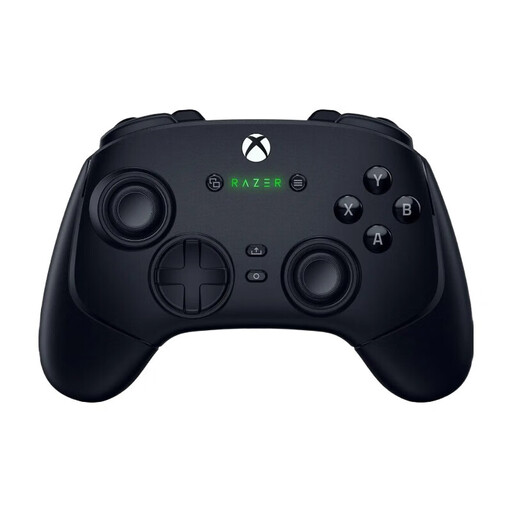 No image available
An option for the listed Xbox Series X and PC setups, with a choice of wireless or USB-C wired use.
The product information lists additional assignable buttons and profiles. Check that your chosen connection suits where you sit and the system you use.
Not necessarily. First check whether your game runs on a console, a connected PC or another device, and whether that system and the game support the controller. Bluetooth on the TV alone doesn’t confirm compatibility.
Nintendo says you can pair the controller wirelessly or connect it to the dock with the supplied USB cable while the system is in the dock. Check whether you’re using a Switch or Switch 2, then follow the pairing steps for that system.
No. Sony says the game must support the feature, and that haptic feedback on PC requires a USB connection.
According to the Dutch government, you’re entitled to a product that works properly. If it’s faulty, contact the retailer to arrange a solution. The Netherlands has no fixed statutory warranty period. For online purchases from a business, you’ll often also have a 14-day cooling-off period; this is a separate right from getting a solution for a faulty product.
No. Nintendo says the Switch 2 Pro Controller cannot be used with the original Nintendo Switch.