What should you look for?
First, check that the controller works with your device and game. Then weigh up the controls and lighting against the freedom of a wireless connection and the power source it requires.
| What to consider |
What should you check? |
Who is this important for? |
| Compatibility |
Check the console generation and operating system, and make sure the features you want are supported in your game. |
I want to avoid finding that my controller or a particular feature doesn’t work with my device or game. Around 33% of consumers say compatibility is their top priority. |
| Grip and action buttons |
Compare the grip and button layout, and check whether extra buttons can be customised on your platform. |
For repeated actions, I want to reach the buttons without having to change how I hold the controller awkwardly. Around 27% of consumers prioritise grip and easy-to-reach action buttons. |
| Lighting in the dark |
Check which parts light up and whether you can adjust the brightness or lighting effects. |
I want to see well enough without lighting effects distracting me from the game. Suitable lighting is the main concern for around 20% of consumers. |
| Connection and power |
Check which connections are supported and whether batteries or charging accessories are included with the version you choose. |
I want to play comfortably from where I’m sitting and avoid running out of power unexpectedly. Around 20% of consumers prioritise freedom of movement, connection or power. |
Controllers on Joybuy
This selection includes controllers for PS5, Nintendo Switch, and PS4 or PC. Check the compatibility, features and included accessories listed for each model.
 No image available
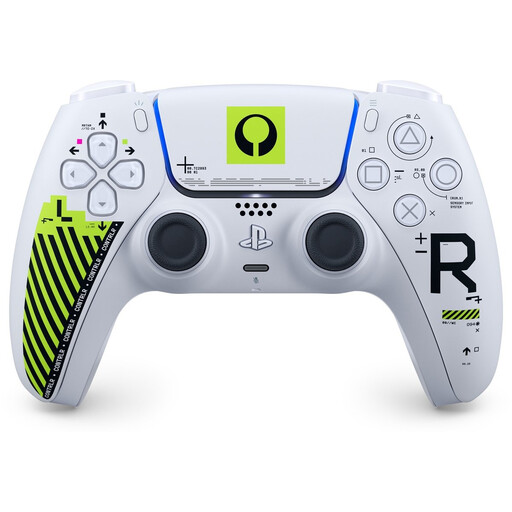
Sony DualSense Wireless Controller - Marathon Limited Edition
For PS5 players looking for a wireless DualSense controller. Haptic feedback and adaptive triggers depend on the game. On PC, advanced features may require a wired connection.
View at Joybuy
 No image available
NAXSIR Wireless Gamepad for Switch, 04-66666666
For anyone looking for a Switch gamepad with a wireless connection and lighting accents. Check which Switch features are compatible with this version.
Bluetooth; 7-colour LED; vibration feedback; stated range of 10 m.
View at Joybuy
 No image available
Turtle Beach Afterglow Wave Wireless Controller, transparent
For Switch players looking for programmable rear buttons and customisable lighting accents. According to the product information, the USB-C charging cable isn’t included.
Bluetooth; TMR sticks; stated battery life of 40 hours; four RGB modes; two programmable buttons. Listed for Nintendo Switch 2, Switch, Switch Lite and Switch OLED.
View at Joybuy
 No image available
Wireless DualShock game controller for PS4 and PC
For anyone looking for a wireless controller for PS4 or PC. Before buying, check that the stated compatibility and the features you want are suitable for your device.
View at Joybuy
 No image available
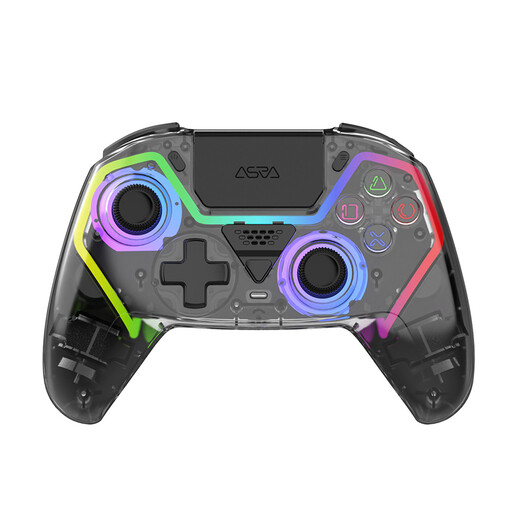
NAXSIR Wireless PS5 Controller
For PS5 players looking for programmable buttons and RGB lighting effects. The product name doesn’t confirm that the button labels light up.
Hall Effect joysticks; programmable buttons; RGB lighting; 1000 mAh battery.
View at Joybuy
Frequently asked questions
Can RGB lighting make the action buttons easier to see in the dark?
Not unless this is confirmed for the specific model. PowerA describes adjustable RGB zones on the Lumectra mentioned, but that doesn’t mean the individual action button labels are illuminated. Check which parts actually light up.
How do I dim the light on an Xbox controller?
On an Xbox console, you can adjust the brightness of the controller light when Night Mode is switched on or scheduled. Xbox Support describes this as a setting for the light, not for all the buttons.
What should I have ready for a long wireless gaming session?
Check the battery status and what’s included with your version. Xbox describes using batteries in the standard wireless controller and also offers a separate rechargeable battery with a USB-C cable.
Am I automatically entitled to exactly two years’ statutory warranty on a controller in the Netherlands?
No. According to the Dutch government, the Netherlands doesn’t have a fixed statutory warranty period: you’re entitled to a product that’s fit for purpose. Depending on the circumstances, a fault may entitle you to a free repair, replacement or refund. A commercial warranty is separate.
Can I return a controller bought online if I don’t like the grip?
According to the Dutch government, a 14-day cooling-off period applies in many cases to eligible distance sales to consumers. Check who the seller is and the returns information provided with your purchase. The Dutch government says that buying online from a private individual doesn’t count as a distance sale.


