
Players with limited access to plug sockets
If you don’t want a separate controller charger, you can weigh up using a suitable USB port on your gaming system against replaceable batteries or charging between gaming sessions.


First, choose a controller that works with your console or PC and the game you play. Then consider how it’s powered: a wired controller uses a port on your gaming system, while wireless models need batteries or time to recharge. Also check the cable reach and whether the game supports any extra features.
If you don’t want a separate controller charger, you can weigh up using a suitable USB port on your gaming system against replaceable batteries or charging between gaming sessions.
Check the exact controller model for your console. For example, Nintendo distinguishes between the Pro Controller for Switch and the one for Switch 2.
Cable reach, grip and button layout can all make a difference. PowerA lists a 10 ft cable for the Advantage Wired, while Sony says haptics and adaptive triggers depend on the game.
First check compatibility with your system and game, then choose the power option that suits your setup. This helps you avoid choosing a wireless connection, extra feature or battery option that doesn’t match what you actually use.
| What to consider | What should you check? | Who is this important for? |
|---|---|---|
| Power without an extra plug socket | Check whether you can use a USB port on your gaming system, or which batteries and cables come with the model. | If I don’t want to use a separate controller plug while gaming, I compare wired play with using batteries and charging between sessions. Around 33% of consumers put this power choice first. |
| Compatibility with your system and game | Compare the full model name and console version. On PC, also check the required connection type and game support. | If you mainly want to make sure the controller works with your system and the game you plan to play, check that combination first. Around 33% of consumers say compatibility is their main consideration. |
| Comfort and control during long sessions | Check the cable reach and the position of the sticks and buttons; try the shape for yourself if possible. | If I play for a long time, I want the cable to reach where I sit and the controls to suit my hands. Around 20% of consumers prioritise comfort during extended play. |
| Extra buttons and gaming features | Check whether the game and platform support the feature you want and whether it requires a particular connection. | If you want to customise an action RPG around extra buttons or specific in-game feedback, first check that those features are available in your game. Around 14% of consumers prioritise extra controls or feedback. |
Nintendo lists the Switch 2 Pro Controller for use with Switch 2 only. The Pro Controller name doesn’t mean the models are interchangeable.
Compare the full model name with the console you own before weighing up other features.
Microsoft specifies standard AA batteries for its Xbox controller battery test and also offers a separate rechargeable battery.
Check which batteries, cable and charging options are included with each pack.
Sony says haptic feedback and adaptive triggers depend on the game and may require a USB connection. PowerA also notes that support for certain features varies by title.
Check whether the feature you want works with your game and platform, rather than relying on the controller description alone.
The model and included items listed with a controller can determine how it’s powered.
Check the full manufacturer model name and what’s in the box before relying on a particular battery or charging option.
Xbox controllers are available for supported Xbox consoles and Windows PCs, with both wireless and wired models.
DualSense is the controller for PS5 and can be used via USB-C or Bluetooth with certain PC and mobile applications.
Nintendo has separate Pro Controller ranges for the original Switch and Switch 2. Choose the one that matches your console version.
PowerA makes, among other products, wired controllers licensed for Xbox that also work with supported Windows PCs.
According to 8BitDo, the Ultimate 2C Wireless is designed for Windows and Android, with different connection options for each platform.
This selection includes controllers labelled for Switch, PC, PS5 and Xbox, including one wired model. For each version, check the stated platform support, connection type and power options.
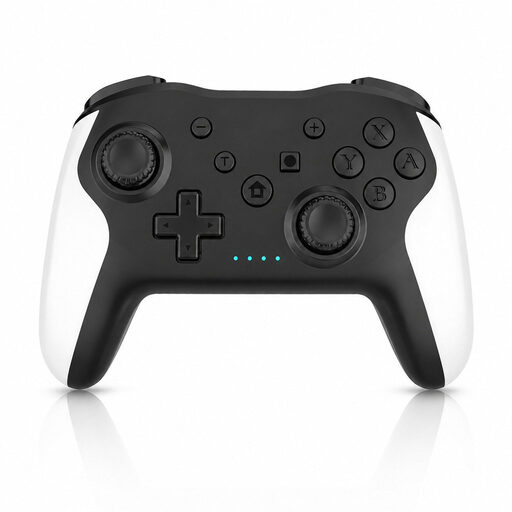 No image available
The product name mentions Switch and PC, along with dual vibration and gyro. Check which connection and features are supported on your system.
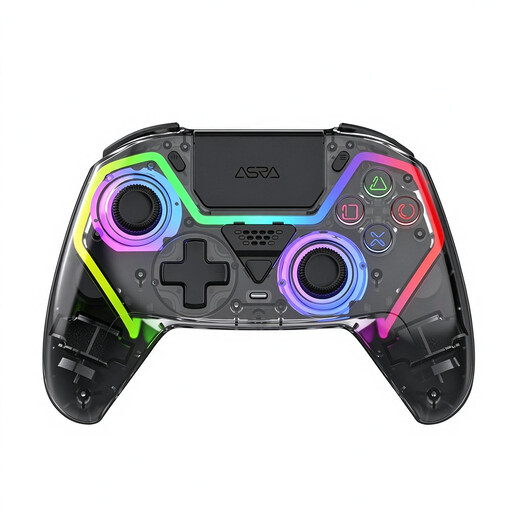 No image available
The product name mentions PC and a PS5 layout, but that layout alone doesn’t confirm PS5 compatibility. Check which devices and connections are supported before buying.
 No image available
The product name identifies this as a wireless PS5 controller. Check which cable and other accessories are included with the version you choose.
 No image available
The product name identifies this as a wireless Xbox controller. Check its compatibility with your system and which power options are included with this version.
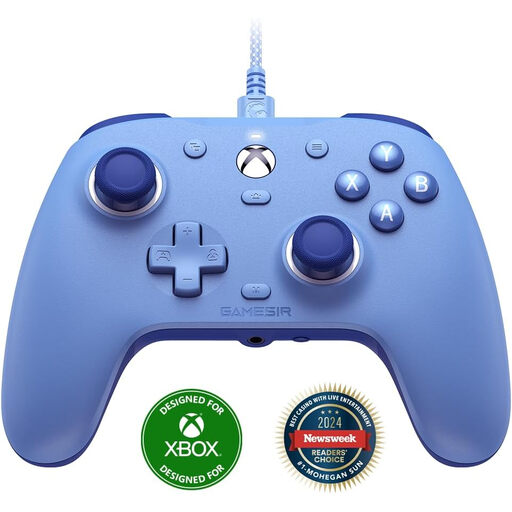 No image available
The product name specifies a wired connection and support for the listed Xbox systems and Windows versions. Check that the cable reach and connection suit your setup.
Not the PowerA Advantage reviewed here: it connects to a supported Xbox or Windows PC using a USB-C cable. Your gaming system still needs its own power supply, so check that you have a suitable USB port and enough cable reach.
Sony lists USB-C and Bluetooth for use with Windows PCs, among other devices. Haptic feedback and adaptive triggers depend on the game and may require a USB connection, so check support for the specific title.
You don’t need a controller charging kit if you use AA batteries. Microsoft also offers a separate rechargeable Xbox battery, so check whether it’s included with the version you choose.
Nintendo lists the Switch 2 Pro Controller for use with Switch 2 only. Compare the full model name with your console rather than relying on the Pro Controller name alone.
The Dutch government lists shops and supermarkets that sell batteries as collection points for used batteries. Follow the instructions at the collection point.