
You want to keep the room quiet
You play while someone else is resting and want to know where the game audio goes and which controller outputs you can adjust. Options vary by system.


Start with a controller that works with your console or PC and the game you play. Then check where you can connect headphones and which controller sounds or vibrations you can adjust. Wireless play gives you room to move; a wired controller does not need batteries, but it does mean running a cable through the shared room.
You play while someone else is resting and want to know where the game audio goes and which controller outputs you can adjust. Options vary by system.
You switch between PC, Xbox, PlayStation or Switch and want to check that the controller works with your device. Supported features can also depend on the platform, game and connection.
You use sticks, triggers and buttons for extended periods, and weigh up extra controls against cable space, charging or batteries. A list of features won’t tell you on its own how comfortable a controller will be in your hands.
First, check that the controller works with your system and game. Then look at the audio connection and settings that suit the room, before weighing up the controls and power options.
| What to consider | What should you check? | Who is this important for? |
|---|---|---|
| Compatibility | Check the exact model name, system, game and connection method. Don’t assume every feature works with every connection. | If I play on multiple systems, I want to avoid buying a controller that doesn’t suit my setup. Around 33% of consumers say compatibility is their main buying priority. |
| Sound and vibration | Check where you can connect a headset and which outputs you can adjust. PlayStation Support explains volume and vibration settings on PS5; Nintendo Support explains how to turn off controller vibration on Switch. | If someone else is resting in the bedroom, I want to be able to adjust game audio and vibration without assuming the buttons are quiet. Around 27% of consumers prioritise their roommate’s peace and quiet. |
| Controls in combat | Check whether the button layout and any mappable buttons suit the actions in your game. Extra buttons alone are no proof of better gaming performance. | For repeated actions, I want to use controls that suit my play style. Around 20% of consumers give combat controls top priority. |
| Power and cable space | Compare AA batteries, charging and wired play. If you choose a wired controller, also check whether you can route the cable safely through the room. | If I play long sessions, I want to know whether I’ll need to change batteries, charge a controller or work around a cable. Around 20% of consumers focus mainly on extended use and power options. |
With a DualSense on PC, features depend on the game and connection. Sony states that haptic feedback and the headset jack require a wired connection on PC.
Before buying, check which feature you want to use in each game and whether it requires USB or Bluetooth.
You may need a cable or a different audio connection to use the feature you want.
Nintendo lists the Switch 2 Pro Controller for Switch 2 only. The older Switch Pro Controller can be used wirelessly with Switch 2, but it doesn’t have the same listed features.
Check the full model name and the system you want to use the controller with.
Xbox quotes a battery life of up to 40 hours for the standard Xbox Wireless Controller; according to Xbox, this varies depending on factors including use and accessories.
Compare AA batteries, charging and wired play with the way you use your controller.
A standard Xbox Wireless Controller may need replacement AA batteries or a separate charging solution.
GameSir specifies that the G7 SE has a detachable 3 m cable. That reach doesn’t automatically mean the cable will be convenient or safe in a shared room.
Measure the distance to your device and choose a route that your roommate won’t have to walk across.
The DualSense is designed for PS5 and is also supported with certain PC, Mac and mobile setups.
The Xbox Wireless Controller is designed for supported Xbox systems, Windows PCs and mobile devices.
Nintendo offers separate Pro Controllers for Switch and Switch 2.
The G7 SE is a wired option for the Xbox systems and Windows 10/11 listed by GameSir.
The Ultimate 2C Wireless is designed for the Windows and Android setups listed by 8BitDo.
This selection includes controllers for Nintendo Switch, PS5, PC, Xbox and mobile devices. Check that the features you want are available for each model, game and connection.
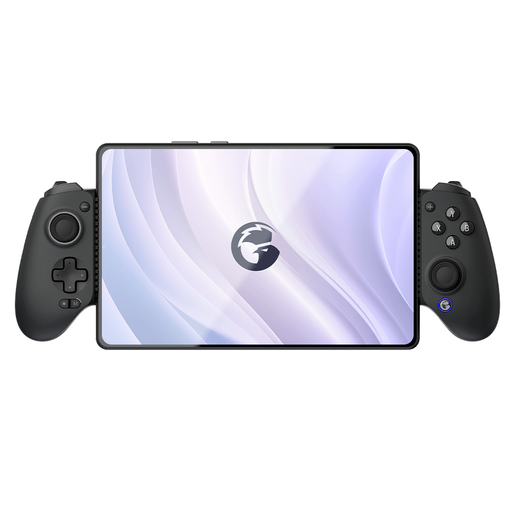 No image available
For the listed Switch, iOS, Android, tablet and PC setups, the product information specifies Bluetooth support.
The product information lists Hall Effect triggers and programmable rear buttons.
 No image available
According to the product information, this wireless controller is designed for Nintendo Switch.
The product information lists motion controls, HD Rumble and a built-in lithium-polymer battery.
 No image available
For PS5 games that support these features, Sony lists haptic feedback and adaptive triggers.
The product information lists a headset jack. PlayStation Support explains how to adjust speaker volume and vibration intensity on PS5.
 No image available
The product information lists support for Switch, PC, iOS and Android, with wired, Bluetooth and 2.4GHz connections.
The product information lists TMR sticks and micro-switch face buttons.
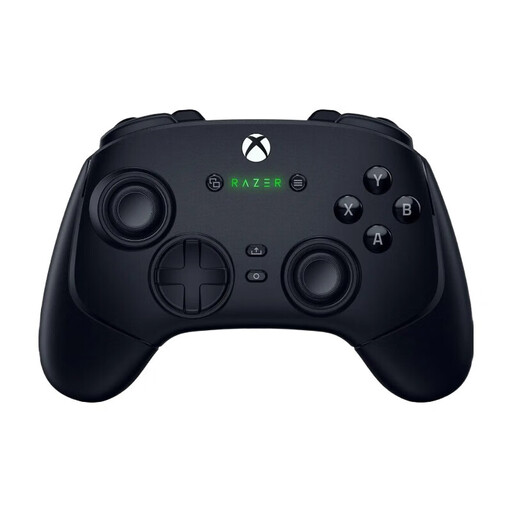 No image available
The product information lists support for PC and Xbox Series X|S, with wireless play or a wired USB-C connection.
The product description lists a built-in battery with a quoted battery life of up to 30 hours.
No, it varies by controller and connection. Xbox specifies a 3.5mm jack, and Nintendo lists one for the Switch 2 Pro Controller. Sony states that using a DualSense headset jack on PC or Mac requires a wired controller connection. Check the audio connection for your device.
According to PlayStation Support, you can adjust the controller speaker volume and vibration intensity on PS5. According to Nintendo Support, you can turn off controller vibration on Nintendo Switch under System Settings > Controllers and Sensors. These settings don’t mean that physical button sounds will disappear.
Nintendo states that up to two wireless controllers can be connected to a Nintendo Switch while Bluetooth audio is in use; a pair of Joy-Cons counts as two controllers. Nintendo also states that Bluetooth microphones aren’t supported and that audio delay may occur depending on the audio device.
According to the Dutch government, online purchases from a business generally come with a 14-day cooling-off period. If a product is faulty, Dutch law gives you the right to a product that works properly; there is no fixed statutory warranty period, and the retailer is your point of contact.
The World Health Organization recommends keeping the volume low and taking regular breaks. Its general guidance suggests using no more than 60% of the device’s maximum volume; this is health advice, not a Dutch purchasing requirement or a feature of any controller.