If you’re short of free sockets, an AA charger with a USB input may be a better fit, provided you have a suitable USB power supply. First check which battery type your mouse requires and how many cells you want to charge at once: not every charger can charge a single AA cell, and a USB connection doesn’t replace the power supply.
Who is this relevant for?
Anyone with few free sockets
You want to charge AA rechargeable batteries for a mouse using an available USB power supply, without using a separate socket for the charger. A USB charger still needs a suitable power source; VARTA specifies a USB-C input for the Universal Charger.
Anyone with a mouse that uses one AA cell
You may want to charge a single spare cell on its own. Check the charging channels: IKEA says the STENKOL can charge one to four AA or AAA NiMH cells individually.
Anyone starting without AA rechargeable batteries
You want to buy a charger and enough suitable rechargeable batteries for everyday use and as spares. Check what’s included in each pack; Energizer lists four AA NiMH rechargeable batteries in its Pro Charger set.
What should you look for?
USB charging
Choose this if: you can use a suitable USB power supply and don’t want to reserve a socket for the charger. VARTA specifies charging two or four AA NiMH cells.
Bear in mind: you’ll need a power supply; a USB-C connection doesn’t mean the charger supplies power by itself.
Mains charging
Choose this if: you can free up a socket temporarily and want to be able to charge a single AA NiMH cell. IKEA specifies four independent charging channels for the STENKOL.
Bear in mind: the charger uses a socket while charging.
A starter set with rechargeable batteries
Choose this if: you don’t already have suitable rechargeable batteries. Energizer lists four AA NiMH rechargeable batteries in its Dutch Pro Charger set.
Bear in mind: this charger uses a socket and, according to Energizer, is designed to charge two or four cells at a time.
| What to consider |
What to look for when buying |
Who is this important for? |
| Keeping a socket free |
Check the connection and the USB power supply required. |
I want to charge without using an extra socket, but I still need a suitable USB power supply. Around 28% of consumers prioritise avoiding a dedicated plug for the charger. |
| Charging a single cell on its own |
Check whether one AA cell is enough or whether two or four cells need to be charged at once. |
If I want to charge one spare AA cell, I don’t want to have to add a second cell to the charger. Around 22% of consumers particularly value the ability to charge cells individually. |
| Battery type and mouse requirements |
Check your mouse’s instructions and the battery chemistry the charger supports. |
I want to make sure the rechargeable battery is compatible with both my mouse and the charger. Around 22% of consumers put compatibility first. |
| Keeping a spare set ready |
Count how many AA cells your mouse uses and check how many suitable rechargeable batteries are included in the pack. |
I want to have spares ready while the other cells are charging. Around 17% of consumers prioritise having a usable spare set. |
| Knowing what the full purchase involves |
Check whether you’ll also need rechargeable batteries, a cable or a USB power supply. |
I want to know in advance which parts I’ll need for charging and keeping spares. Around 11% of consumers pay particular attention to the complete purchase. |
Common pitfalls
-
Assuming all AA batteries are interchangeable
AA indicates the size, but not whether the battery is rechargeable or suitable for your mouse. The chargers mentioned are designed for rechargeable NiMH cells.
Check your mouse’s instructions and only use a battery type approved for both the mouse and the charger.
-
Assuming every charger can charge a single cell
IKEA specifies individual charging channels for one to four cells; VARTA and Energizer specify charging two or four cells.
If you need to charge a single AA cell on its own, check explicitly that the charger supports this.
-
Thinking USB doesn’t need a power supply
USB describes the charger’s connection, not an independent power source.
Check which USB power supply you need and whether you have one available. VARTA says a USB-C cable is included, but a cable isn’t the same as a power source.
-
Confusing a standalone charger with a complete set
A pack containing just a charger may not include rechargeable batteries. Energizer lists four AA cells in its Pro Charger set; that doesn’t tell you what’s included in a different pack.
Check the contents of the pack you choose and count how many suitable rechargeable batteries you’ll need for everyday use and as spares.
Relevant brands to consider
IKEA
The STENKOL is a charger for AA and AAA NiMH cells that plugs directly into a socket.
- IKEA says the STENKOL has four independent charging channels for one to four cells.
- The charger uses a socket; if you’re buying a pack with rechargeable batteries, check which cells are included.
VARTA
The Universal Charger type 57658 is a USB-C-powered option for AA NiMH cells.
- VARTA says a USB-C cable is included and that the charger can charge two or four AA cells.
- Charging a single AA cell isn’t listed as an option. The stated charging time of 4.5 hours applies to four 1600 mAh AA cells.
Energizer
The Dutch Pro Charger product page describes a mains charger that comes with four AA NiMH rechargeable batteries.
- Energizer says the charger can charge two or four AA or AAA NiMH cells and indicates the charging status.
- Energizer says the stated charging time of four hours may vary for each NiMH battery.
Products at Joybuy
These products are suitable if you want to charge via USB or keep AA cells ready as spares. Always check that the battery type is suitable for your specific mouse before use.
 No image available
Aigostar Quick battery charger with Smart IC, 4 AA/AAA, black
Suitable if you want to charge cells individually via USB; check that the permitted battery type matches your mouse’s instructions.
The product description specifies four independent charging channels for NiMH and NiCd cells and a USB cable. The stated power supply is DC 5 V 1 A.
Joybuy
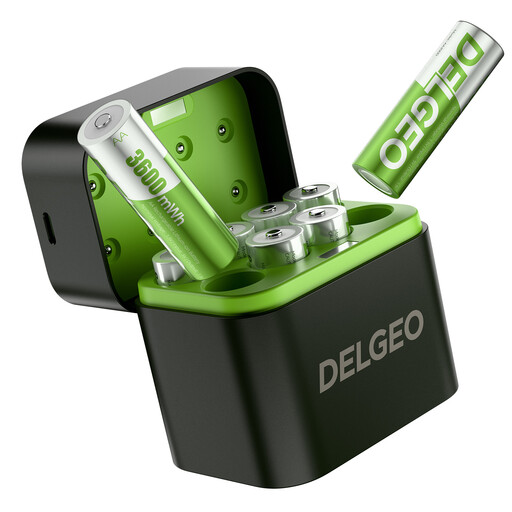 No image available
Set of 8 AA lithium batteries with USB-C charger
This set may be useful if you want to keep several AA cells ready, but the product title doesn’t confirm that these cells are suitable for your mouse. Check the instructions before using them.
The product title lists eight AA lithium batteries and a USB-C charger. The description specifies a 5 V 3 A power supply.
Joybuy
Frequently asked questions
Can I charge any AA battery in an AA NiMH charger?
No. The chargers mentioned are designed for rechargeable NiMH cells; the STENKOL instructions describe a fault-detection feature for non-rechargeable batteries. Also check which battery type your mouse’s instructions require.
How can I keep a spare ready if my mouse uses two AA cells?
First check whether that specific mouse supports NiMH cells. Then make sure you have enough suitable cells for everyday use and as spares. Milieu Centraal advises against using old and new batteries, or rechargeable and non-rechargeable batteries, together in one device.
Does USB-C on the charger mean I don’t need a power supply?
No. The VARTA Universal Charger has a USB-C input and, according to VARTA, comes with a USB-C cable. Check which suitable USB power supply you can use.
What if the charger breaks too quickly during normal use?
In the Netherlands, ACM ConsuWijzer says the seller must provide an appropriate solution free of charge if the product doesn’t meet what you could reasonably expect during normal use. This could include a repair, replacement or refund.
Can empty AA batteries go in general waste?
No. According to the Dutch government, empty batteries must not go in the bin; take them to a designated collection point.


