
Someone with one AA-powered keyboard
You want to have a suitable set ready to use. Check your keyboard manual to find out which battery type it needs; Logitech recommends following the size and type specified in the device instructions.


First, check your keyboard manual to see whether rechargeable AA NiMH cells are suitable; the AA size alone doesn’t confirm this. A charger with two slots may be enough for a fixed pair, while individual charging channels are more convenient if you also want to charge a single spare cell. Compare the charging time for the number of cells you use at once, and check whether batteries and any power adapter are included.
You want to have a suitable set ready to use. Check your keyboard manual to find out which battery type it needs; Logitech recommends following the size and type specified in the device instructions.
You may want to charge one cell sometimes and several cells at other times. Compare how many cells you can charge at once and whether the charger has separate charging slots.
You may need both a charger and batteries. Check what’s included and whether a power adapter is supplied; VARTA, for example, states that the adapter required for the LCD Multi Charger+ 57681 is not included.
Start by checking your keyboard’s battery instructions. Then choose based on how many cells you want to prepare at once, and whether the set should include batteries or an adapter.
| What to consider | What to look for | Who should pay most attention? |
|---|---|---|
| Battery type and suitability | Compare your keyboard manual with the sizes and chemistries supported by the charger. Don’t charge ordinary alkaline batteries in a charger for NiMH cells; Energizer warns against this in the instructions for its NiMH charger. | If you first need to check whether rechargeable AA cells are suitable for your keyboard, compatibility is the key question. Around 40% of consumers prioritise choosing the right battery type. |
| Charging slots | Check whether you can charge one, two or more cells, and whether each slot works independently. | If you sometimes charge a single spare cell and at other times a set, flexible charging matters more than being able to load only a fixed pair. Around 25% of consumers prioritise individual or interchangeable spare cells. |
| Charging time | Compare the stated charging time for the same number of cells with the same capacity. A time quoted for two cells doesn’t automatically apply to a full charger. | If you want a charged spare set ready for the working day, a charging time that suits the number of cells you’re charging will help you plan. Around 18% of consumers prioritise this. |
| What’s included and power supply | Check whether batteries are included and what power source or adapter the charger requires. | If you don’t already have rechargeable cells, you’ll want to know whether your purchase gives you a complete, ready-to-use set. Around 17% of consumers focus on buying a complete set with a suitable power supply. |
An AA battery isn’t automatically the right chemistry for your device. Panasonic states that eneloop cells have a nominal voltage of around 1.2 V, compared with around 1.5 V for alkaline batteries. Don’t assume that an unfamiliar keyboard will accept NiMH cells.
Check your exact keyboard model and follow its battery instructions before choosing a charger or set.
The stated charging time can depend on how many cells you charge at once and their capacity. A time given for a smaller number of cells isn’t a general guarantee for a full charger.
Plan for a spare set using the time the manufacturer specifies for the number of cells you’re charging.
The VARTA LCD Multi Charger+ 57681 requires a suitable USB-C-PD adapter, but one isn’t included.
Check the power requirements and what’s in the box for the exact model before ordering.
The models mentioned offer different numbers of charging slots.
The BQ-CC55 is designed to charge one to four eneloop or eneloop pro AA/AAA cells individually.
The Dutch product information describes a Pro Charger for NiMH AA and AAA cells.
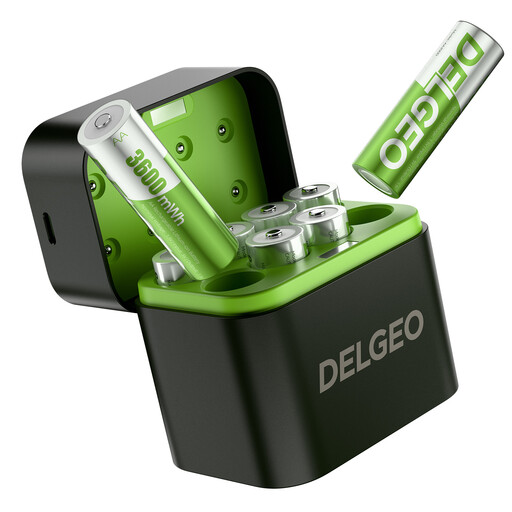
These products include a set of AA lithium batteries with a compatible charger, and an AA/AAA battery charger. Before use, check that the battery type matches your keyboard’s instructions.
 No image available
Could suit you if you’re looking for a set of rechargeable AA lithium cells with a compatible charger, but only use these if your keyboard manual says this battery type is suitable.
The product name lists eight AA lithium batteries and a USB-C charger. This isn’t a NiMH set; use the supplied charger with the cells it’s designed for.
 No image available
This could be an option if you’re looking for a charger for AA or AAA cells and want to charge individual cells too. Before use, check which battery chemistries are supported by your keyboard and the specific charger.
The product name lists AA/AAA. It requires a DC 5 V/1 A power supply.
No. Don’t charge ordinary alkaline batteries in a charger for rechargeable NiMH cells. Check the type shown on the battery and follow your keyboard’s instructions too.
Check the manual for your exact keyboard model. The AA size alone doesn’t confirm that NiMH cells are suitable; follow the specified battery type.
It depends on the version. Check what’s in the box and the power requirements. For example, the VARTA LCD Multi Charger+ 57681 requires a suitable USB-C-PD adapter, which isn’t included.
According to the Dutch government, you can return used batteries to shops and supermarkets that sell batteries, among other places. In the Netherlands, there’s no fixed statutory warranty period; the legal guarantee means a product must be fit for purpose, and the retailer is your point of contact if something goes wrong.