First, check whether your controller uses replaceable AA cells. Microsoft states that rechargeable AA cells cannot be charged inside the relevant Xbox controller, while the Xbox Elite Wireless Controller Series 2 has a built-in battery. For a spare set of AA cells, choose a charger that’s compatible with their chemistry; a NiMH charger isn’t designed for disposable batteries. Only compare charging times when the cells have the same capacity and you’re charging the same number of them, and check whether batteries and a power supply are included.
Who needs an AA charger?
Gamer with a spare set of AA cells
Wants to keep a set of charged AA cells ready to use. First, check whether your controller uses replaceable AA cells; Microsoft states that rechargeable AA cells cannot be charged inside the relevant Xbox controller.
Gamer short on time to prepare
Has little time between discovering that the cells are flat and starting to play. Compare charging times under the same conditions, such as cell capacity and the number of cells being charged.
New user with one charging spot
Is looking for a charger to use at home and wants to know whether the pack includes the required cells or power supply. For example, IKEA sells both a standalone STENKOL charger and a STENKOL/LADDA set.
What should you look for when buying?
| What to consider |
What should you check? |
Who does this matter to? |
| Compatibility |
Check your controller model, whether it uses replaceable AA cells, and the AA/HR6 and NiMH markings on the cells and charger. |
If my controller doesn’t use replaceable AA cells, I don’t need an AA charger. That’s why around 33% of consumers prioritise compatibility. |
| Charging time |
Compare chargers using the same number of cells and the same capacity; also check whether the time is for a partial or full charge. |
I want my spare set ready before I start playing, so I compare charging times under the same conditions. Around 27% of consumers prioritise preparation time. |
| What’s in the box |
Check whether AA cells, a cable and any required mains power supply are included. |
I don’t want to find out after buying that I still need compatible cells or a power supply. Around 20% of consumers focus on what comes with the charger. |
| Charging management |
Check whether the charging slots work independently, how many AA cells can be charged at once and how the charging status is shown. |
If I don’t want to charge four cells at a time, it’s useful to see the status of each cell. Around 20% of consumers value being able to monitor the charging process. |
Common buying mistakes
-
Buying an AA charger for a controller with a built-in battery
Controller models vary. For example, Microsoft states that the Xbox Elite Wireless Controller Series 2 has a built-in battery.
Before buying, check the exact controller model, battery compartment and manual.
-
Assuming a 45-minute charging time means a full charge
According to Duracell, the CEF27’s claim refers to around 85% charge for specific 1.300 mAh AA NiMH cells. That’s not the same as a general charging time for a full charge.
For any fast-charging claim, check the cell capacity, the number of cells and whether the stated time is for a partial or full charge.
-
Assuming a USB-C port means a power adapter is included
According to VARTA, the VARTA LCD Smart Charger+ 57684 requires a compatible USB-C-PD power supply, which isn’t included.
Check what’s in the box and the power specifications required for the exact model.
If you don’t already have a suitable USB-C-PD power supply, you’ll need to get one separately.
-
Putting non-rechargeable AA cells in a NiMH charger
The IKEA STENKOL manual only permits compatible rechargeable NiMH cells and warns against charging non-rechargeable batteries.
Check the markings on the cells and read the manual for your chosen charger before charging.
Brands to compare
IKEA
STENKOL is a mains-powered charger for AA and AAA NiMH cells. IKEA also offers a STENKOL/LADDA set that includes cells.
- IKEA states that it has four independent charging channels for one to four cells.
- IKEA gives a typical charging time of 6–8 hours for four AA cells. Check whether you’re choosing the standalone charger or the set with cells.
Duracell
The Hi-Speed Advanced Charger CEF27 is designed to charge two or four AA or AAA cells.
- Duracell’s information gives a specific example of charging time for certain cells.
- According to Duracell, the 45-minute claim refers to around 85% charge for 1.300 mAh AA NiMH cells; it isn’t a general time for a full charge.
VARTA
The LCD Smart Charger+ 57684 is designed to charge AA and AAA cells individually, with a display and USB-C connection.
- VARTA lists charging and refresh modes, as well as detection of alkaline or faulty cells.
- A compatible USB-C-PD power supply is required; VARTA states that it isn’t included. The stated charging time applies under specific conditions.
Panasonic
The eneloop BQ-CC55 is designed for users of eneloop or eneloop pro cells in AA or AAA sizes.
- Panasonic states that cells charge individually, with a charging progress indicator for each one.
- Check which plug version is sold in your region; Panasonic states that the plug configuration varies by region.
Joybuy picks for AA cells
These picks are for getting spare AA cells ready to use: a complete set of rechargeable lithium AA cells with its own charger, and a standalone AA/AAA charger. Check that your controller is compatible with the cell type. The standalone Aigostar charger lists NiMH and NiCd cells, while the complete set contains lithium cells.
 No image available
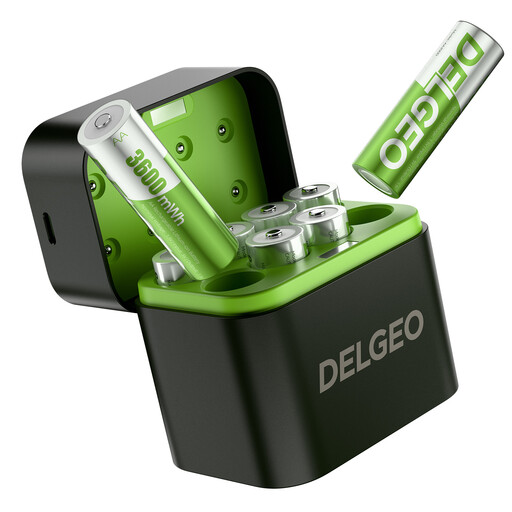
Rechargeable AA lithium battery set with USB-C charger, 8 pack
A complete set for anyone wanting to prepare AA lithium cells using the included USB-C charger. First, check that your controller supports this cell type.
The product information lists eight rechargeable AA lithium cells and a charging time of 2,5 hours when used with a 5 V/3 A power supply.
View at Joybuy
 No image available
Aigostar Quick Battery Charger with Smart IC, 4 AA/AAA
A standalone charger for anyone who already has compatible AA or AAA cells and wants to charge them in separate channels.
The product information lists support for NiMH and NiCd cells, four charging channels and a DC 5 V/1 A USB input. Check that your power supply meets this requirement.
View at Joybuy
Frequently asked questions
Will a USB cable charge AA cells while they’re in my Xbox controller?
Not with the Xbox Wireless Controller covered in Microsoft’s battery instructions: Microsoft states that rechargeable AA/HR6 cells cannot be charged inside the controller. Use a suitable external charger and follow the battery manufacturer’s instructions. If you have a different controller model, check its manual.
Can I put ordinary, non-rechargeable AA batteries in a NiMH charger?
No. The IKEA STENKOL manual warns against charging non-rechargeable batteries and states that it supports NiMH cells. If you have a different charger, follow its manual.
How can I use the IKEA STENKOL charger safely at home?
Insert compatible cells with the positive and negative ends facing the indicated direction. IKEA’s instructions for the STENKOL say to unplug the charger before cleaning it and when it’s not in use; the manual states that it’s for indoor use.
What can I do if a new charger doesn’t work properly?
According to the Dutch government, contact the retailer if the product is faulty. The retailer must offer a solution and can’t simply refer you to the manufacturer; a manufacturer’s guarantee doesn’t replace your statutory rights.
Where can I recycle used AA cells and an old battery charger?
According to the Dutch government, used household batteries must not go in general waste and can be returned to shops that sell batteries, among other places. An old electrical charger can be taken to a collection point or recycling centre. The Dutch government also describes a take-back scheme for household appliances when you buy a new, similar appliance.


