
Anyone checking compatibility first
You know your receiver uses AA batteries, but you still need to check whether its manual allows NiMH cells. The AA size alone doesn’t tell you which battery chemistry or voltage is suitable.


First, check whether your doorbell receiver’s manual allows rechargeable NiMH batteries. A receiver that specifies 1.5 V AA alkaline batteries is not automatically compatible with 1.2 V NiMH cells. If NiMH batteries are allowed, choose a charger that supports the right cells and can handle the number of AAs you want to have ready. Charge the cells in a clear space and follow the instructions; never charge them under bedding. For example, the manual for the KlikAanKlikUit ACDB-9000C specifies 2 × 1.5 V AA alkaline batteries.
You know your receiver uses AA batteries, but you still need to check whether its manual allows NiMH cells. The AA size alone doesn’t tell you which battery chemistry or voltage is suitable.
You want to have charged cells ready in advance, and you’re looking for the right battery type, a clear space for charging and guidance from the manufacturer.
Sometimes you need to charge one cell, sometimes a whole set, or you may have little time before you need to change the batteries. The number of charging slots and the conditions attached to the stated charging time may also matter.
Start with your receiver’s manual. Only once it confirms that rechargeable cells are suitable does it make sense to compare chargers by cell type, charging slots and how long you need to prepare them.
| What to consider | What should you check? | Who is this important for? |
|---|---|---|
| Compatibility | Look up the exact receiver model and check which type and voltage of AA battery it allows. Also check that the charger supports the chemistry of the rechargeable cell. | If I want to avoid buying batteries or a charger that won’t work with my receiver, I check both manuals first. Around 36% of consumers put compatibility first. |
| Safe charging | Check the battery type, polarity and charger error messages. Place it in a clear space so that heat can escape. | If I’m preparing cells in the bedroom, I want to be able to put the charger in a clear space rather than under a pillow or duvet. Around 29% of consumers prioritise safe charging. |
| Number of charging slots | Count how many AAs you need and check whether the charger can handle individual cells. Check whether any required adapter is included. | If I sometimes want to have one cell ready and sometimes a whole set, I look at how many cells the charger can charge individually. Around 21% of consumers value flexibility in set size. |
| Charging time | Compare the stated time for the right number of cells and the specified capacity. Check whether it refers to a partial or full charge. | If I only start charging shortly before I need to change the batteries, I check the charging time for my type and number of cells. Around 14% of consumers put preparation time first. |
AA is a battery size, not proof that every AA chemistry or voltage will work with your doorbell. The manual for the KlikAanKlikUit ACDB-9000C specifies 2 × 1.5 V AA alkaline batteries; that doesn’t tell you what another receiver model needs.
Look up the exact receiver model and use the specified battery type. Only charge rechargeable cells supported by the charger; non-rechargeable alkaline batteries must not be put in a charger.
Duracell’s claim of around 95% charge after 15 minutes applies to the specified Duracell AA NiMH cells rated at 1300 mAh. It doesn’t automatically apply to other batteries or mean they’ll be fully charged.
Before choosing a charger for speed, compare the stated capacity, number of cells and level of charge achieved.
VARTA states that the LCD Multi Charger+ type 57681 requires a suitable USB-C Power Delivery adapter.
Check the power requirements and what’s included with the exact model.
If you don’t already have an adapter like this, you’ll need one to power the charger.
The Fire Service advises placing a charger in a clear space so that heat can escape, and not charging it under a pillow or duvet.
Charge the cells in a clear space and follow the charger’s instructions. Only then should you have suitable cells ready by the receiver.
STENKOL is a NiMH charger for anyone looking to prepare one to four AA or AAA cells.
The BQ-CC55 is designed for users of eneloop or eneloop pro cells who want to charge one to four AA or AAA batteries.
The Expert Charger CEF15 is an option if a short preparation time matters to you and you check the charging conditions.
The LCD Multi Charger+ type 57681 is worth considering if you want to charge several NiMH AA or AAA cells and have a display.
The Pro Charger CHPRO is designed for anyone who usually charges two or four NiMH AA cells at a time.
These options are rechargeable AA cells or a charger for AA and AAA cells. Before buying, check that the battery chemistry and voltage are compatible with your doorbell receiver.
 No image available
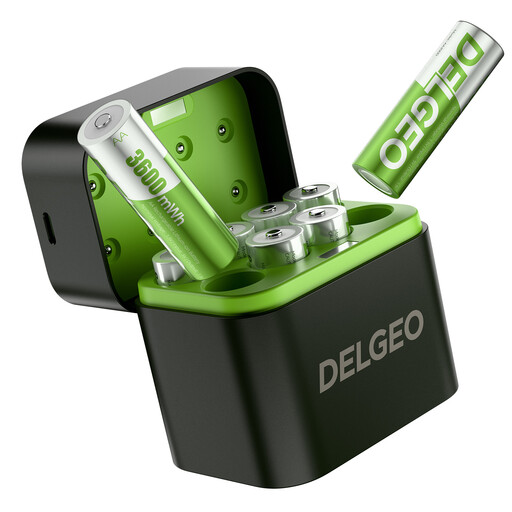
Only suitable if your receiver’s manual allows this battery chemistry and voltage; the AA size alone isn’t enough.
The product title lists a constant 1.5 V output, 3600 mWh and 2.5H, along with a USB-C charger.
 No image available
An option to compare if you’re looking for a charger for AA or AAA cells. Check that the supported battery chemistry is suitable for your cells and receiver.
The product title lists Smart IC and a model for 4 AA/AAA batteries.
Only if they’re rechargeable cells of a type supported by the charger and the receiver’s manual allows that type. The STENKOL manual allows NiMH cells and prohibits charging non-rechargeable batteries. The AA size alone isn’t enough to establish compatibility.
Place the charger in a clear space so that heat can escape, and don’t charge it under a pillow or duvet. This is the Fire Service’s safety advice; also follow the charger’s instructions.
Check the polarity and make sure the cell is rechargeable and undamaged, following the manual. With STENKOL, a flashing red light may indicate a non-rechargeable, damaged or incorrectly inserted battery, among other things.
No, it depends on the model. VARTA states that the LCD Multi Charger+ type 57681 requires a suitable USB-C Power Delivery adapter, which isn’t included. For other chargers, check the packaging and the plug type of the model on offer too.
According to the Dutch government, the seller must provide an appropriate solution if a product is faulty. There is no fixed statutory warranty period in the Netherlands; a manufacturer’s warranty is in addition to your statutory rights.