
Clock owners with few spare sockets
You want to charge suitable AA cells in advance using a USB power source you already have, without tying up another socket while they charge. First, check your clock’s battery requirements.


First, check whether your wall clock’s manual allows rechargeable AA cells; the AA size alone doesn’t tell you. If it does, a USB-powered charger is a practical choice when you have few spare sockets. If your clock uses just one AA cell, check that the charger can charge a single cell on its own. A compact plug-in charger is another option if you can free up a socket temporarily.
You want to charge suitable AA cells in advance using a USB power source you already have, without tying up another socket while they charge. First, check your clock’s battery requirements.
You don’t want to have to charge a second cell as well. So it’s more important that the charger can charge a single cell on its own than that it has lots of slots.
You want to charge other suitable battery sizes as well as those for your clock. Extra charging options are only useful if they match the cells you actually use.
Choose this option: if your clock allows rechargeable AA cells and you have a suitable USB power source. VARTA says the Eco Charger Multi Recycled can charge one to eight AA or AAA cells.
Bear in mind: eight charging slots may be more than you need for one clock. Also check what kind of USB power source is required.
Choose this option: if you want to prepare two suitable AA cells at the same time. Panasonic says the BQ-CC80 can be powered via a USB port or a suitable USB adapter.
Bear in mind: the Panasonic BQ-CC80 can’t charge a single cell or a mixed pair of AA and AAA cells. The USB mains adapter isn’t included.
Choose this option: if you can free up a socket while charging and want to charge one or two AA NiMH cells at a time. Energizer lists these charging combinations for the Mini Charger.
Bear in mind: the charger plugs directly into a socket. Energizer gives eight hours as an estimated charging time; the actual time may vary from cell to cell.
Choose this option: if your clock’s manual rules out rechargeable cells or specifies a different battery type.
Bear in mind: an AA charger won’t solve the battery requirements for that clock. Requirements vary by clock model.
| What to consider | What to look for | Who is this important for? |
|---|---|---|
| Suitable for your clock | Check the manual for the permitted battery size and type, then compare these with the cells supported by the charger. | I want to avoid charging cells that aren’t permitted in my clock. Around 36% of consumers make suitability for their clock their top buying priority. |
| Power options when sockets are limited | Check the USB connection and the power required; a USB charger still needs a suitable power source. | I want to charge using a USB power source I already have, rather than use another socket. Around 29% of consumers give the available charging option top priority. |
| Can charge a single cell | Look for explicit support for charging one AA cell at a time; the number of slots doesn’t automatically mean it can charge a single cell. | My clock uses one AA cell, and I don’t want to need a second cell as a charging partner every time. Around 21% of consumers prioritise charging cells individually. |
| Other battery-powered devices | Compare the supported sizes and charging channels with the cells you use; six slots don’t automatically mean six independent channels. | I want to use the same charger for suitable cells from other devices too. Around 14% of consumers make this broader usability their top priority. |
The AA size doesn’t automatically mean your clock can use a rechargeable cell. Manuals may specify a particular battery type for each model.
Check your exact clock model and the required battery chemistry before choosing your cells and charger.
Panasonic says the BQ-CC80 can’t charge a single battery. That’s inconvenient if your clock uses just one AA cell.
Check that the charger explicitly supports charging one cell at a time. With a charger that works in pairs, you may need a second suitable cell.
Panasonic says a USB mains adapter isn’t included with the BQ-CC80.
Check which power source the exact version requires and whether it’s included in the box.
Energizer warns in the instructions for its NiMH charger that charging other battery types can cause leakage, cracking or an explosion.
Only charge battery types and sizes permitted by the manual for your chosen charger.
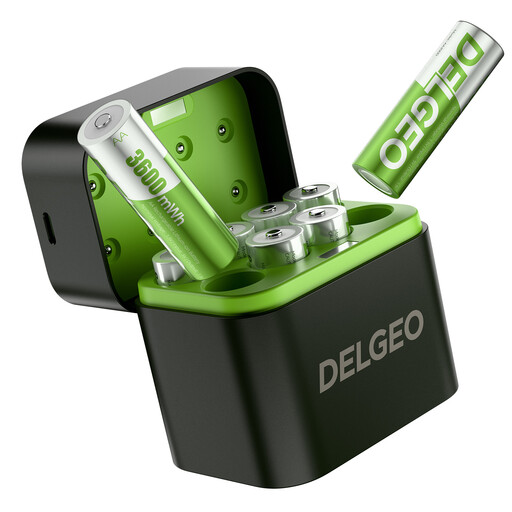
The Eco Charger Multi Recycled is worth considering if you’re looking for USB-C power and individual charging slots.
The RECYKO B631 is worth considering if you use other supported battery sizes as well as AA.
The Mini Charger is a compact plug-in option for charging one or two AA or AAA NiMH cells.
The BQ-CC80 is a USB-powered charging option if you usually prepare two suitable AA cells at the same time.
These products are designed to help you prepare rechargeable AA cells using USB power. Before use, check whether your wall clock’s manual allows that cell type.
 No image available
The set contains eight 1.5 V rechargeable AA lithium cells and a USB-C charger. The product information specifies a 5 V/3 A power source, so check that you have one available. Only use the cells if your clock’s manual allows this battery type.
 No image available
This USB-powered charger is described as suitable for rechargeable NiMH or NiCd cells. The product information lists four independent charging channels and says it can be powered by a power bank or computer, for example. Check that your clock allows rechargeable AA cells.
No. The AA size alone doesn’t tell you whether it’s suitable. Check your clock’s manual: permitted battery types vary by model.
Don’t recharge an alkaline battery in a charger designed solely for NiMH cells. Energizer warns in the instructions for its NiMH charger that charging other battery types can cause leakage, cracking or an explosion. Follow the manual for your exact charger.
Not necessarily, but a USB charger still needs a suitable power source. Panasonic lists a laptop USB port, power bank or suitable USB mains adapter as options for the BQ-CC80. Panasonic says the mains adapter isn’t included.
Check whether the charger can charge a single cell on its own. Panasonic says the BQ-CC80 can’t charge a single cell, while VARTA says the Eco Charger Multi Recycled can charge one to eight AA or AAA cells.
According to the Dutch government, used batteries must not go in the bin. Take them to a collection point, such as a shop or supermarket that sells batteries.