
Student with one AA mouse
Wants to keep a suitable spare battery handy and first checks which battery type the mouse manufacturer recommends. Milieu Centraal advises using the battery type specified by the manufacturer.


First, check whether your mouse uses replaceable AA batteries and which type the manufacturer recommends. A basic charger may be enough for one mouse. Individual charging channels are useful if you want to charge one cell at a time, while extra charging slots are mainly helpful if you use other devices too. If your mouse uses very little power, you may not need a separate charger at all; Milieu Centraal notes that alkaline batteries can sometimes be a sensible choice for devices with very low power consumption.
Wants to keep a suitable spare battery handy and first checks which battery type the mouse manufacturer recommends. Milieu Centraal advises using the battery type specified by the manufacturer.
You may also want to charge AA or AAA cells for other devices. Individual charging channels or extra slots can suit the number of cells you want to charge at once; IKEA and VARTA describe these options for their chargers.
Compares a standalone charger with a set that includes cells, and considers whether a charger is necessary if the mouse uses little power.
Start by checking the battery type and your mouse. Then look at the number of charging slots, included cells and any power supply you may need.
| What to consider | What should you check? | Who is this important for? |
|---|---|---|
| Compatibility | Check the battery size and type specified for your mouse, and compare these with the cell chemistry supported by the charger. | I want to make sure my mouse accepts the rechargeable AA cell I choose, so the combination will work. Around 36% of consumers say compatibility is their main concern when buying. |
| Everything you need to get started | Check whether suitable AA cells are included and whether the required power adapter is supplied. | I want to know what I need to get started, rather than looking at the charger on its own. Around 29% of consumers prioritise having everything they need in one purchase. |
| Charging one cell | Look for explicit confirmation that the charger supports charging cells individually; don’t assume this from the number of slots. | If my mouse uses one cell, I want to be able to charge it without having to find a second cell first. Around 21% of consumers prioritise the ability to charge one cell at a time. |
| Several devices | Count how many AA and AAA cells you actually use, and check the maximum capacity and charging method. | I also want to charge cells for other devices, so I’m looking for a charger that suits how I use them. Around 14% of consumers say use with several devices is their main concern when buying. |
AA describes the size, not whether a battery is rechargeable or suitable for your mouse.
Check both the mouse manufacturer’s instructions and which types of cells the charger can charge.
A charger specified for two cells doesn’t necessarily let you charge just one.
If this matters for your mouse, look for explicit confirmation that the charger works with a single cell.
If a charger only works with pairs, you may need a second compatible cell to charge a single flat one.
A standalone charger isn’t a complete starter set if you don’t already have suitable rechargeable cells. The VARTA LCD Multi Charger+ type 57681 also requires a suitable Power Delivery power supply, which isn’t included according to VARTA.
Check which cells and power supply you already have, and what’s included with the offer you’re considering.
To use it, you may need suitable rechargeable cells and, for this VARTA model, a compatible Power Delivery power supply.
The stated charging time may depend on the number of cells, their capacity and how charged they are. VARTA and Duracell give their stated times for specific conditions.
When checking a charging time, see how many cells are involved and what capacity and charge level the estimate is based on.
The STENKOL is a plug-in charger for AA and AAA NiMH cells. A STENKOL/LADDA set with cells is also available.
The Mini Charger type 57656 is specified for two NiMH cells, while the LCD Multi Charger+ type 57681 can charge up to eight AA or AAA cells individually.
The BQ-CC55 is designed for one to four eneloop or eneloop pro AA and AAA cells.
The Hi-Speed Value Charger CEF14 is specified for charging two or four AA or AAA cells at once.
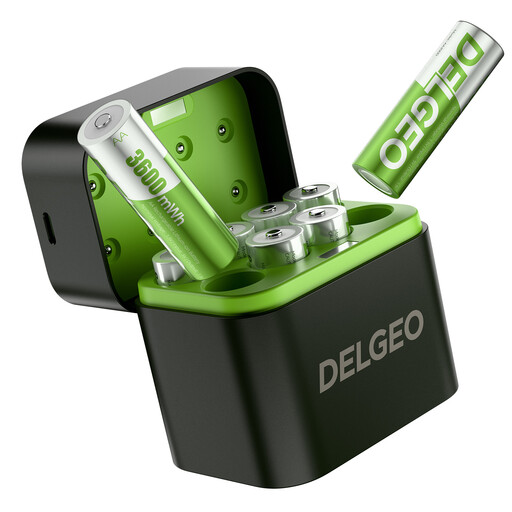
These products include a set of AA lithium cells with a USB-C charger, and a charger for AA and AAA cells. For both, first check that the battery type matches the one specified for your mouse.
 No image available
This offer is described as a set of rechargeable lithium AA cells. Choose it only if the mouse manufacturer allows this battery type.
The product name specifies eight cells, a USB-C charger and 1,5 V.
 No image available
This charger may be suitable if the mouse manufacturer allows rechargeable NiMH or NiCd cells. Check the specified cell chemistry before choosing.
The product name specifies a charger for four AA or AAA cells.
No. First check which battery type the mouse manufacturer specifies, and only charge cell types that the charger is designed for. AA only describes the size; the STENKOL, for example, is designed for AA and AAA NiMH cells.
Follow the charger’s instructions and the markings for the battery terminals. Milieu Centraal advises storing batteries in a cool, dry place and not mixing old and new cells, or rechargeable and non-rechargeable cells, in the same device.
Check whether suitable rechargeable cells and, for a USB-C model, the required power supply are included. According to the Dutch government, the retailer is responsible for the statutory guarantee if a product is faulty; in the Netherlands, there is no fixed statutory guarantee period.
According to the Dutch government, flat batteries must not go in the bin. Take them to a collection point, such as a shop that sells batteries. Milieu Centraal describes separate recycling options for small electrical items, such as chargers.