First, check your keyboard’s manual. The battery size and permitted chemistry determine whether a charger is suitable, while the number of charging slots determines how many cells you can prepare at once. If your keyboard needs six AA cells, as the Yamaha PSR-F52 does, you’ll need a charger that can charge six cells at once or you’ll have to charge them in batches. Also check the conditions attached to charging-time claims and whether a separate USB-C PD adapter is required.
Who is this choice relevant to?
Student with an AA-powered musical keyboard
Wants a full set of batteries ready before playing, and checks how many AA cells the instrument needs and whether rechargeable NiMH cells are permitted. Yamaha, for example, states that the PSR-F52 uses six AA cells; this isn’t a general rule for musical keyboards.
Student with a wireless computer keyboard
Looking for a compact charging set-up, but checks the battery size first. Logitech, for example, specifies AAA cells for the K250; not every computer keyboard uses AA batteries.
Student with limited space or few sockets
Weighs up a charger that plugs directly into the mains against a USB-C charger. Check whether a separate power adapter is needed and where you can store a spare set.
What should you look for when choosing?
Start with your keyboard’s manual, then compare the number of charging slots, charging method, power requirements and any included cells.
| What to consider |
What should you check? |
Who is this important for? |
| Battery compatibility |
Check the manual for the battery size, permitted chemistry and which cells the charger supports. |
If you’re preparing batteries for a keyboard, first make sure the size and chemistry are right. Around 26% of consumers rank compatibility as their top priority. |
| Charging a full set at once |
Count the cells you need and check how many AA cells the charger can charge simultaneously. |
If you want to prepare a full set in one go, you’ll probably prefer not to wait for a second charging cycle. Around 21% of consumers prioritise the number of charging slots. |
| Safe, hands-off charging |
Check the instructions for charging cut-off, compatible cells and where to place the charger. |
If you don’t want to keep checking on the charger, look at the stated cut-off method and charging channels. Around 21% of consumers prioritise safe, hands-off charging. |
| Charging time and power supply |
Read any charging-time claim alongside the number of cells and their capacity; also check what power supply is needed. |
If you’re getting batteries ready just before playing, you’ll want to know whether the charging time fits your plans and whether you have the right power supply. Around 16% of consumers make charging time and power supply their main considerations. |
| Included cells and accessories |
Check whether the set includes AA cells, a cable and any power adapter, and whether there are enough cells. |
If you want to buy everything you need in one go, check what’s in the box and how many cells are required. Around 16% of consumers give the most weight to included components. |
Common buying pitfalls
-
Assuming every keyboard uses AA batteries
A musical keyboard may use AA cells, while a computer keyboard may need AAA cells. Battery size and permitted chemistry vary by model.
Check your keyboard’s manual for the battery size, number of cells and permitted chemistry before choosing a charger or batteries.
-
Assuming four charging slots are enough for every set
A charger with four slots can’t prepare a set of six AA cells in one cycle.
Compare the number of cells you need with the number of AA cells the charger can charge at once. If your charger has fewer slots, plan for two charging sessions if necessary.
-
Assuming the shortest charging time applies to every battery set
The stated time may depend on the number of cells and their capacity. For example, the time VARTA gives for the LCD Smart Charger+ type 57684 applies to two 1600 mAh AA cells.
When you see a charging-time claim, read the test conditions and compare them with the cells you want to charge.
-
Assuming a USB-C charger is a complete set
VARTA states that the LCD Smart Charger+ type 57684 requires a suitable USB-C PD adapter, which isn’t included.
Before buying, check the power requirements and whether the adapter is in the box.
Brands to compare
Panasonic
The eneloop BQ-CC55 is worth comparing if you want to charge one to four compatible AA or AAA cells individually.
- Panasonic specifies individual charging control and status LEDs for each charging slot.
- The stated 90 minutes applies to two eneloop AA cells and varies with temperature and battery condition.
VARTA
The LCD Smart Charger+ type 57684 is designed for anyone who wants to see charging information on a display while charging one to four AA or AAA NiMH cells.
- VARTA specifies charging by slot and a refresh mode.
- A USB-C PD adapter rated at a minimum of 9 V/2 A or 12 V/1.25 A is required and isn’t included. The stated 1.5 hours applies to two 1600 mAh AA cells.
Energizer
The Energizer Pro Charger sold in the Netherlands is a set option that includes four AA NiMH cells.
- Energizer specifies charging two or four AA or AAA cells, with a charging status indicator.
- The stated charging options are two or four cells at a time; charging a single cell individually isn’t specified for this model. The four included AA cells don’t make up a set of six.
Aigostar
The Joybuy product description lists a compact USB-C charger with two charging slots for AA and AAA NiMH cells.
- The description specifies separate charging channels.
- According to the product description, the red LED stays on after charging. It advises removing the cells promptly.
Joybuy products
These products are suited to preparing rechargeable AA or AAA cells: a compact charger and, only if your keyboard permits this battery chemistry, a set of AA lithium cells with its own charger.
 Image unavailable
Aigostar Quick Battery Charger with Smart IC, 4 AA/AAA, black
Worth considering if your keyboard’s manual permits rechargeable AA or AAA cells and you want to charge up to four at once.
The product information lists four separate charging channels, automatic shut-off and charging status LEDs for rechargeable NiMH or NiCd cells.
USB power and a USB cable are listed. The stated dimensions are 75 × 66 × 25,2 mm.
A set of six AA cells won’t fit in a single charging cycle.
View at Joybuy
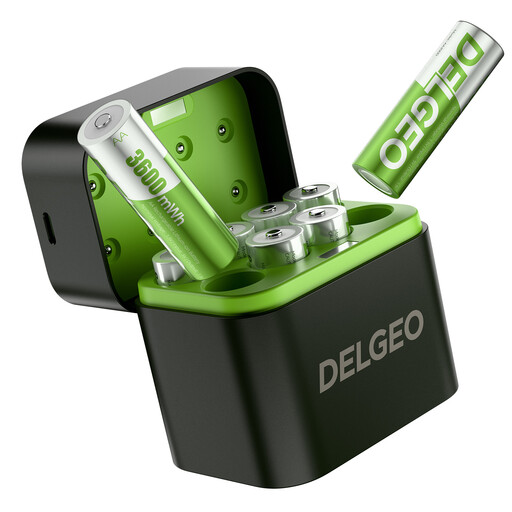 Image unavailable
8-pack of AA lithium batteries with USB-C charger
Only consider these if your keyboard’s manual expressly permits this type of rechargeable AA lithium cell; check the chemistry and voltage before use.
The product name specifies eight AA lithium cells, 1,5 V and a USB-C charger.
The product description states that all eight cells can be charged in 2,5 hours using a 5 V/3 A power supply. Check that this requirement is compatible with the included charger.
View at Joybuy
Frequently asked questions
Can I assume my keyboard accepts AA NiMH batteries?
No. Check the exact model and its manual. Yamaha specifies six rechargeable AA NiMH cells for the PSR-F52, while Logitech lists AAA cells for the K250. These examples don’t tell you what another keyboard requires.
How should I charge AA cells in a student room?
Follow the polarity markings and the instructions for the charger and cells. Don’t charge non-rechargeable batteries, and place the charger in a clear space where heat can escape, as advised by Brandweer Nederland. Don’t use damaged cells or cables.
Which accessories and warranty rights should I check?
Before buying, check whether the AA cells and required power supply are included: the Energizer Pro Charger sold in the Netherlands is listed with four AA cells, while VARTA states that the required adapter isn’t included with type 57684. For a faulty product, ACM ConsuWijzer explains your statutory warranty rights with the seller. Depending on the circumstances, the seller may repair or replace the product free of charge, or refund the purchase price.
Where can I recycle used batteries and an old charger in the Netherlands?
According to the Dutch government, used batteries must not go in general waste. You can take them to places such as shops that sell batteries. Discarded electrical appliances have a separate collection scheme. When buying a new, similar appliance, private individuals can return the old one free of charge under the take-back scheme.


