Which type of charger is right for you?

Photographers with few spare sockets

If your flash uses compatible AA cells, a USB-powered charger can be a good option if you have a suitable USB power supply or power bank. Panasonic Energy specifies a 5 V USB input for the BQ-CC87; check the power requirements for each model.

Photographers preparing spare sets

If you want to have more than one set ready, compare the number of charging slots with the number of independent charging channels, as well as the charging time when using several cells. Canon Europe specifies four AA cells for the Speedlite 600EX II-RT; a charger with eight slots could therefore accommodate two sets, provided the cells and charger are suitable.

Occasional flash users

If you usually charge one set at a time and can use a socket, a four-slot charger may be enough. IKEA Netherlands specifies four individual charging channels for the STENKOL, while Panasonic Energy describes the BQ-CC55 as a plug-in charger for eneloop cells.

What should you consider when choosing?

First, check whether your flash uses rechargeable AA cells and which types it supports. Then decide whether you want to charge without using a mains socket directly, how many cells need to be ready at once and how much time you have.

What to consider What to look for Especially useful for
Charging without using an extra socket Check the USB input, the required power supply and whether an adapter or cable is included. If I don’t want the charger to take up a socket, I need to know whether my available USB power supply is suitable. Around 36% of consumers give charging without using an extra socket top priority.
Several spare sets Compare the number of charging slots with the number of independent charging channels. If I want to prepare several flash sets at once, I need enough slots and want to know how the charger distributes the cells. Around 29% of consumers prioritise having several spare sets.
Preparation time Compare charging times only for the same number of cells, and check the stated capacity and power supply. If my batteries need to be ready by a certain time, I want a charging-time estimate that applies to my whole set. Around 21% of consumers make the time available for preparation their main consideration.
Simple four-slot charger Check whether four slots are enough and whether the charger works with the approved rechargeable AA cells. If I usually charge one set and can use a socket, I don’t want to choose extra charging slots or a power supply I don’t need. Around 14% of consumers give a simple four-slot setup top priority.

Common buying mistakes

  • Assuming eight charging slots means eight independent channels

    The number of slots doesn’t tell you how many cells are charged individually. GP specifies four independent channels for the E821; VARTA separately describes individual charging for the LCD Multi Charger+ type 57681.

    If you’re preparing different sets, compare both the number of slots and the stated number of independent channels.

  • Assuming a USB-C connection works with any USB adapter

    According to VARTA, the LCD Multi Charger+ type 57681 requires a USB-C PD power supply rated at a minimum of 9 V/2 A or 12 V/1.25 A. The power supply isn’t included.

    Before buying, check whether you already have a power supply with the required specifications and what’s included with the version you’ve chosen.

    This VARTA model requires a suitable USB-C PD power supply, which isn’t included in the box.

  • Using a charging time for two cells as a guide for a set of four

    A charging-time estimate applies to a specific number of cells and a particular capacity. Panasonic specifies approximately 90 minutes for two eneloop AA cells in the BQ-CC55; IKEA Netherlands gives a typical charging time of 6–8 hours for four AA cells in the STENKOL.

    Plan around the charging time for the number and capacity of your cells, rather than using a shorter estimate for a smaller load.

  • Assuming every camera flash uses AA batteries

    Power sources vary by flash. Canon Europe specifies four AA cells for the Speedlite 600EX II-RT and a proprietary LP-EL lithium-ion battery for the EL-5 (Ver.2).

    Check the exact model and its manual before choosing AA cells or an AA charger.

    An AA charger won’t work with a flash that uses its own battery pack.

Relevant brands to consider

VARTA

The LCD Multi Charger+ type 57681 is an option if you want to load up to eight NiMH AA cells and have a USB-C PD power supply available.

  • VARTA specifies eight individual charging slots and an LCD showing the charging status.
  • The required USB-C PD power supply isn’t included. The stated four-hour charging time applies to four 1600 mAh AA cells; it won’t necessarily apply to eight cells or other capacities.

Panasonic

The eneloop range includes the BQ-CC87 USB charger and the BQ-CC55 plug-in charger, both with four charging slots.

  • Panasonic specifies individual charging for both models.
  • According to Panasonic, the BQ-CC87 is designed for eneloop and eneloop pro cells; a USB mains adapter isn’t included. The plug type for the BQ-CC55 varies by sales region.

GP Batteries

The ReCyko E821 is a USB-powered charger for anyone who wants to prepare several NiMH AA or AAA cells at once.

  • GP specifies charging two, four, six or eight cells at once, using four independent channels.
  • For 1300–2600 mAh AA cells, GP gives a charging time of 6–12 hours, depending in part on the USB power supply.

IKEA

The STENKOL is a four-slot plug-in charger for NiMH AA and AAA cells.

  • IKEA specifies individual charging channels and automatic shut-off.
  • IKEA Netherlands gives a typical charging time of 6–8 hours for four AA cells. Use this estimate for a full set rather than relying on a shorter general estimate.

Joybuy product picks

The options below include a USB-C set with AA lithium batteries and a USB charger for rechargeable NiMH or NiCd cells. Check which cell type your flash supports and which power supply is suitable for the charger.
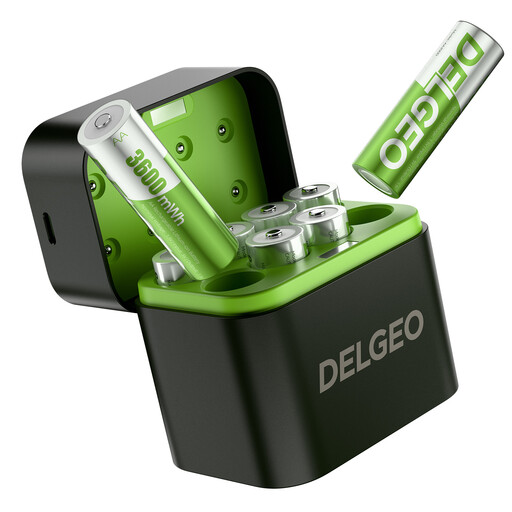
Set of AA lithium batteries with USB-C charger

AA lithium batteries, 8-pack with USB-C charger

This set may suit you if you want to prepare AA lithium cells using a USB-C charger; first check that your flash supports this type of rechargeable AA cell.

The product description states that all eight batteries can be charged at once using a 5 V/3 A power supply.

View at Joybuy

Aigostar charger for four AA or AAA cells

Aigostar Quick Battery Charger, 4 AA/AAA

This USB charger may suit you if you want to prepare up to four rechargeable AA cells at once and have a suitable USB power supply.

The product information specifies four independent charging channels, a USB cable included and support for rechargeable NiMH or NiCd cells.

View at Joybuy

Frequently asked questions

Can I use any AA charger to prepare my flash batteries?

No. First check which type of battery your flash uses. Canon Europe specifies four AA cells for the Speedlite 600EX II-RT, while the EL-5 (Ver.2) uses an LP-EL lithium-ion battery. Also check that the charger is suitable for the rechargeable cells you want to use.

Can I always use a USB charger with my phone adapter?

Not necessarily; power requirements vary by model. For the LCD Multi Charger+ type 57681, VARTA specifies a USB-C PD power supply rated at a minimum of 9 V/2 A or 12 V/1.25 A, which isn’t included. Panasonic specifies a 5 V USB input for the BQ-CC87, so check the requirements for the charger you choose.

How do I use a NiMH charger safely?

Follow the manual and only use the approved rechargeable cells. The STENKOL manual warns against charging non-rechargeable or damaged batteries and advises unplugging the charger before cleaning it. The Netherlands Fire Service recommends placing the charger in an open space so heat can escape.

Which extra parts should I check for?

Check whether the required power supply and suitable rechargeable cells are included with the version you’ve chosen. The Panasonic BQ-CC87 doesn’t include a USB mains adapter; the VARTA LCD Multi Charger+ type 57681 requires a USB-C PD power supply, which isn’t included.

Can I put used batteries in general waste in the Netherlands?

No. According to the Dutch government, used batteries must not be put in the bin. Take them to a collection point, such as a shop or supermarket that sells batteries.
