
Vandaag of morgen in huis

Kwaliteit gegarandeerd

Welkomstaanbiedingen ontgrendelen: GRATIS bezorging | Tot 80% korting | Gratis 30 dagen JoyPlus-proefperiode
Download de app
A 52-inch 6K monitor can make your workspace considerably more organised. You’ll have room for video editing, timelines, code, spreadsheets and preview windows without constantly switching between screens. A screen this large does, however, call for careful consideration before you buy. High resolution alone doesn’t tell you enough about connectivity, ergonomics or practical compatibility.
For professionals, content creators, designers, video editors and programmers, there are three key pitfalls to watch out for:
Read on to find out which specifications to check before investing in a business ultrawide monitor.
“6K” isn’t always used in the same way for monitors. So don’t just look at the marketing name: check the pixel count. A screen with 6144 horizontal pixels gives you plenty of workspace, but the vertical resolution also affects how many lines of code, video tracks or documents you can see at once.
The Dell UltraSharp U5226KW is described in the product information as a 52-inch 6K Ultra HD LCD monitor. The specifications list both 6144 × 2560 and 6144 × 3456. Aspect ratios of 21:9 and 12:5 are also given. This is an important reason to check the latest product specifications on the product page before buying.
The stated pixel density is 128 ppi. This can deliver sharp text and fine detail, but your computer also needs to be able to handle the high resolution. Check that:
A monitor with USB-C isn’t automatically a complete docking station. Check which features the port actually supports. The Dell UltraSharp U5226KW is listed with USB-C, DisplayPort, HDMI 2.1 and Thunderbolt 4, among other connections. The detailed product specifications also include:
HDMI 2.1 can be useful with compatible computers and consoles, but always check the source device’s specifications. A cable or laptop may limit the final resolution. DisplayPort 1.4 is also not the same as DisplayPort 2.1: the version partly determines how much picture information can be sent without compression.
An ultrawide monitor measuring 132.1 cm across needs a sturdy desk. According to the product details, the Dell is approximately 1.223 metres wide, with 90 mm of height adjustment, swivel and tilt adjustment. The screen is curved, with a stated curvature of 4200R.
Keep the following in mind:
An ergonomic monitor is only practical if you can adjust its height and viewing angle properly. With a large screen, a fixed stand can quickly lead to an awkward working posture.
The selection below matches product specifications to different needs. The 34-inch models aren’t 52-inch 6K monitors, but they may be a more realistic alternative if desk space, budget or graphics requirements are a concern.
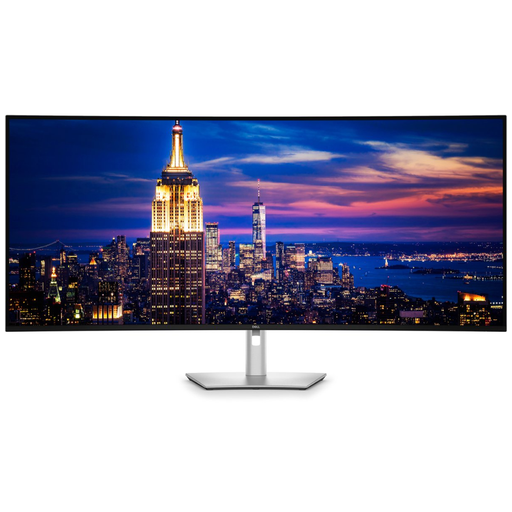
Why it suits this user: For professionals who need a large, single workspace for multitasking, video editing and complex dashboards. Its wide design and high stated resolution are geared towards business use.
The product details list several video inputs, 120 Hz and extensive ergonomic adjustment. Before buying, check which resolution is actually available through the input you plan to use, as the listing gives different resolutions.
52 inch, IPS Black panel, 120 Hz, HDMI 2.1, Thunderbolt 4, USB-C with up to 140 W Power Delivery and adjustable stand.
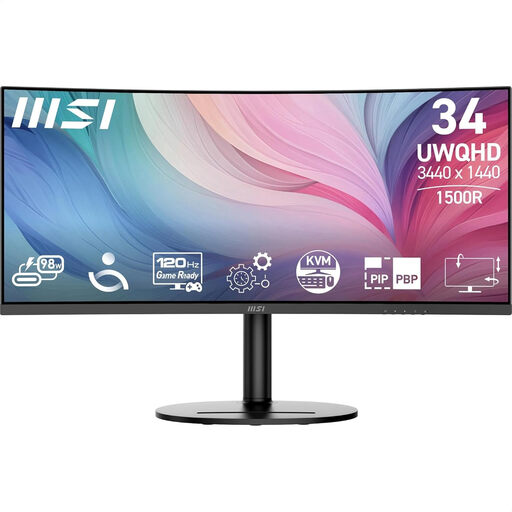
Why it suits this user: A practical choice for programmers, business users and content creators who want an ultrawide workspace without moving up to a 52-inch screen.
The resolution, screen size and connections are better suited to a standard desk setup. According to the specifications, the HDMI inputs are limited to a maximum of 100 Hz, so check this if you plan to use HDMI.
34 inch, 3440 × 1440, 120 Hz, curved VA panel, USB-C with up to 98 W Power Delivery, plus height, swivel and tilt adjustment.
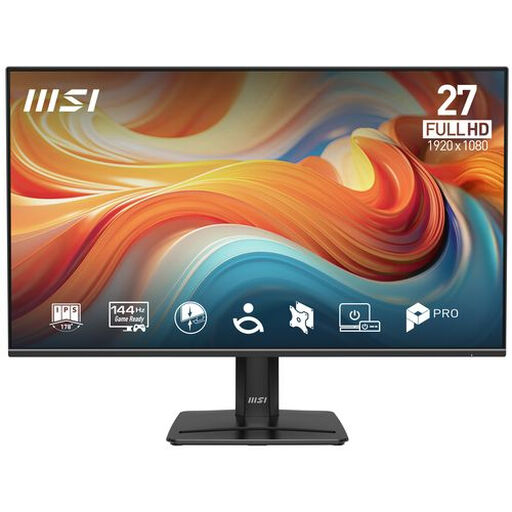
Why it suits this user: A good fit if you want to try a larger workspace first, without the size and system requirements of a 52-inch 6K monitor.
The specifications are easy to understand: Full HD, 27 inch, IPS and 144 Hz. That means you won’t pay for features your computer or workflow may not make use of.
27-inch IPS panel, 1920 × 1080, 144 Hz, Adaptive-Sync, built-in speakers and VESA 100 × 100 mm.
We’ve put together a complete, up-to-date list of products that meet these strict selection criteria and current European safety requirements.
No. Check your laptop’s graphics output, maximum resolution, refresh rate and bandwidth. Thunderbolt 4 or USB-C can transmit a picture signal, but not every USB-C port supports DisplayPort Alt Mode or sufficient Power Delivery.
Allow for at least around 1.25 metres of clear width, plus room for cables and the stand. Check your desk depth and viewing distance too. If you’re mounting the monitor on a wall or arm, the VESA mount must be able to support its weight.
It depends on brightness, refresh rate and how long you use it. Dell’s product details state around 63.6 watts during use and an energy rating of G. Compare energy consumption per 1,000 hours, and switch off the screen when you’re not using it for an extended period.
120 Hz makes scrolling and movement look smoother than at 60 Hz. For word processing and programming, high resolution is often more important than the maximum refresh rate. Both features can be useful for video editing and moving images.
