
Subtitle and lesson-slide editor
You want to check spelling, timings and slide layouts alongside the video timeline, and care about readability and an adjustable workstation. Philips lists a height-adjustable stand for the 27E1N1800AE/00.


A 27-inch 4K IPS monitor is a useful starting point for editing a Dutch-language lesson video, particularly if you’ll mainly be checking subtitles and slides. Choose a model geared towards colour if you work in sRGB or Rec.709. For USB-C, check compatibility with your laptop and cable, as well as the power output you need. Manufacturer information on colour and calibration can help you compare models, but it doesn’t prove how the video will look on the final exhibition display.
You want to check spelling, timings and slide layouts alongside the video timeline, and care about readability and an adjustable workstation. Philips lists a height-adjustable stand for the 27E1N1800AE/00.
You want to know which colour modes and calibration information are available for the exact model and the project’s colour space. BenQ and ASUS list sRGB and Rec.709 specifications for specific models.
You want to connect your laptop and peripherals easily, and perhaps charge it through the same connection. BenQ and LG list USB-C features for specific models; check your laptop and cable’s capabilities too.
Start with the readability of text and slides, then decide whether colour checking, laptop connectivity or the overall purchase and running costs matter most for your workspace.
| What to consider | What should you check? | Who will find this more relevant? |
|---|---|---|
| Text and slide readability | Check the 4K resolution, screen size, height adjustment and available desk space. Also assess the scaling settings and text on the final display setup. | I want to check Dutch subtitles and lesson slides alongside the timeline without the text becoming too small at my workstation. Around 33% of consumers rank text readability as their top priority when buying. |
| Colour checking while editing | Match an sRGB or Rec.709 mode to the project’s colour space and check what calibration information is available for the exact model. | If I want to assess the colours in my video and slides carefully, I look for a suitable colour mode and calibration information. Around 27% of consumers give colour checking top priority. |
| Connecting and charging a laptop | Check that your laptop and monitor support video over USB-C, that the cable is suitable and that the power output meets your laptop’s requirements. | I want to connect my laptop with as few cables as possible and charge it while editing. Around 20% of consumers prioritise the connection between their laptop and monitor. |
| Purchase and running costs | Compare the total price from the retailer, any cables or adapters you may need, energy information and warranty terms. | When choosing a display for a student project, I want to know which features I need and what extra costs they involve. Around 20% of consumers put total purchase and running costs first. |
An HDR label alone doesn’t tell you which colour space the project uses or how the final exhibition display is set up.
First, decide on the delivery format. Treat colour and HDR specifications as information about the exact model, and check the export on the intended display setup.
For video and charging, the features and power output of the monitor, laptop and cable need to be compatible.
Check your laptop’s video output, the monitor’s USB-C video function and the power output you need.
You may also need a suitable cable or adapter, or have to keep using your laptop’s power supply separately.
The Philips 27E1N1800AE/00 and 27E1N1900AE/00 have different full model numbers; the second is sold as a USB-C model. The model number may therefore indicate different connections.
Compare the full model number and connections on the product page with the manufacturer’s information.
Dutch statutory consumer rights apply alongside any manufacturer’s or retailer’s warranty. ACM ConsuWijzer explains that, depending on the circumstances, the retailer must resolve the issue free of charge if a product develops a fault sooner than you could reasonably expect with normal use.
Compare any extra cover by looking at its additional terms; don’t assume you have no statutory rights without it.
The 27E1N1800AE/00 is a specific 27-inch 4K IPS model worth considering for checking text and general editing.
The Creative Pro PD2705U is worth considering if sRGB or Rec.709 checking and laptop connectivity are important to you.
The UltraFine 27UP850K-W is a 27-inch 4K option to compare if USB-C and the stated DCI-P3 colour coverage matter to you.
The ProArt PA279CV is an option to compare for sRGB or Rec.709 editing and an adjustable workstation.
The UltraSharp U2723QE is a reference point for a 4K workstation with a wide range of connections.
This selection includes 4K monitors for editing lesson videos and one USB-C to HDMI cable as a separate connection accessory; the cable is not a monitor.
 Image unavailable
A 27-inch display for editing and checking lesson videos in 4K.
The product information lists an IPS panel, 3840 × 2160, 60 Hz and HDR10.
 Image unavailable
A 4K option for anyone who also wants to consider stated colour coverage when editing video.
The product information lists 3840 × 2160, QD-OLED, 165 Hz, 99% DCI-P3 and 98% Adobe RGB. According to the description, USB-C Power Delivery is up to 15 W; don’t rely on it as a replacement for your laptop’s power supply.
 Image unavailable
A 4K display to compare if colour information and checking features are important when editing.
The product information lists 3840 × 2160, 120 Hz, 99% DCI-P3, 100% sRGB and an integrated colorimeter.
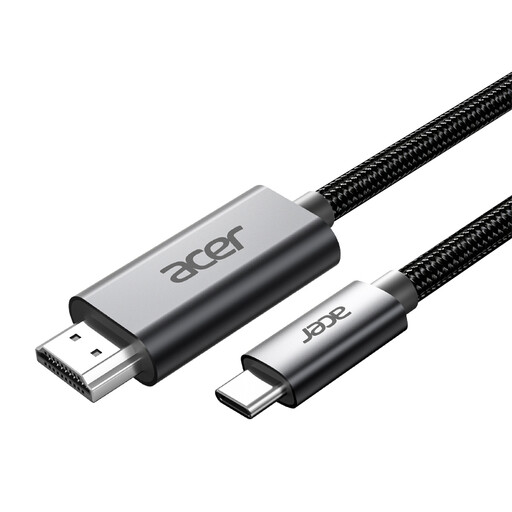 Image unavailable
A connection accessory to consider if you want to connect a USB-C laptop to an HDMI monitor.
The product name lists USB-C to HDMI, 2 m and 4K@60Hz. Check that your laptop’s video output supports the connection you need.
 Image unavailable
A 32-inch 4K option to compare if screen size and stated sRGB coverage matter to you.
The product information lists a curved VA panel, 3000R, 3840 × 2160, HDR10 and 100% sRGB.
The 27-inch models reviewed offer 3840 × 2160 pixels, but that alone doesn’t determine how readable the text will be for visitors. Check text size and contrast on the actual display setup and from the intended viewing distance.
Only if the monitor supports video and power through the connection, and your laptop and cable are compatible. BenQ specifies DisplayPort Alt Mode and 65 W Power Delivery for the PD2705U; LG lists charging up to 96 W for the 27UP850K-W. Check that the power output suits your laptop.
Match the monitor mode to your project’s colour space. BenQ lists sRGB and Rec.709 modes for the PD2705U; also check your edit on the final exhibition display setup.
No. You don’t need an extended warranty to have Dutch statutory consumer rights: these apply alongside any manufacturer’s or retailer’s warranty. According to ACM ConsuWijzer, depending on the circumstances, the retailer must resolve the issue free of charge if a product develops a fault sooner than you could reasonably expect with normal use. This might mean a repair, replacement or refund. Compare any extra cover separately and check its terms.
According to the European Commission, computer monitors are covered by EU energy-labelling rules. Use the energy label and product information for the exact model to compare energy data between displays.