First, choose a 4K monitor that suits your film’s delivery format: for SDR, a specified Rec.709 mode is relevant, while an HDR label alone is no proof that a monitor is suitable for HDR colour grading. Then work out how much physical space you need for your timeline and versions, and check that the video connection and any USB-C power delivery will work with your computer.
Who is this choice relevant to?
Editor working on multiple film versions
You switch between edits and want to keep the preview, timeline and tools clearly arranged. Adobe explains how sequences can have their own colour and export settings; EIZO describes the space available for the timeline and palettes on the CS2740.
Creator who wants to check SDR colour
You deliver a Rec.709 version and want to match the specified colour space with the colour settings on your monitor and in your editing software. BenQ and Dell publish Rec.709 specifications for the models mentioned.
Laptop editor who wants a single-cable setup
You want to connect your display and peripherals, and possibly power your laptop, via USB-C. Whether this works also depends on your laptop’s video output and the power it needs to charge.
What should you look for when choosing?
| What to consider |
What should you check? |
Who is this important for? |
| Space for the timeline and versions |
Check the native resolution, screen size, available desk space and scaling setting. |
If I want to see the timeline and multiple versions at once, usable screen space is a major priority for me; around 31% of consumers put space for editing and comparison first. |
| Colour-checking your delivery |
Identify the export colour space and check the corresponding monitor mode and colour management settings. |
If the SDR version needs to be delivered in Rec.709, I want to be able to match the display and project settings; around 31% of consumers name colour checking as their top priority. |
| Connections and laptop power |
Compare your computer’s video output and the monitor’s connection with the charging power you need and the USB-C specification. |
If I want to handle the display and possibly power through a single cable, the connection needs to suit my laptop; around 23% of consumers say this connection is their main concern. |
| Checking an HDR version |
First establish whether you’ll be delivering in HDR; then look into the exact display and the full HDR colour management workflow. |
If I need to check an HDR version, I want to know what the display and my workflow actually support; around 15% of consumers put HDR checking first. |
Adobe describes separate colour settings for each sequence. So choose the settings for each delivery version; a wide colour gamut or HDR label is no substitute for that workflow.
Pitfalls to avoid
-
Assuming an HDR label means reliable HDR colour grading
A project’s HDR settings and a display’s capabilities are not the same thing. An HDR label alone doesn’t tell you how suitable the display is for checking an HDR delivery.
First decide whether you’re making an HDR version, then investigate how the exact display performs in your intended workflow.
-
Assuming USB-C will automatically provide video and enough power for your laptop
Your laptop must support video over the USB-C connection you choose, and the stated power delivery needs to meet its power requirements. The monitors mentioned have different Power Delivery ratings.
Check the specifications of both devices and the connections you need before choosing a single-cable setup.
Depending on your laptop, you may also need a different video or power connection.
-
Assuming a similar model is the same product
A similar-looking model name doesn’t confirm that the version, connections or specifications are the same. LG lists the 32UN880-B as discontinued; other models have their own specifications.
Check the full model code and compare the relevant display and connection details for the version you’re looking at.
Brands to consider
BenQ
The Creative Pro PD2705U is a 27-inch 4K option to consider if Rec.709 and USB-C matter to you.
- BenQ specifies 99% Rec.709, 65 W USB-C Power Delivery and DualView for the PD2705U.
- These specifications apply to this model and don’t prove that it’s suitable as an HDR reference monitor.
Dell
The UltraSharp U2723QE is a 27-inch 4K hub monitor to consider for a desk setup with a laptop and peripherals.
- Dell specifies 100% Rec.709, IPS Black and up to 90 W power delivery through the video USB-C connection for the U2723QE.
- Check that the connections and power delivery suit your computer; the specifications alone don’t determine how the complete setup will work.
LG
The UltraFine range includes 4K options; the 32UN880-B is worth considering if you want a larger screen and an adjustable arm.
- LG lists a 31.5-inch screen, a C-clamp arm and 60 W USB-C power delivery for the 32UN880-B.
- LG lists the 32UN880-B as discontinued. The 27UP850K-W has its own model specifications and is not an identical version.
EIZO
EIZO positions the ColorEdge CS2740 for tasks including video editing, post-production and colour grading.
- EIZO specifies a 26.9-inch wide-gamut IPS panel with a resolution of 3840 × 2160.
- Accurate colour display for a delivery also depends on your settings and workflow.
ASUS
The ProArt PA279CRV is a 27-inch 4K option to consider if specified colour gamut coverage and laptop connectivity are important to you.
- ASUS specifies 99% DCI-P3, 99% Adobe RGB and up to 96 W USB-C power delivery for this model.
- Check the version and purchase terms that apply to the product you’re looking at.
4K monitors at Joybuy
These models are 4K options for a dedicated editing workstation with extra room for your timeline and windows, or for a setup where connections and colour management matter.
 No image available
Philips 32E1N1800LA 32-inch 4K UHD monitor
The 32-inch size is worth considering if you’d like more physical space for your timeline and windows.
VA panel; 3840 × 2160 at 60 Hz; 300 cd/m²; 2 HDMI ports and DisplayPort; tilt-adjustable stand; speakers.
View at Joybuy
 No image available
Dell UltraSharp U3226Q 32-inch 4K UHD 120Hz QD-OLED monitor
The 32-inch size is worth considering if you want to arrange your timeline and multiple windows on a larger screen.
QD-OLED; 120 Hz; 99% DCI-P3 and 100% sRGB according to the product description; integrated calibrator.
View at Joybuy
 No image available
BenQ PD3225U 32-inch 4K monitor
This larger model is worth considering if you want to spread your editing windows across a bigger screen.
31.5 inches; 3840 × 2160; Thunderbolt 3 with 85 W Power Delivery; KVM.
View at Joybuy
 No image available
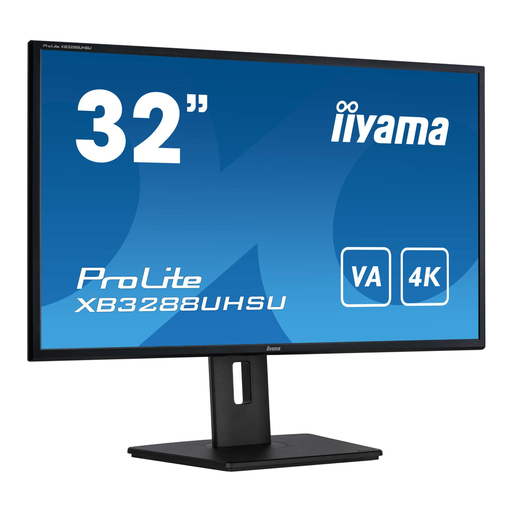
iiyama ProLite 32-inch VA 4K monitor
The 32-inch screen size is worth considering if you want extra room for editing panels in a dedicated workstation.
VA panel; 3840 × 2160; height-adjustable stand with pivot function; HDMI and DisplayPort.
View at Joybuy
 No image available
BenQ PD3205U 31.5-inch 4K monitor
This larger screen is an option if you want more physical space for multiple editing windows and versions.
3840 × 2160; 99% sRGB and Rec.709 according to the product description; USB-C with 90 W Power Delivery; KVM.
View at Joybuy
Frequently asked questions
Do I need a different monitor for each version of my film?
No, not necessarily. Adobe explains that sequences can have separate colour settings and export colour spaces. Check the settings for each version, and bear in mind that this alone doesn’t show whether a particular display is suitable for HDR reference work.
How do I know whether a USB-C monitor will work with my laptop?
Check that the USB-C connection you’ve chosen on your laptop outputs video, and compare the power it needs with the specification for the exact monitor model. BenQ lists DisplayPort Alt Mode and 65 W for the PD2705U; Dell lists up to 90 W through the video USB-C connection for the U2723QE.
Which settings should I check if SDR and HDR versions look different?
Check the export colour space for each sequence and the colour management settings in your editing software. Adobe describes separate colour settings for sequences and different export versions.
What are my rights when buying a monitor online in the Netherlands?
For distance purchases, you usually have a 14-day cooling-off period; the Dutch government lists some exceptions. You’re also entitled to a product that works properly under the statutory guarantee. This is separate from any manufacturer’s or retailer’s warranty.


