Choose according to your main priority: workspace for your panorama and editing panels, colour management for reviewing and exporting, or connectivity for a shared workstation. At the same 4K resolution, a larger screen gives you more physical display area, but takes up more desk space. Even with a colour-focused monitor, the right profile and controlled ambient lighting remain important.
Who is this guide for?
Panorama editor who uses lots of panels
You want to review the composition while keeping your editing tools visible. Screen size and desk space together determine how much working area is practical. BenQ lists the PD3225U as having a 31.5-inch screen; the Arboportaal offers advice on workstation setups for screen-based work.
Colour-critical image editor
You review panoramas for sharing or printing, so you pay attention to monitor profiles, colour modes and office lighting. Adobe explains how colour management and ambient light affect what you see, while EIZO describes the CG2700X as a monitor for uses including photography and print work.
Shared workstation user
You share the workstation with colleagues who may use a different laptop or sit in a different position. You want to match its connections, any laptop charging and an adjustable setup to the devices and users. BenQ’s model specifications and the Arboportaal’s workstation advice can help you weigh up your options.
What should you look for when buying?
31.5-inch 4K with shared connectivity
Choose this if: you want to view your panorama alongside editing panels and colleagues connect their laptops to the same workstation.
Bear in mind: the extra desk space required and video and laptop charging compatibility.
27-inch 4K with a focus on colour management
Choose this if: colour review or print preparation is your priority and a more compact screen suits your setup.
Bear in mind: it offers less physical display area than a 31.5-inch screen, and profiles and office lighting still matter.
27-inch 4K for a compact workstation
Choose this if: you’re mainly looking for a compact 4K workspace and an adjustable setup.
Bear in mind: a stated colour gamut coverage on its own does not guarantee that a print or another screen will show the same image.
The percentages below show, for each row, which buying criterion is the highest priority for consumers in this panoramic workstation scenario.
| Priority |
What to look for |
Who is this important for? |
| Space for your panorama and tools |
Compare 27-inch and 31.5-inch screens at 3840 × 2160 pixels, and measure your desk. |
If I want to see the composition and panels at the same time, I weigh up screen size against the space available. Consumers who put workspace first account for around 29% of the group. |
| Colour for review and export |
Check the colour modes and profiling options, and consider output profiles and office lighting. |
If I share or print panoramas, I want to review colours as part of a suitable colour workflow. Around 29% of consumers give colour management top priority. |
| Sharing laptops and peripherals |
For each laptop, check video output, connections, charging requirements and any KVM function. |
When colleagues share the workstation, I want to know whether their laptops and peripherals can connect without unnecessary cable swapping. Consumers who prioritise switching between devices account for around 21% of the group. |
| Adjustability and lighting |
Check the height and tilt adjustment, the stand and the monitor’s position in relation to windows. |
If several people use the screen, I want to adjust it for each seating position and reduce distracting reflections. Around 21% of consumers give workstation setup top priority. |
Adobe highlights how monitor profiles and ambient light affect colour review. The Arboportaal recommends positioning your viewing direction parallel to the window. BenQ lists features including KVM and Thunderbolt 3 with 85 W Power Delivery for the PD3225U. Check that the connected laptop supports and needs these features.
Common buying mistakes
-
Assuming 4K means colours will look the same on every device
A panorama can look different on another screen or in print. Adobe highlights differences between devices, profiles and ambient lighting.
Decide where the panorama will be viewed or printed, then choose a profile and colour management workflow to suit.
Profiling and checking your output can take extra time.
-
Assuming USB-C provides video and power for every laptop
A monitor’s video and Power Delivery specifications do not automatically mean that every laptop supports the connection or charging power.
Before buying, check each laptop’s video output, connection and power requirements.
Depending on the laptop, you may also need a different cable, an adapter or a separate power supply.
-
Choosing a larger screen without measuring your workspace
A 31.5-inch screen takes up more physical space than a 27-inch model. The setup and incoming light also matter.
Measure the available width and depth, and check where the windows are before choosing a screen size.
You may need a different monitor arm or to adjust your desk setup.
Relevant brands to compare
BenQ
The PD3225U is worth considering if you want a larger 4K workspace and shared connectivity.
- BenQ lists a 31.5-inch screen, 3840 × 2160 pixels, KVM and Thunderbolt 3 with 85 W Power Delivery for this model.
- Check that your laptop supports the video signal and charging connection you need.
EIZO
EIZO positions the 27-inch ColorEdge CG2700X for photography, image editing and print work.
- EIZO specifies a wide-gamut IPS panel with 3840 × 2160 pixels for this model.
- A colour-focused screen does not remove the need for suitable profiles and controlled ambient lighting.
ASUS
The ProArt PA279CRV is a 27-inch 4K option for a more compact creative workspace.
- ASUS lists features for this model including an anti-glare coating, an IPS panel and colour gamut coverage.
- The stated colour gamut coverage is a model specification, not independent confirmation that every print will match.
LG
The UltraFine 27UP850K-W is a 27-inch 4K IPS option with USB-C and an adjustable stand.
- For this variant, LG lists height, tilt and pivot adjustment, and typical DCI-P3 coverage of 95%.
- For colour-critical work, check your complete profile and output workflow.
Dell
The UltraSharp U3223QE is an example of a 31.5-inch 4K USB-C hub setup for shared office equipment.
- Dell lists features for this model including USB-C power delivery up to 90 W and an RJ-45 connection.
- The Dutch product page says the U3223QE is currently unavailable. Treat its specifications as comparison information, not as a current offer to buy.
Joybuy products for a shared 4K workstation
These models are aimed at 4K monitor work with panoramas, with screen sizes and connections to weigh up against the available desk space and shared equipment.
 No image available
Philips 32E1N1800LA 32-inch 4K UHD monitor
The 32-inch 4K screen gives you a large physical workspace for a panorama and editing panels.
3840 × 2160 pixels, 60 Hz, VA panel, 2 HDMI connections and DisplayPort.
The stand tilts; check that the connections suit the shared computers.
Joybuy
 No image available
Dell UltraSharp U3226Q 32-inch 4K UHD monitor
This 32-inch 4K model is an option for combining a large panoramic workspace with features for switching between computers and managing colour.
3840 × 2160 pixels, 120 Hz and QD-OLED, as stated in the product name.
The product description lists an integrated colourimeter, Auto-KVM and Thunderbolt 4. Check which features suit the computers used at the workstation.
Joybuy
 No image available
BenQ PD3225U 32-inch 4K monitor
The 32-inch 4K screen is worth considering if you want to weigh up panoramic workspace and shared connectivity in one monitor.
3840 × 2160 pixels; the description lists KVM and Thunderbolt 3 with 85 W Power Delivery.
Video connectivity and 85 W laptop charging depend on the laptop’s connection and charging requirements.
Joybuy
 No image available
Dell Pro Plus P3225QE 31.5-inch 4K monitor
The 31.5-inch 4K size may suit you if you want a spacious workspace and a shared laptop connection is a priority.
3840 × 2160 pixels; the product description lists an IPS panel, USB-C with up to 90 W Power Delivery and RJ-45.
Check that the connected laptops support the USB-C features you intend to use.
Joybuy
 No image available
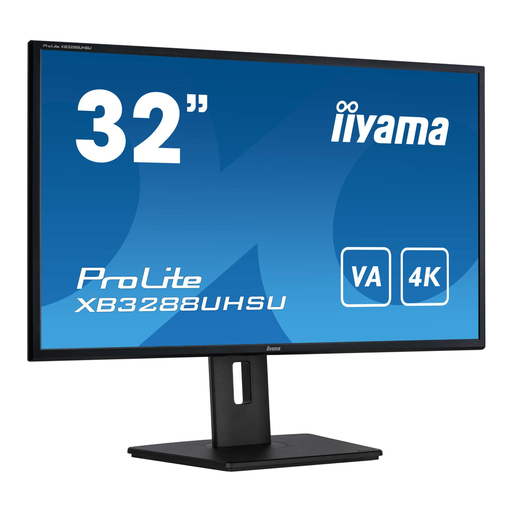
iiyama ProLite 32-inch 4K monitor
The 32-inch 4K screen gives you space to view a panorama and work panels on a large display.
3840 × 2160 pixels and a VA panel; the description lists HDMI and DisplayPort connections.
The description lists a height-adjustable stand with pivot function; check the computers’ connections at the workstation.
Joybuy
Frequently asked questions
Do you need to calibrate a 4K monitor before reviewing panorama colours?
If consistent colour between colleagues, screens or printed materials is important, use a suitable monitor profile and colour management workflow. Adobe explains that devices display colours differently and that ambient lighting affects what you see; 4K resolution alone does not address this.
Can every laptop display video and charge through a single USB-C cable?
No. Don’t assume so just from the shape of the connection. Check that the laptop supports video through the intended connection and that the charging power meets its needs. BenQ specifies 85 W Power Delivery for the PD3225U’s Thunderbolt 3 connection.
What should you consider when positioning a monitor in a shared office?
Adjust the monitor for each user and reduce distracting reflections. The Dutch Arboportaal recommends setting up screen-based workstations so that the viewing direction is parallel to the window, and using blinds if needed.
What consumer rights and product information matter when buying in the Netherlands?
The European Commission states that energy labelling and ecodesign requirements also apply to computer monitors, so compare the information for the specific model. According to the Dutch government, consumer purchases are covered by the legal guarantee and distance purchases often come with a 14-day cooling-off period. If buying on behalf of an office, check the applicable contract terms separately: these consumer rights do not automatically apply to business purchases.


