What should you look for when choosing?
| What to consider |
What to look for |
Who is this important for? |
| Reflections by the window |
Compare the coating and stated brightness, but also consider screen position and blinds or curtains. |
If I animate beside a bright window, I want to see frames and controls without distracting reflections. For around 36% of consumers, managing reflections is the top priority. |
| Space for frames and panels |
Choose a screen size to suit your desk and viewing distance, and compare the physical screen dimensions, not just the resolution. |
When I keep the timeline, thumbnails and tools open at the same time, the available screen space really matters. Around 29% of consumers put layout space first. |
| Colour for the intended output |
Check which colour space your workflow uses and which colour modes or calibration options are listed for the exact model. |
If colour assessment is central to my work, I want to be able to match the settings to the final output. This is the top priority for around 21% of consumers. |
| Connection to your computer |
Check the video output and, if you have a laptop, whether the charging power is suitable for your device. |
If you want to connect a laptop with a single cable, check that it supports both video and the power supply you need. Around 14% of consumers prioritise connecting to their work computer. |
A larger screen can provide more physical space for your editing layout, but it also takes up more desk space. Interface elements may appear physically smaller on a smaller 4K screen, so assess readability at your own viewing distance. None of these choices will automatically solve problems caused by poor lighting.
Joybuy products
This selection includes 27-inch and around 32-inch 4K monitors for compact or more spacious animation layouts, plus a USB-C to HDMI cable. Always compare the full model code, the connection you need and the features that matter for your workspace.
 No image available
LG UltraFine 27U711B-B 27-inch 4K IPS monitor
A 27-inch screen is an option if you want a more compact workspace for frames and interface elements.
The product description lists an IPS panel and a resolution of 3840 × 2160.
Joybuy
 No image available
MSI MAG 322UP QD-OLED E16 31.5-inch 4K UHD monitor
This model may suit you if you want to compare a 31.5-inch 4K screen with an anti-reflective surface.
The product specifications list QD-OLED, 3840 × 2160, 99% DCI-P3 and 98% Adobe RGB. USB-C delivers up to 15 W and, according to the product information, does not replace most laptop power supplies. Avoid displaying static images at high brightness for long periods, and use the OLED care features to reduce the risk of image retention.
Joybuy
 No image available
Dell UltraSharp U3226Q 32-inch 4K UHD QD-OLED monitor
A screen of around 32 inches may suit you if you want more physical space for the timeline, frames and panels.
The product description lists 31.5 inches, 3840 × 2160 and an integrated motorised colorimeter. It also states typical brightness of 300 cd/m² and a maximum of 1000 cd/m² for HDR; these figures do not prove readability in direct sunlight.
Joybuy
 No image available
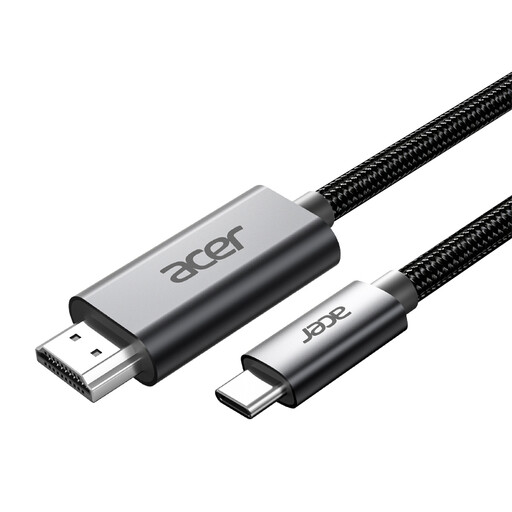
Acer OCB6BO USB-C to HDMI cable, 2 m
This cable is designed to connect USB-C to HDMI when your devices support that connection.
The product name lists 4K at 60 Hz and a length of 2 m. Check that your computer's USB-C port outputs video and that the HDMI connection is compatible with your screen.
Joybuy
 No image available
Philips 27E1N1800AE/00 27-inch 4K UHD IPS monitor
This 27-inch model may suit you if you want a more compact 4K workspace with an adjustable screen height.
The product description lists an IPS panel, 3840 × 2160, an anti-glare screen, typical brightness of 350 cd/m² and a height-adjustable stand. Anti-glare technology and the stated brightness do not guarantee readability in direct sunlight; the position of the screen in relation to the window still matters.
Joybuy
Frequently asked questions
Is an anti-glare screen enough if the sun shines on my workspace?
No, an anti-glare screen does not offer a universal guarantee against the effects of direct sunlight. Check the coating, position the screen parallel to the window if possible, and use blinds or curtains if daylight causes reflections.
How should I set up my screen to arrange animation frames?
Adjust your screen and interface so that text and thumbnails are readable for you, and reduce reflections wherever possible. Arboportaal also describes workplace requirements for employees who work at a screen for more than two hours a day; these employer rules are not automatically product specifications for every home user.
Who can help if a monitor I bought as a consumer in the Netherlands is faulty?
According to the Dutch government, the seller must provide a solution if there is a problem with a product. Any manufacturer's warranty does not replace your statutory right to a product that is fit for purpose.
Which rules and rights apply to online purchases and disposal?
For distance purchases, the Dutch government says you usually have a 14-day cooling-off period; check whether it applies to your purchase. The European Commission lists energy labelling and ecodesign requirements for computer monitors. You can take an old monitor to an appropriate collection point or, when buying a similar new device, return it through the shop or its online service.


