Who is this monitor for?

Album designers who review spreads

You want to view two pages and the toolbars you need at the same time, without making text unreadable. Compare screen size and display scaling. EIZO Netherlands, BenQ Netherlands, Dell Netherlands and Philips Netherlands list models with 4K resolution.

Creators who assess print colours

If you’re assessing colours for a particular album or print process, a stated colour space isn’t enough: you’ll also need a suitable calibration and output-profile workflow. Adobe explains that screens and output devices don’t always reproduce colours in exactly the same way.

Creators who work sitting and standing

If you change your working height throughout the day, it helps to have a screen you can position comfortably in both positions, with minimal reflections. Arboportaal highlights height adjustment and avoiding glare in screen-based workspaces.

What should you look for when choosing?

What to consider What to look for when buying Who is this important for?
Overview and readability Compare 27, 31.5 and 32-inch screens based on your viewing distance. Open a full spread with toolbars in your own software and check that it’s readable at your preferred display scale. If I want to review two album pages and the controls at the same time, I look at both the usable space and readability. Around 33% of consumers give overview and readability top priority.
Colour for print Check the calibration options and ask the print service which profile or proofing workflow is right for the output. If I’m assessing colours for a particular album or print process, I want to know how the screen settings relate to the final output. Around 27% of consumers prioritise assessing colour for print.
Working posture and positioning Check the height range, stand and adjustment options for both sitting and standing. Also see whether windows or lights cause reflections. If I switch between sitting and standing, I want to position the screen comfortably at both working heights and avoid distracting reflections. Around 20% of consumers give adjustable working posture top priority.
Connections Compare the monitor ports with your exact computer configuration. Check which video, charging and hub features are compatible, and which cable is included. If I want to connect my existing computer and peripherals, the ports and any charging function need to suit my setup. Around 20% of consumers focus on connectivity and cable management when choosing.

Common pitfalls

  • Assuming a wide colour gamut guarantees a reliable print proof

    A screen and a printer or album producer may reproduce colours differently. Adobe explains that not all colours will match exactly, even when colour management is used.

    Ask which profile is used for your intended album output, and check colour claims for the exact monitor model. Adobe describes using a colourimeter for objective screen calibration.

    Your chosen print workflow may require a measuring device and additional settings.

  • Focusing only on 4K and overlooking how a spread actually looks

    A 27-inch and a 31.5-inch screen can have the same resolution of 3840 × 2160 pixels, but they don’t offer the same physical screen size.

    Open a full spread with toolbars in your own layout software and check that the text and controls remain readable from your viewing distance.

  • Buying an extended warranty without comparing the cover

    According to the Dutch government, a manufacturer’s or retailer’s warranty is in addition to your statutory rights.

    Check what extra cover the package offers. If there’s a problem with the product, contact the retailer.

Brands to compare

BenQ

The PhotoVue SW272U is a 27-inch 4K option for photography colour workflows.

  • BenQ Netherlands lists 99% Adobe RGB, hardware calibration, a matte coating and 140 mm of height adjustment for this model.
  • These manufacturer specifications alone can’t predict how a particular album print will look. Make sure your workflow also suits the output.

EIZO

The ColorEdge CG2700X is a 27-inch 4K option for those who value repeatable colour settings.

  • EIZO Netherlands lists an integrated sensor for self-calibration and uniformity correction.
  • Check that the physical 27-inch screen size suits your spread layout and preferred display scale.

Dell

The UltraSharp U3225QE is a 31.5-inch 4K option with a hub to help create a more spacious workstation.

  • Dell Netherlands lists IPS Black, height adjustment and a hub.
  • These features don’t guarantee accurate colour reproduction for a particular album print without additional profiling.

ASUS

The ProArt PA279CRV is a 27-inch 4K option with stated wide colour-space coverage and USB-C.

  • ASUS lists 99% Adobe RGB, factory calibration and 96 W USB-C power delivery for this model.
  • Before buying, check the exact version sold in the Netherlands and its warranty terms. The specifications listed come from an international product page.

Philips

The 27E1N1800AE/00 is a 27-inch 4K IPS option for general album-spread checks.

  • Philips Netherlands lists 4K, IPS and a height-adjustable stand.
  • No specialist hardware calibration features are substantiated for this model. Bear that in mind if print colour is a deciding factor.

Joybuy monitors for album spreads

These Joybuy products are 4K monitors for viewing album spreads. Compare screen size, adjustability and connections with your own workspace. For print colour, also consider the calibration you need and the output profile.

Philips 32E1N1800LA 32-inch 4K UHD monitor

Philips 32E1N1800LA 32-inch 4K UHD monitor

The 32-inch 4K screen is an option if you want to view a spread on a larger physical display.

3840 × 2160 pixels; VA panel; 60 Hz; 2 HDMI ports and DisplayPort; tilting stand.

View at Joybuy

MSI MAG 322UP QD-OLED E16 31.5-inch 4K UHD monitor

MSI MAG 322UP QD-OLED E16 31.5-inch 4K UHD monitor

The 31.5-inch 4K screen gives you plenty of space to review spreads. The listed adjustment options are useful if you work sitting and standing.

QD-OLED; 3840 × 2160; 165 Hz; USB-C; height, tilt, swivel and pivot adjustment. The product information lists 98% Adobe RGB and warns that displaying static images at high brightness for long periods may increase the risk of image retention.

View at Joybuy

Dell UltraSharp U3226Q 32-inch 4K UHD monitor

Dell UltraSharp U3226Q 32-inch 4K UHD monitor

The product information lists a 31.5-inch screen and an integrated automatic colourimeter for a creative colour workflow.

3840 × 2160; 120 Hz; QD-OLED; Thunderbolt 4; adjustable stand and detachable screen hood.

View at Joybuy

BenQ PD3225U 32-inch 4K monitor

BenQ PD3225U 32-inch 4K monitor

The 31.5-inch screen and 4K resolution are useful if you want to view a spread on a larger display.

3840 × 2160; height and tilt adjustment; Thunderbolt 3 and 85 W Power Delivery. The product information lists Calman verification and Pantone validation.

View at Joybuy
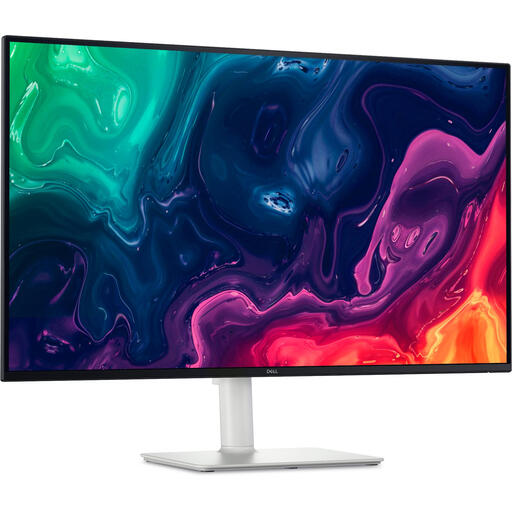
Dell Plus S3225QS 31.5-inch 4K Ultra HD monitor

Dell Plus S3225QS 31.5-inch 4K Ultra HD monitor

The 31.5-inch 4K screen and height-adjustable stand are useful for reviewing spreads at a sit-stand desk.

3840 × 2160; VA panel; 3000:1 contrast ratio; HDMI and DisplayPort.

View at Joybuy

Frequently asked questions

Is a wide colour gamut enough to predict how my album will look when printed?

No, a wide colour gamut alone isn’t enough. A screen and an output device may reproduce colours differently. Use colour management and the profile for your intended output, and bear in mind that screen and print colours may not match exactly.

How should I set up my monitor if I alternate between sitting and standing?

Check that you can position the monitor comfortably at both desk heights, and see whether windows or lights cause distracting reflections. For workplaces with employees, Arboportaal outlines rules for screen-based work. These don’t automatically apply as a personal buying requirement for everyone shopping for a home setup.

Do I need a measuring device to assess colours on my screen?

Adobe describes using a colourimeter for objective screen calibration. Tailor the rest of your colour workflow to your chosen print service; a monitor feature doesn’t replace the output profile.

What are my rights when I buy a monitor online in the Netherlands?

According to the Dutch government, distance purchases often come with a 14-day cooling-off period. Statutory rights are separate from any manufacturer’s or retailer’s warranty. If there’s a problem, contact the retailer and check the terms that apply to your purchase.

Is a height-adjustable screen a legal requirement for my sit-stand desk?

Not as a general buying requirement for every private consumer. Arboportaal outlines rules for screen-based workplaces with employees, including conditions and possible exemptions. Check these separately if you’re setting up a workplace for employees.
